Virtual Private cloud (VPC)
Other options:
-
Tenancy: defines if EC2 instances that you launch into the VPC will run on hardware that’s shared with other AWS accounts or on hardware that’s dedicated for your use only. If you choose the tenancy of the VPC to be Dedicated, the instances will always run as Dedicated Instances on hardware that’s dedicated for your use.
Default VPC
Configured and ready for you to use.
It has a default subnet in each Availability Zone in the Region, an attached internet gateway, a route in the main route table that sends all traffic to the internet gateway, and DNS settings that automatically assign public DNS hostnames to instances with public IP addresses and enable DNS resolution through the Amazon-provided DNS server*.
A default VPC includes an internet gateway, and each default subnet is a public subnet.
By default the following are created:
-
VPC CIDR block: 172.31.0.0/16
-
Subnets mask: /20
-
Internet gateway
-
Main route with
0.0.0.0/0through the internet gateway -
Default security group
-
Default NACL (Allow all)
-
Default DHCP Options Set association with the VPC
Defualt VPCs can be modified.
If deleted Default VPCs can be recreated via the console.
Route tables
A route table contains a set of rules, called routes, that are used to determine where network traffic from your VPC is directed. You can explicitly associate a subnet with a particular route table. Otherwise, the subnet is implicitly associated with the main route table.
Main route table: The route table that automatically comes with your VPC. By default, when you create a nondefault VPC, the main route table contains only a local route. If you Create a VPC and choose a NAT gateway, Amazon VPC automatically adds routes to the main route table for the gateways. You can’t delete the main route table but you can replace the main route table by associating a custom route table with a subnet. You can change which route table is the main one.
Custom route table: If you Create a VPC and choose a public subnet, Amazon VPC creates a custom route table and adds a route that points to the internet gateway. One way to protect your VPC is to leave the main route table in its original default state. Then, explicitly associate each new subnet that you create with one of the custom route tables you’ve created. This ensures that you explicitly control how each subnet routes traffic.
Destination: The range of IP addresses where you want traffic to go (destination CIDR).
Target: The gateway, network interface, or connection through which to send the destination traffic.
Route table association: The association between a route table and a subnet, internet gateway, or virtual private gateway. Each subnet in your VPC must be associated with a route table. A subnet can be explicitly associated with custom route table, or implicitly or explicitly associated with the main route table.
Subnet route table: A route table that’s associated with a subnet.
Local route: A default route for communication within the VPC. They always take precedence, regardless of specificity.
Propagation: If you’ve attached a virtual private gateway to your VPC and enable route propagation, we automatically add routes for your VPN connection to your subnet route tables. This means that you don’t need to manually add or remove VPN routes.
Gateway route table: A route table that’s associated with an internet gateway or virtual private gateway. You can associate a route table with an internet gateway or a virtual private gateway. When a route table is associated with a gateway, it’s referred to as a gateway route table. You can create a gateway route table for fine-grain control over the routing path of traffic entering your VPC. For example, you can intercept the traffic that enters your VPC through an internet gateway by redirecting that traffic to a middlebox appliance (such as a security appliance) in your VPC.
-
Supported targets:
-
default local route
-
Gateway Load Balancer endpoints
-
Middlebox network interfaces
-
-
Supported destinations:
-
VPC CIDR blocks
-
Subnet CIDR
-
Single IP address in CIDR notation (/32, /128)
-
Edge association: A route table that you use to route inbound VPC traffic to an appliance. You associate a route table with the internet gateway or virtual private gateway, and specify the network interface of your appliance as the target for VPC traffic.
If you frequently reference the same set of CIDR blocks across your AWS resources, you can create a customer-managed prefix list to group them together. You can then specify the prefix list as the destination in your route table entry.
Every route table contains a local route for communication within the VPC. This route is added by default to all route tables. If your VPC has more than one IPv4 CIDR block, your route tables contain a local route for each IPv4 CIDR block. If you’ve associated an IPv6 CIDR block with your VPC, your route tables contain a local route for the IPv6 CIDR block. You can replace or restore the target of each local route as needed.
You can add a route to your route tables that is more specific than the local route. The destination must match the entire IPv4 or IPv6 CIDR block of a subnet in your VPC. The target must be a NAT gateway, network interface, or Gateway Load Balancer endpoint.
If your route table has multiple routes, we use the most specific route that matches the traffic (longest prefix match) to determine how to route the traffic.
You can’t add routes to IPv4 addresses that are an exact match or a subset of the following:
-
169.254.168.0/22 - IPv4 Link-local
-
fd00:ec2::/32 - IPv6 Unique Local Address (ULA)
DHCP
You can specify the network configurations that are provided by Amazon DHCP servers by using DHCP option sets. Each Region has a default DHCP option set. Each VPC uses the default DHCP option set for its Region unless you either create and associate a custom DHCP option set with the VPC or configure the VPC with no DHCP option set. You cannot edit the default Option Set
Options:
-
Domain name servers: The DNS servers that your network interfaces use for domain name resolution. For a default DHCP option set, this is always AmazonProvidedDNS.
-
Domain name: The domain name that a client should use when resolving hostnames using the Domain Name System (DNS).
-
IPv6 Preferred Lease Time: How frequently a running instance with an IPv6 assigned to it goes through DHCPv6 lease renewal. (Default 140s)
-
NTP servers
-
NetBIOS name servers
-
NetBIOS node type
DNS
-
enableDnsHostnames: Determines whether the VPC supports assigning public DNS hostnames to instances with public IP addresses. (defaults to false for non default VPCs)
-
enableDnsSupport: Determines whether the VPC supports DNS resolution through the Amazon provided DNS server. (defaults to true)
If at least one of the attributes is set to false, the following occurs:
-
Instances with public IP addresses do not receive corresponding public DNS hostnames.
-
The Amazon Route 53 Resolver cannot resolve Amazon-provided private DNS hostnames.
Addresses
The allowed block size is between a /16 netmask (65,536 IP addresses) and /28 netmask (16 IP addresses). After you’ve created your VPC, you can associate additional IPv4 CIDR blocks with the VPC.
In addition:
-
You cannot increase or decrease the size of an existing CIDR block.
-
You have a quota on the number of CIDR blocks you can associate with a VPC and the number of routes you can add to a route table.
|
Some AWS services use the 172.17.0.0/16 CIDR range. To avoid future conflicts, don’t use this range when creating your VPC. |
Subnets
The first four IP addresses and the last IP address (5 addresses) in each subnet CIDR block are not available for your use:
Example for a xxx.xxx.xxx.0/24 IPv4 network
-
VPC + 0; .0 ⇒ network address -
VPC + 1; .1 ⇒ VPC router -
VPC + 2; .2 ⇒ VPC DNS server. For VPCs with multiple CIDR blocks, the IP address of the DNS server is located in the primary CIDR. AWS also reserve the base of each subnet range plus two for all CIDR blocks in the VPC. -
VPC + 3; .3 ⇒ reserved for future use. -
last IP; .255 ⇒ broadcast address, although broadcast is not supported in a VPC.
Subnet types:
-
Public subnet: the default route points to an Internet Gateway in it.
-
Private subnet: No direct route to an Internet Gateway, requires a NAT Gateway for internet connectivity;
-
VPN-only subnet: The subnet has a route to a Site-to-Site VPN connection through a virtual private gateway. The subnet does not have a route to an internet gateway.
-
Isolated subnet: The subnet has no routes to destinations outside its VPC. Resources in an isolated subnet can only access or be accessed by other resources in the same VPC.
Options:
-
Auto-assign public IPv4: Configure the auto-assign IP settings to automatically request a public IPv4 address for a new network interface in this subnet.
-
Auto-assign public IPv6: Configure the auto-assign IP settings to automatically request a public IPv6 address for a new network interface in this subnet.
-
Resource-based Name (RBN): Enables you to specify the hostname type for EC2 instances in this subnet and configure how DNS A and AAAA record queries are handled.
Subnet CIDR reservations
A subnet CIDR reservation is a range of IPv4 or IPv6 addresses that you set aside so that AWS can’t assign them to your network interfaces. This enables you to reserve IPv4 or IPv6 CIDR blocks (also called "prefixes") for use with your network interfaces.
IPv4
-
VPC Size: /28 ⇒ /16
-
Subnet Size: /28 ⇒ /16. A VPC can contain just 1 subnets that make up for all the available range.
-
Addresses: range from VPC or Amazon IPAM.
-
Internet Access: Internet Gateway
-
Elastic IP addresses: supported.
-
NAT Gateway: Supported, public and private. Up to 45 Gbps.
-
DNS Names: supported.
IPv6
-
VPC Size: base quota of 5 subnets /60 ⇒ /44 with increments of /4. Increasable.
-
Subnet Size: /60 ⇒ /44 with increments of /4.
-
Addresses: BYOIP, range from VPC or Amazon IPAM.
-
Internet Access: Internet Gateway, outbound-only is possible using Egress-only Internet Gateway.
-
Elastic IP addresses: NOT supported, it doesn’t apply.
-
NAT Gateway: You can use a NAT gateway with NAT64 to enable instances in IPv6-only subnets to communicate with IPv4-only resources within VPCs, between VPCs, in your on-premises networks, or over the internet.
-
DNS Names: supported.
-
The first four IPv6 addresses and the last IPv6 address in each subnet CIDR block are not available for your use, and they cannot be assigned
-
In a /56 network there’s room for 256 /64 subnets.
IPv6 Addresses
Your instance receives an IPv6 address if an IPv6 CIDR block is associated with your VPC and subnet, and if one of the following is true:
-
Your subnet is configured to automatically assign an IPv6 address to an instance during launch.
-
You assign an IPv6 address to your instance during launch.
-
You assign an IPv6 address to the primary network interface of your instance after launch.
-
You assign an IPv6 address to a network interface in the same subnet, and attach the network interface to your instance after launch.
Private IP addresses
You can assign additional private IP addresses, known as secondary private IP addresses, to instances that are running in a VPC. Unlike a primary private IP address, you can reassign a secondary private IP address from one network interface to another. A private IP address remains associated with the network interface when the instance is stopped and restarted, and is released when the instance is terminated.
Elastic IP addresses
Elastic IP addresses remains allocated to your AWS account until you explicitly release it.
An Elastic IP address is a property of a network interface. The advantage of associating the Elastic IP address with the network interface instead of directly with the instance is that you can move all the attributes of the network interface from one instance to another in a single step.
Rules:
-
can be associated with a single network interface at a time.
-
You can move an Elastic IP address from one instance or network interface to another.
-
If you associate an Elastic IP address with the eth0 network interface of your instance, its current ephemeral public IPv4 address (if it had one) is released to the EC2-VPC public IP address pool.
-
If you disassociate the Elastic IP address, the eth0 network interface is automatically assigned a new public IPv4 address within a few minutes. This doesn’t apply if you’ve attached a second network interface to your instance.
-
No IPv6.
-
You can tag an Elastic IP address that’s allocated for use in a VPC, however, cost allocation tags are not supported.
-
You can access an Elastic IP address from the internet when the security group and network ACL allow traffic from the source IP address. The reply traffic from within the VPC back to the internet requires an internet gateway.
-
Options:
-
Have Amazon provide the Elastic IP addresses.
-
Bring Your Own IP (BYOIP)
-
VPC Peering
Creates a private and encrypted link between TWO VPCs, the VPCs can also be cross-account and cross-region. Cross-region traffic between peers transits over the AWS Global Network.
The link is not transitive: if A is peered to B, which is peered to C, A CANNOT communicate with C!
It uses a request-accept architecture: the requester VPC sends an invitation which must be accepted.
It’s essential that there’s no CIDR ranges OVERLAP beetwteen the peered VPCs.
Once the peering is established both VPC must be configured in their route tables how to route traffic, it’s not automatic.
If both VPCs are in the same region Security Groups from each VPC can directly reference Security Groups in the other, even cross-account.
Peering comes at no additional cost, normal traffic charges apply, so cross-AZ and cross-Region traffic is billed at a higher cost but *traffic within the same AZ even if it flows cross-account is free.
You can enable an option to have public hostnames of resources in the other VPC resolve to private IP addresses.
Shared VPCs
VPC sharing allows multiple AWS accounts to create their application resources into shared, centrally-managed virtual private clouds (VPCs). The account that owns the VPC (owner) shares one or more subnets with other accounts (participants) that belong to the same organization from AWS Organizations. After a subnet is shared, the participants can view, create, modify, and delete their application resources in the subnets shared with them. Participants cannot view, modify, or delete resources that belong to other participants or the VPC owner.
Shared VPC billing
-
In a shared VPC, each participant pays for their application resources. Participants also pay for data transfer charges associated with inter-Availability Zone data transfer as well as data transfer over VPC peering connections, across internet gateways, and across AWS Direct Connect gateways.
-
VPC owners pay hourly charges (where applicable), data processing and data transfer charges across NAT gateways, virtual private gateways, transit gateways, AWS PrivateLink, and VPC endpoints. In addition, public IPv4 addresses used in shared VPCs are billed to VPC owners
Shared VPC Flow Logs
-
Participants cannot create, delete, or describe flow logs in a shared VPC subnet that they do not own.
-
Participants can create, delete, and describe flow logs in a shared VPC subnet that they own.
-
VPC owners cannot describe or delete flow logs created by a participant.
Shared VPC Security Groups
-
Participants can work with (create, delete, describe, modify, or create ingress and egress rules for) security groups that they own in a shared VPC subnet. Participants cannot work with security groups created by VPC owners in any way.
-
Participants can create rules in the security groups that they own that reference security groups that belong to other participants or the VPC owner as follows: account-number/security-group-id
-
Participants can’t launch instances using security groups that are owned by the VPC owner or other participants. Participants can’t launch instances using the default security group for the VPC because it belongs to the owner.
-
VPC owners can describe the security groups created by participants in a shared VPC subnet. VPC owners cannot work with security groups created by participants in any other way. For example, VPC owners can’t launch instances using security groups created by participants.
Connectivity
Internet Gateways
1:1 NAT between public IPs and network interfaces. VMs' operating systems are not aware of the public IP.
Internet gateways are region resilient.
They run within the AWS Public Zone and manage traffic between the VPC and AWS services hosted in the public zone (S3, SQS, SNS, …).
Internet Gateways also allow IPv6 instances to be public, as long as the subnet has a route to ::/0 and there’s NACL that prevents the connection.
Egress-only Internet Gateway (IPv6)
IPv6 addresses are globally unique, and are therefore public by default. If you want your instance to be able to access the internet, but you want to prevent resources on the internet from initiating communication with your instance, you can use an egress-only internet gateway.
An egress-only internet gateway is stateful: it forwards traffic from the instances in the subnet to the internet or other AWS services, and then sends the response back to the instances.
You cannot associate a security group with an egress-only internet gateway. You can use security groups for your instances in the private subnet to control the traffic to and from those instances.
You can use a network ACL to control the traffic to and from the subnet for which the egress-only internet gateway routes traffic.
NAT Devices
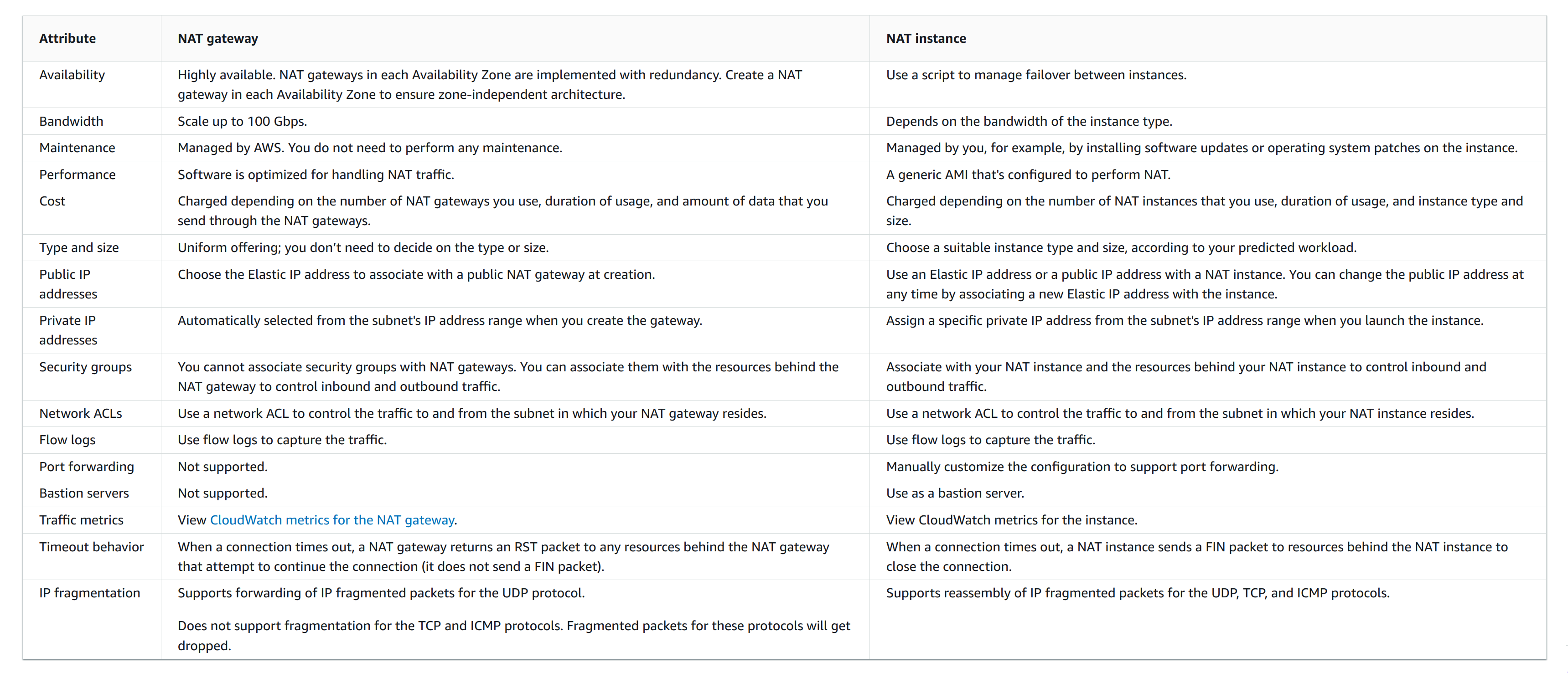
Used to allow resources in private subnets to connect to the internet, other VPCs, or on-premises networks. These instances can communicate with services outside the VPC, but they cannot receive unsolicited connection requests.
They don’t support IPv6!
Nat Gateways
They’re AZ resilient, not region resilient. To improve resiliency, create a NAT gateway in each Availability Zone.
It can be either:
-
private: it has no route for the public internet, only to transit gateways or virtual gateways. You cannot associate an elastic IP address with a private NAT gateway and, while you can attach an internet gateway to a VPC with a private NAT gateway, if you route traffic from the private NAT gateway to the internet gateway, the internet gateway drops the traffic.
-
public: for instances in private subnets that can connect to the internet through a public NAT gateway, but cannot receive unsolicited inbound connections from the internet. You create a public NAT gateway in a public subnet and must associate an elastic IP address with the NAT gateway at creation
Characteristics:
-
Supported protocols: TCP, UDP, ICMP.
-
Ports used: 1024-65535.
-
Traffic IP Versions: both IPv4 and IPv6 (using NAT64 for 6→4 translation and DNS64 for DNS).
-
Bandwidth: 5-100 Gbps. Use multiple NAT gateways if you need more.
-
Number of connections: max 55.000 for each unique destination (IP:Port/protocol) per ip address. You can associate up tp 1 primary IPv4 address and 7 secondary IPv4 addresses.
-
You cannot associate a security group with a NAT gateway. You can associate security groups with your instances to control inbound and outbound traffic.
-
You can use a NACL to control the traffic to and from the subnet for your NAT gateway.
-
You can’t route traffic to a NAT gateway through a VPC peering connection.
-
You can’t route traffic through a NAT Gateway when traffic arrives over a hybrid connection (Site to Site VPN or Direct Connect) through a Virtual Private Gateway.
-
You’re billed for both hourly usage and traffic, so costs are inherently kinda unpredictable compared to NAT instances.
Use cases:
-
Access the internet from a private subnet.
-
Access your on-premise network using allow-listed IP addresses: Instead of assigning each instance a separate IP address from the allow-listed IP address range, you can route traffic from the subnet that is destined for the on-premises network through a private NAT gateway with an IP address from the allow-listed IP address range.
-
Enable communication between overlapping networks
NAT Instances
The NAT instance must have internet access, so it must be in a public subnet (a subnet that has a route table with a route to the internet gateway), and it must have a public IP address or an Elastic IP address.
To have one:
-
create a NAT AMI
-
create a security group for the NAT instance
-
launch the NAT instance into your VPC.
For an instance to successfully act as a NAT device you need to disable Source/Destination Check. It discards all the traffic that doesn’t have the network interface as a source or destination, which is not good for forwarding packets.
Transit Gateways
Connect your virtual private clouds (VPC) and on-premises networks using a transit gateway, which acts as a central hub, routing traffic between VPCs, VPN connections, and AWS Direct Connect connections.
A transit gateway acts as a Regional virtual router for traffic flowing between your virtual private clouds (VPCs) and on-premises networks.
Site-to-site VPN
You can optionally connect your VPC to your own corporate data center using an IPsec AWS Site-to-Site VPN connection, making the AWS Cloud an extension of your data center.
A Site-to-Site VPN connection consists of two VPN tunnels between a virtual private gateway or transit gateway on the AWS side, and a customer gateway device located in your data center.
Security
Security Groups
They act as an allow-only stateful firewall that gets attached to resources created in the same VPC as the security group.
There’s an implicit deny, explicit deny is not possible. Only explicit allow is supported. You cannot deny a subset in an allowed group of CIDRs/protocols/resources (E.g.: Allow 0.0.0.0/0 but deny 35.23.116.128/25).
They have Layer 7 capabilities.
You actually attach Security Groups to a primary ENI (Elastic Network Interface) under the hood, not "instances" or other resources.
Changes take effect immediately.
The default security group has:
-
An inbound rule referencing itself for all ports and all protocols: every resource it’s attached to can freely connect to each other.
-
An outgoing rule for
0.0.0.0/0and::/0.
Characteristics:
-
You can assign multiple security groups to a single resource.
-
They’re ineffective against traffic to/from:
-
Amazon Domain Name Services (DNS)
-
Amazon Dynamic Host Configuration Protocol (DHCP)
-
Amazon EC2 instance metadata
-
Amazon Time Sync Service
-
Reserved IP addresses used by the default VPC router
-
Security group rules
-
Only allow rules can be specified.
-
Upon creation:
-
No inbound traffic allowed.
-
Outbound traffic allowed to
0.0.0.0/0.
-
-
Rules changes are reflected immediately.
Security group components
-
Source/Destination:
-
A single IPv4 (/32) or IPv6 (/128) address.
-
An IPv4/IPv6 range.
-
The ID of a prefix list.
-
The ID of another security group.
-
-
Protocol number: E.g. 6(TCP), 17(UDP), 1(ICMP).
-
Port range: E.g. 22-22, 5000-5100.
-
ICMP: if protocol is 1.
-
Type: E.g.: "Echo request"
-
Code: E.g.: 8
-
Security groups referencing
When you specify a security group as the source or destination for a rule, the rule affects all instances that are associated with the security groups.
Both security groups must belong to the same VPC or peered VPC. No rules from the referenced security group are added to the security group that references it. It becomes like an identity.
Self referencing is useful when resources in a group/cluster needs to communicate with each other: they all have attached the same security group which references itself.
It’s perfect when resources scale.
Network ACLs (NACLs)
A network access control list (ACL) explicitly allows or denies specific inbound or outbound traffic at the subnet level.
They filter traffic from and to the subnet not within.
They act as a stateless firewall. they only have Layer 4 capabilities.
Rules with the lowest number take precedence over the others.
After a rule matches evaluation STOPS.
You usually want to use NACLs to deny traffic and Security Groups to allow.
-
Your VPC automatically comes with a modifiable default network ACL. By default, it allows all inbound and outbound IPv4 traffic and, if applicable, IPv6 traffic.
-
Each subnet in your VPC must be associated with a single network ACL. A Network can be associated with multiple subnets.
-
A network ACL has inbound rules and outbound rules. Each rule can either allow or deny traffic.
-
Each rule has a number from 1 to 32766. We evaluate the rules in order, starting with the lowest numbered rule, when deciding whether allow or deny traffic. If the traffic matches a rule, the rule is applied and we do not evaluate any additional rules.
They’re ineffective against traffic to/from:
-
Route 53 Resolver (
VPC+2 IP), to filter that traffic you need to use Route 53 Resolver DNS Firewall. -
Endpoints for Instance Metadata Service (IMDS)
-
Amazon Domain Name Services (DNS)
-
Amazon Dynamic Host Configuration Protocol (DHCP)
-
Amazon EC2 instance metadata
-
Amazon ECS task metadata endpoints
-
License activation for Windows instances
-
Amazon Time Sync Service
-
Reserved IP addresses used by the default VPC router
NACLs rules
-
Rule number: Rules are evaluated starting with the lowest numbered rule. As soon as a rule matches traffic, it’s applied regardless of any higher-numbered rule that might contradict it.
-
Type: the type of traffic. E.g.: custom, SSH, HTTP, ALL TCP…
-
Protocol
-
Port range
-
Source
-
Destination
-
Allow/Deny