EventBridge
EventBridge is a serverless service that uses events to connect application components together following an event-driven architecture.
It provides 2 main ways to process events: event buses and pipes.
Event Bus
It’s a router that receives events and delivers them to zero or more targets according to rules that match events in the event bus using event patterns. Before sending events to targets it’s possible to use input transformation. An optional dead-letter queue can be configured for events whose delivery to targets fails.
A default event bus is always present in each account. Others can be created (Custom event buses).
Events
An event indicates a change in an environment, you can also set up scheduled events that are generated on a periodic basis.
They’re JSON objects with a common top-level structure:
{
  "version": "0",
  "id": "UUID",
  "detail-type": "event name",
  "source": "event source",
  "account": "ARN",
  "time": "timestamp",
  "region": "region",
  "resources": [
    "ARN"
  ],
  "detail": {
    // JSON object
  }
}
You can send multiple events using the PutEvents api call or CLI command.
PutEvents
$ aws events put-events \
--entries '[{"Time": "2016-01-14T01:02:03Z", "Source": "com.mycompany.myapp",
"Resources": ["resource1", "resource2"], "DetailType": "myDetailType", "Detail":
"{ \"key1\": \"value1\", \"key2\": \"value2\" }"}]'

# Or
$ aws events put-events --entries file://entries.json
Event Patterns
An event pattern contains one or more filters to match events and can include filters that match on:
-
Event metadata: data about the event, such as the event source, or the account or Region.
-
Event data: the properties of the event itself. These properties vary according to event.
-
Event content: The actual property values of the event data.
|
In EventBridge, it is possible to create rules that can lead to higher-than-expected charges and throttling: Suppose you created a rule to detect that ACLs have changed on an Amazon S3 bucket, and trigger software to change them to the desired state. If the rule is not written carefully, the subsequent change to the ACLs fires the rule again, creating an infinite loop. |
Rules
In rules you specify what EventBridge does with the events delivered to each event bus.
You can create two kinds of rules:
-
Rules that match on event data using an Event pattern
-
Rules that run on a schedule (← EventBridge Scheduler)
-
(Managed rules: these are created by AWS on your behalf.)
An event might match multiple rules, and each rule can specify up to five targets. An event may not match any rules, in which case EventBridge takes no action.
You can define up yo 5 targets for each rule.
Targets
When defining targets you can optionally set a dead-letter queue for events that couldn’t be delivered.
Available targets:
-
API destination
-
API Gateway
-
AWS AppSync
-
Batch job queue
-
CloudWatch log group
-
CodeBuild project
-
CodePipeline
-
Amazon EBS CreateSnapshot API call
-
EC2:
-
Image Builder
-
RebootInstances API call
-
StopInstances API call
-
TerminateInstances API call
-
-
ECS task
-
Event bus in a different account or Region
-
Event bus in the same account and Region
-
Firehose delivery stream
-
Glue workflow
-
Incident Manager response plan
-
Inspector assessment template
-
Kinesis stream
-
Lambda function (ASYNC)
-
Amazon Redshift:
-
cluster data API queries
-
Serverless workgroup data API queries
-
-
SageMaker Pipeline
-
Amazon SNS topic: EventBridge does not support Amazon SNS FIFO topics.
-
Amazon SQS queue
-
Step Functions state machine (ASYNC)
-
Systems Manager:
-
Automation
-
OpsItem
-
Run Command
-
API destinations
Amazon EventBridge API destinations are HTTP endpoints that you can invoke as the target of a rule.
When you create an API destination, you specify a connection to use for it. Each connection includes the details about the authorization type and parameters to use to authorize with the API destination endpoint.
Input Transformation
You can customize the text from an event before EventBridge passes the information to the target of a rule. You define up to 100 variables that use JSON path to reference values in the original event source.
Archiving and Replaying
In EventBridge, you can create an archive of events so that you can easily replay them at a later time to recover from errors or to validate new functionality in your application.
Archiving is accomplished sby specifying an Event Pattern.
|
There may be a delay between an event being published to an event bus and the event arriving in the archive. We recommend you delay replaying archived events for 10 minutes to make sure all events are replayed. |
Schema Registry and Schema Discovery
A schema defines the structure of events that are sent to EventBridge. EventBridge provides schemas for all events that are generated by AWS services. You can also create or upload custom schemas or infer schemas directly from events on an event bus. Once you have a schema for an event, you can download code bindings for popular programming languages and speed up development.
You can also use Schema Discovery to let EventBridge build schemas from events.
EventBridge Scheduler
You can create schedules using cron and rate expressions for recurring patterns, or configure one-time invocations.
EventBridge Pipes
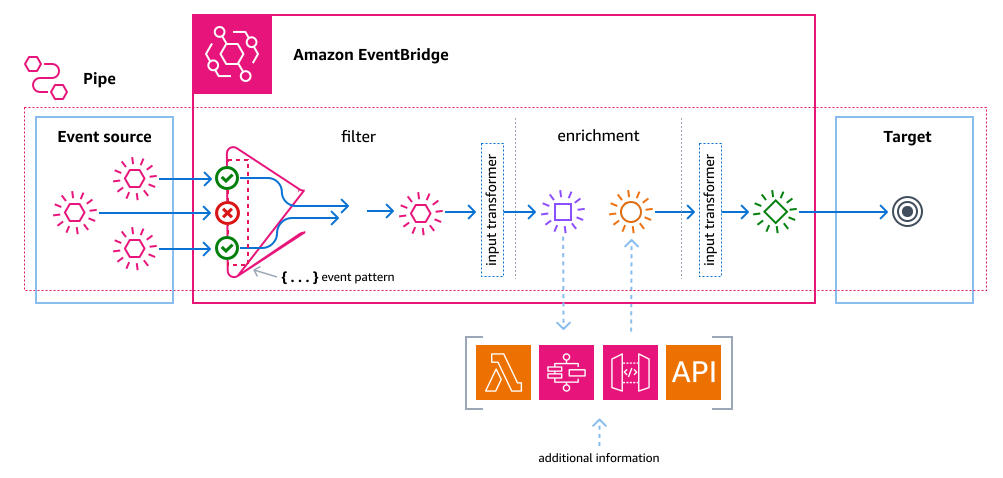
Amazon EventBridge Pipes connects point-to-point supported sources to supported targets adding advanced transformations and enrichment in the middle.
Supported Pipe Sources
-
Amazon DynamoDB stream
-
Amazon Kinesis stream
-
Amazon MQ broker
-
Amazon MSK stream
-
Amazon SQS queue
-
Apache Kafka stream
Supported Pipe Targets
-
API destination
-
API Gateway
-
Batch job queue
-
CloudWatch log group
-
ECS task
-
Event bus in the same account and Region
-
Firehose delivery stream
-
Inspector assessment template
-
Kinesis stream
-
Lambda function (SYNC or ASYNC)
-
Redshift cluster data API queries
-
SageMaker Pipeline
-
Amazon SNS topic (SNS FIFO topics not supported)
-
Amazon SQS queue
-
Step Functions state machine:
-
Express workflows (SYNC or ASYNC)
-
Standard workflows (ASYNC)
-
Global Endpoints for EventBridge
For no additional cost you can assign an Amazon Route 53 health check to the endpoint. When failover is initiated, the health check reports an “unhealthy” state. Within minutes of failover initiation, all custom events are routed to an event bus in the secondary Region and are processed by that event bus. Once the health check reports a “healthy” state, events are processed by the event bus in the primary Region.
You can also enable event replication, which sends events from the event bus in the primary and secondary regione.