Storage Gateway
It runs on premises oras a VM or can be ordered as a hardware appliance. It bridges on-prem and AWS from a storage perspective.
It presents storage on premises using:
-
iSCSI (NAS/SANs protocol)
-
NFS
-
SMB
On AWS it’s backed by:
-
EBS
-
S3
-
FSx for Windows Server
-
The various Glacier declinations
Depending on the deployment type it can be used for:
-
Extensions of the on-prem storage
-
Migrations
-
DR
-
Storage Tiering
-
Replacement of backup systems
Volume
Volume is a mode that presents your data to applications as a raw block device.
Stored Mode
You store your primary data locally, while asynchronously backing up that data to AWS. Stored volumes provide your on-premises applications with highlow-latency access to their ENTIRE datasets. At the same time, they provide durable, offsite backups.
Data is presented over iSCSI to on-prem servers. ALL of the storage is local, AWS only has a copy.

The VM/Applicance has two kinds of storage:
-
Local storage to be provided to servers by iSCSI
-
Upload Buffer to temporary store new data before it is asynchronously uploaded to AWS
The appliance then connects to the Storage Gateway, an endpoint in the AWS Public Zone, accessed via the internet or maybe using a Public VIF in a Direct Connect connection.
Data is constantly backed up as [.underline]EBS snapshots# in the background.
This enables:
-
FULL-DISK backups for servers.
-
DR: you can quickly create an EBS volume from a snapshot. In theory you can spin up a new server (full copy) in an EC2 instance.
This mode does not provide Datacenter Extension!. You need to have ALL the data locally. This mode does not mitigate capacity issues!
Each volume can be up to 16 TiB and a gateway can serve up to 32 volumes. So you have a capacity limit of 512 TiB per gateway.
Cached Mode
It’s similar to stored mode architecturally but the logic is very different. You still have a physical/virtual appliance that connects to a storage gateway, and the appliance still has a local storage and an upload buffer.
The main location for data is now AWS. What is local is a cache of frequently-accessed data.
This means that you don’t have to keep all your storage locally.
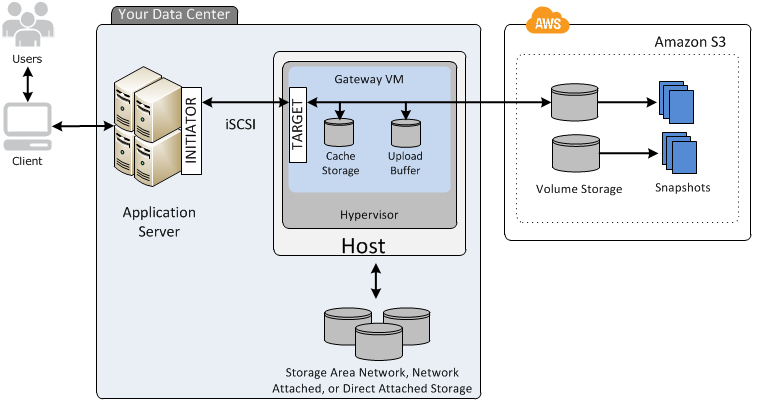
The storage backend on AWS is S3. In particular in an AWS-managed S3 area: buckets are only visible from the Storage Gateway console. Data wouldn’t be inspectable anyway since is raw block data.
You can use data to create an EBS Snapshot, from which you can create an EBS volume.
This allows for Datacenter Extension but most importantly it means that you can have way more data on AWS than your datacenter alone can handle because you only fetch the fraction you need. This really helps with limited capacity issues.
You only get low latency for data that, in addition to being on AWS, is also cached on-prem.
Each volume can be up to 32 TiB and a gateway can serve up to 32 volumes. So you have a capacity limit of 1 PiB per gateway.
Tape (VTL)
The Storage Appliance presents itself via iSCSI like a tape drive, it contains a local cache and an upload buffer.
The Storage Gateway presents two interfaces that leat to a Virtual Tape Library (VTL) hosted on S3 and to a Virtual Tape Shelf (VTS) hosted on Glacier (Archive or Deep Archive).
A Virtual Tape can go from 100 GiB to 5 TiB (5 TiB is the maximum object size for S3). The Storage Gateway can handle up to 1 PiB in the Virtual Tape Library of data across 1500 Virtuals Tapes.
When the tape is ready for archival it gets exported: just like exporting a physical tape means pulling it from the library and sending it offsite, exported tapes are moved to the Glacier VTS, which allows for unlimited storage.
Use cases:
-
Backup
-
Migration
File
In this mode the Storage Appliance creates a network share (mout point) in the LAN and maps its content to an S3 bucket or FSx for Windows Server. The S3 bucket + the LAN share is known ad Bucket Share.
Shares can be presented as:
-
NFS
-
SMB, with the possibility to integrate it into an existing Active Directory
On AWS side the S3 bucket benefits of all the available integrations like, S3 Events, Lambda, Athena and more.
File mode allows Share Extension for what it’s in the local shares.
Contents are cached (read and write) providing LAN-like performance. But primary data is stored in S3.
A single File Gateway can have up to 10 Bucket Shares.
Architectures
Multi-site
File mode allows for a true multi-site architecture: a single bucket can have more than one contributor. But there’s a catch:
If you have two sites and you create a file from Site A, the file is immediately uploaded, Site B though will not see the file until it initiates a list operation! This is to preserve compute and network. The Storage Gateway though uses NotifyWhenUploaded to create a CloudWatch Event when the upload is complete.
Your application must be aware of that.
There’s also no form of data locking, so a second write from another site can overwrite the file’s content. You should use read-only mode in the second site or use a custom logic to prevent this.