IAM Basics
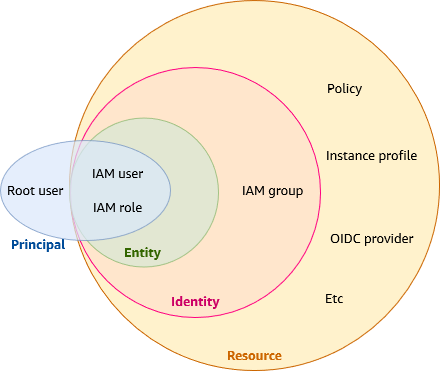
IAM is an Identity Provider (IdP) and Authorization service, it is a Global service, changes are stored in each AWS Region.
It is eventually consistent: if a request to change some data is successful, the change is committed and safely stored. However, the change must be replicated across IAM, which can take some time.
Authentication: Authentication is how you sign in to AWS using your entity credentials. You must be authenticated (signed in to AWS) as the AWS account root user, as an IAM user, or by assuming an IAM role. You can sign in to AWS as a federated identity by using credentials provided through an identity source. AWS IAM Identity Center (IAM Identity Center) users, your company’s single sign-on authentication, and your Google or Facebook credentials are examples of federated identities. When you sign in as a federated identity, your administrator previously set up identity federation using IAM roles. When you access AWS by using federation, you are indirectly assuming a role. Authentication is provided by matching the sign-in credentials to a principal (an IAM user, federated user, IAM role, or application) trusted by the AWS account.
Terms
-
IAM Resource: resource stored in IAM.
-
User
-
Group
-
Role
-
Policy
-
Identity-provider object
-
-
IAM Entity: IAM resources that AWS uses for authentication. Entities can be specified as a Principal in a resource-based policy. GROUPS are NOT ENTITIES, they CANNOT BE SPECIFIED AS A PRINCIPAL IN RESOURCE-BASED POLICIES.
-
User
-
Role
-
-
IAM Identity: An IAM identity provides access to an AWS account. An IAM identity represents a human user or programmatic workload, and can be authenticated and then authorized to perform actions.
-
User
-
Role
-
Group
-
-
Principals: A person or application that uses the AWS account root user, an IAM user, or an IAM role to sign in and make requests to AWS. Principals include federated users and assumed roles. IAM users and root user are granted permanent credentials, while roles are granted temporary credentials. As a best practice, we recommend that you require human users and workloads to access AWS resources using temporary credentials (⇒ roles).
-
Workload: A collection of resources and code that delivers business value.
ARNs (Amazon Resource Identifiers)
arn:partition:service:region:account-id:resource-id
arn:partition:service:region:account-id:resource-type:resource-id
arn:partition:service:region:account-id:resource-type/esource-id

arn:aws:ec2:eu-central-1:<account-id>:instance/i-08bc220f20098bf9barn:aws:s3:::mybucket
arn:aws:s3:::mybucket/*
arn:aws:s3:::mybucket/my/object/keyBut if you want to allow actions in a policy to a user FOR ALL REGIONS you NEED TO USE * because that’s a specification, it makes sense#
Permissions on buckets are different than permissions on objects!
Users
An IAM user is an identity within your AWS account that has specific permissions for a single person, application or service account. A user is uniquely associated with one person or application, but a role is intended to be assumable by anyone who needs it. Users have permanent long-term credentials, but roles provide temporary credentials.
A single AWS account can have NO MORE THAN 5000 users and a single USER CAN BE IN NO MORE THAN 10 GROUPS. If you need more you should use Identity Federation in conjunction with an external identity provider.
You can use both IAM and AWS IAM Identity Center to create new users or federate existing users into AWS. The main difference between the two is that IAM users are granted long-term credentials to your AWS resources while users in IAM Identity Center have temporary credentials that are established each time the user signs-in to AWS. As a best practice, require human users to use federation with an identity provider to access AWS using temporary credentials instead of as an IAM user. A primary use for IAM users is to give workloads that cannot use IAM roles the ability to make programmatic requests to AWS services using the API or CLI.
An IAM user is a resource in IAM that has associated credentials and permissions. An IAM user can represent a person or an application that uses its credentials to make AWS requests. This is typically referred to as a service account. Roles are the preferred way to do so.
By default, a new IAM user has no permissions to do anything.
You can also add a permissions boundary to your IAM users. A permissions boundary is an advanced feature that allows you to use AWS managed policies to limit the maximum permissions that an identity-based policy can grant to an IAM user or role.
User ARN: arn:aws:iam::${account_id_without_hyphens}:user/${user_name}
Credentials for users:
-
Console password
-
Access Keys
-
SSH keypair for CodeCommit
-
mTLS certificates
Management:
-
Password management
-
Access keys management
-
MFA management
-
Review and delete unused credentials
-
Credentials report
Access use cases
-
Built-in SSO (IAM Identity Center) ⇐ human users, if no existing directories or IdP.
-
Federation (IAM Identity Center) ⇐ human users, for existing SAML 2.0 or OIDC directories/IdP.
-
Long-term credentials ⇐ human users and applications that:
-
Cannot use IAM roles
-
are third party clients that require access keys authentication
-
service-specific credentials
-
if IAM Identity Center is not available for the account and there’s no IdP
-
Note: rotate the access keys as a best practice.
-
-
Roles ⇐ cross-account
Groups
An IAM group is an identity that specifies a collection of IAM users. You can’t sign in as a group. You can use groups to specify permissions for multiple users at a time.
You cannot identify a user group as a Principal in a policy (such as a resource-based policy) because groups relate to permissions, not authentication, and principals are authenticated IAM entities.
User groups can’t be nested; they can contain only users, not other user groups.
There is no default user group that automatically includes all users in the AWS account.
There is a soft limit of 300 groups per account, which can be increased via support ticket.
Roles
An IAM role is an identity within your AWS account that has specific permissions. It is similar to an IAM user, but is not associated with a specific person. You can temporarily assume an IAM role in the AWS Management Console by switching roles. IAM roles with temporary credentials are useful in:
-
Federated user access: To assign permissions to a federated identity, you create a role and define permissions for the role. When a federated identity authenticates, the identity is associated with the role and is granted the permissions that are defined by the role.
-
Temporary IAM user permissions: An IAM user or role can assume an IAM role to temporarily take on different permissions for a specific task.
-
Cross-account access: You can use an IAM role to allow someone (a trusted principal) in a different account to access resources in your account. Roles are the primary way to grant cross-account access. However, with some AWS services, you can attach a policy directly to a resource (instead of using a role as a proxy).
-
Cross-service access: Some AWS services use features in other AWS services.
-
Forward access sessions (FAS): FAS uses the permissions of the principal calling an AWS service, combined with the requesting AWS service to make requests to downstream services. FAS requests are only made when a service receives a request that requires interactions with other AWS services or resources to complete. In this case, you must have permissions to perform both actions.
-
Service role: A service role is an IAM role that a service assumes to perform actions on your behalf.
-
Service-linked role: Service-linked role – A service-linked role is a type of service role that is linked to an AWS service. The service can assume the role to perform an action on your behalf. Service-linked roles appear in your AWS account and are owned by the service. An IAM administrator can view, but not edit the permissions for service-linked roles.
-
-
Applications running on Amazon EC2: You can use an IAM role to manage temporary credentials for applications that are running on an EC2 instance and making AWS CLI or AWS API requests. This is preferable to storing access keys within the EC2 instance.
Service roles: roles that a service assumes to perform actions on your behalf. When a role serves a specialized purpose for a service, it is categorized as a service role for EC2 instances (for example), or a service-linked role.
Service roles for an EC2 instance: A special type of service role that an application running on an Amazon EC2 instance can assume to perform actions in your account. This role is assigned to the EC2 instance when it is launched. Applications running on that instance can retrieve temporary security credentials and perform actions that the role allows. See Using instance profiles.
Service-linked roles: A service-linked role is a type of service role that is linked to an AWS service. The service can assume the role to perform an action on your behalf. Service-linked roles appear in your AWS account and are owned by the service. An IAM administrator can view, but not edit the permissions for service-linked roles. Before you can delete service-linked roles you must first delete their related resources.
Role chaining: Role chaining is when you use a role to assume a second role through the AWS CLI or API. RoleA has permission to assume RoleB. You can enable User1 to assume RoleA by using their long-term user credentials in the AssumeRole API operation. This returns RoleA short-term credentials. With role chaining, you can use RoleA’s short-term credentials to enable User1 to assume RoleB.
Role chaining limits your AWS CLI or AWS API role session to a maximum of one hour, while under normal circumstances you can set the session duration to up to 12h.
AWS does not treat using roles to grant permissions to applications that run on EC2 instances as role chaining.
Delegation
The granting of permissions to someone to allow access to resources that you control.
Delegation involves setting up a trust between two accounts. The first is the account that owns the resource (the trusting account). The second is the account that contains the users that need to access the resource (the trusted account).
Trusting and trusted can be:
-
The same account.
-
Two accounts in the same organization.
-
Two accounts in different organizations.
You create an IAM role in the trusting account that has two policies attached:
-
a Permissions policy: what principals that assume the role can do.
-
a Trust policy: a restriction on who those principals (users, roles, accounts, or services) can be (no wildcards allowed), on who can assum the role.
The trusted account must create a permissions policy to define who can assume that external role.
What happens
-
In the trusting account an administrator uses IAM to create the role
-
The administrator creates the role, and optionally sets the "max session duration" to a non default value (default: 1h).
-
The administrator then shares the appropriate information with anyone who needs to assume the role (role ARN).
-
-
In the trusted account an administrator grants members of the Developers group permission to switch to the role by granting the intended group permission to call the AWS Security Token Service (AWS STS) AssumeRole API for the role in the trusting account. Other users who are not in the developer group do not have permission to switch to the role.
-
The user requests switches to the role.
-
AWS STS returns temporary credentials.
-
The temporary credentials allow access to the AWS resource.
Roles scenarios
-
Providing access to an IAM user in another AWS account that you own.
-
Providing access for non AWS workloads: use IAM Roles Anywhere. IAM Roles Anywhere uses X.509 certificates from your certificate authority (CA) to authenticate identities and securely provide access to AWS services with the temporary credentials provided by an IAM role. To use IAM Roles Anywhere, you set up a CA using AWS Private Certificate Authority or use a CA from your own PKI infrastructure. After you have set up a CA, you create an object in IAM Roles Anywhere called a trust anchor to establish trust between IAM Roles Anywhere and your CA for authentication. You can then configure your existing IAM roles, or create new roles that trust the IAM Roles Anywhere service. When your non AWS workloads authenticate with IAM Roles Anywhere using the trust anchor, they can get temporary credentials for your IAM roles to access your AWS resources.
-
Providing access to AWS accounts owned by third parties.
-
Providing access to an AWS service: user a Service role. When a role serves a specialized purpose for a service, it can be categorized as a service role for EC2 instances, or a service-linked role.
Service-linked roles
Service-linked roles are predefined by the service and include all the permissions that the service requires to call other AWS services on your behalf.
The linked service also defines how you create, modify, and delete a service-linked role. A service might automatically create or delete the role. It might allow you to create, modify, or delete the role as part of a wizard or process in the service. Or it might require that you use IAM to create or delete the role. Regardless of the method, service-linked roles simplify the process of setting up a service because you don’t have to manually add permissions for the service to complete actions on your behalf.
|
Service roles are different from service-linked roles. A service role is an IAM role that a service assumes to perform actions on your behalf. An IAM administrator can create, modify, and delete a service role from within IAM. |
A service-linked role is a type of service role that is linked to an AWS service. The service can assume the role to perform an action on your behalf. Service-linked roles appear in your AWS account and are owned by the service.
The linked service defines the permissions of its service-linked roles, and unless defined otherwise, only that service can assume the roles.
You can’t delete a Service-linked role until it’s no longer in use!.
Granting a user permissions to pass a role to an AWS service
To pass a role (and its permissions) to an AWS service, a user must have permissions to pass the role to the service: you must grant the PassRole permission to the user’s IAM user, role, or group. This way a user can pick a role that’s been created by others and pass it to a service!.
This way, for instance in Cloudformation, you may not authorized to create EC2 instances but you can pass a role that authorizes that to Cloudformation!.
Policies
Policies are attached to IDENTITIES (users, roles, groups).
The access management portion of AWS Identity and Access Management (IAM) helps you define what a principal entity is allowed to do in an account. A principal entity is a person or application that is authenticated using an IAM entity (user or role). You manage access in AWS by creating policies and attaching them to IAM identities (users, groups of users, or roles) or AWS resources. A policy is an object in AWS that, when associated with an identity or resource, defines their permissions.
If you manage a single account in AWS, then you define the permissions within that account using policies. If you manage permissions across multiple accounts, you can use IAM roles, resource-based policies, or access control lists (ACLs) for cross-account permissions. However, if you own multiple accounts, we instead recommend using the AWS Organizations service.
AWS checks each policy that applies to the context of the request. If a single policy denies the request, AWS denies the entire request and stops evaluating policies. This is called an explicit deny.
Because requests are denied by default, IAM authorizes your request only if every part of your request is allowed by the applicable policies. Evaluation logic:
-
All requests are implicitly denied. (On the contrary, by default, the AWS account root user has full access.)
-
An explicit allow in an identity-based or resource-based policy overrides this default.
-
An explicit deny in any policy overrides any allows.
Users or groups can have multiple policies attached to them that grant different permissions. In that case, the permissions for the users are calculated based on the combination of policies attached to them directly or from groups and roles.
The basic principle still applies: If the user has not been granted an explicit permission for an action and a resource, the user does not have those permissions.
Root user: The AWS account root user is affected by some policy types but not others. You cannot attach identity-based policies to the root user, and you cannot set the permissions boundary for the root user. However, you can specify the root user as the principal in a resource-based policy or an ACL. A root user is still the member of an account. If that account is a member of an organization in AWS Organizations, the root user is affected by any SCPs for the account.
Least-privilege enforcement tools
-
Policy validation: via IAM Access Analyzer policy validation
-
Policy generation based on activity: via IAM Access Analyzer policy generation
-
Last accessed information: via the Access Advisor tab in the user, group, role or policy details page.
-
The tracking period is 400 days.
-
It reports successful attempts as well as unsuccessful attempts
-
-
Review of account events in AWS CloudTrail.
Policy types
-
Identity-based policies: Standalone identity-based policies that you can attach to multiple users, groups, and roles. They don’t accept a principal, the principal is the entity they’re attached to.
-
Managed Policies
-
AWS managed policies
-
Customer managed policies: When you change a customer managed policy, the changed policy doesn’t overwrite the existing policy. Instead, IAM creates a new version of the managed policy. IAM stores up to five versions of your customer managed policies. The maximum character size limit for managed policies is greater than the character limit for inline policies. If you reach the inline policy’s character size limit, you can create more IAM groups and attach the managed policy to the group.
-
-
Inline Policies: Policies that you create and manage and that are embedded directly into a single user, group, or role. Not recommended.
-
-
Resource-based policies: control what actions a specified principal can perform on that resource. They’re inline policies, and there are no managed resource-based policies. To enable cross-account access, you can specify an entire account or IAM entities in another account as the principal in a resource-based policy.
-
To enable cross-account access, you can specify an entire account or IAM entities in another account as the principal in a resource-based policy. Adding a cross-account principal to a resource-based policy is only half of establishing the trust relationship. When the principal and the resource are in separate AWS accounts, you must also use an identity-based policy to grant the principal access to the resource.
-
If a resource-based policy grants access to a principal in the same account, no additional identity-based policy is required.
-
Trust policies: Because an IAM role is both an identity (it can be "impersonated") and a resource that supports resource-based policies, trust policies are needed to allow entities to assum the role. Trust policies are resource-based policies.
-
-
Organization Service Control Policies (SCP): used in organization to restrict what member accounts (not the management account) can do.
-
Permissions boundaries: the maximum permissions that an identity-based policy can grant to an entity. They do not affect resource-based policies.
-
Access Control Lists (ACLs): control which principals in other accounts can access the resource to which the ACL is attached. They allow you to control which principals in another account can access a resource. ACLs cannot be used to control access for a principal within the same account.
-
Session policies: when you use the AWS CLI or AWS API to assume a role or a federated user session policies limit the permissions that the role or user’s identity-based policies grant to the session. They don’t grant permissions.
Policy syntax
-
Optional top-level policy-wide information
-
Version: latest
2012-10-17. -
Statement: information about a single permission. If there are multiple statements they’re evaluated with logical OR.
-
Sid <string>: optional ID.
-
Effect <string>: Allow | Deny
-
Principal <object>: for resource-based policies. To what entity (account, user or role) the policy applies. NOT for groups, because they’re not entities. You can specify more than one principal for each of the principal types using an array.
-
Action <string | array<string>>: resource-specific action(s).
-
A
NotActionfield can replaceActionif you want to exclude listed action from the policy.
-
-
Resource <string | array<string>>: Optional for resource-based policies.
-
A
NotResourcefield can replaceResourceif you want to exclude listed resources from the policy.
-
-
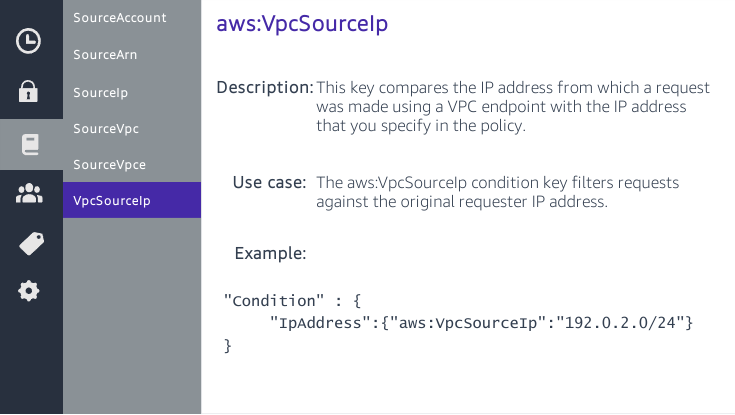
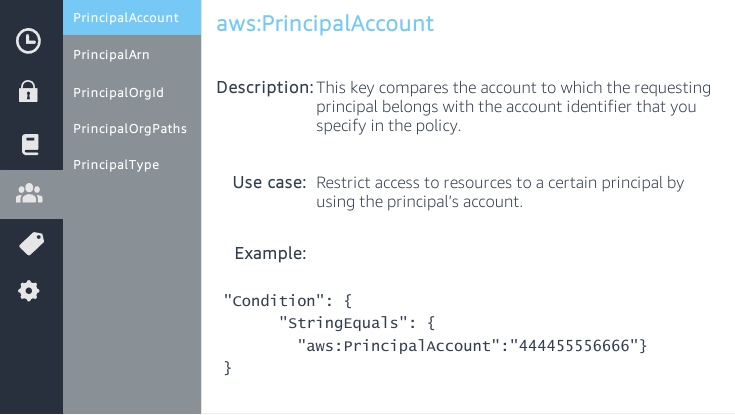
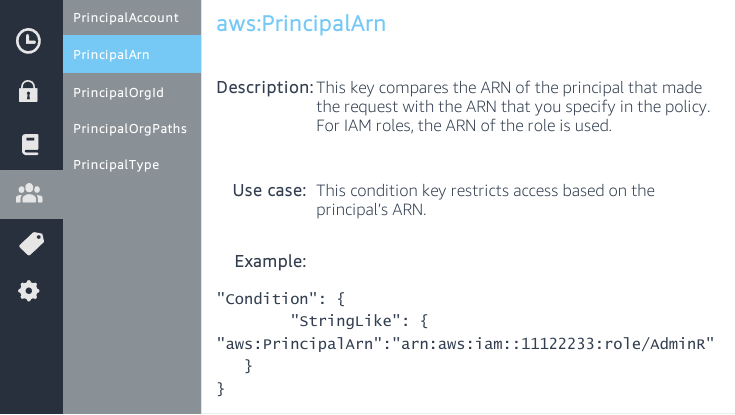
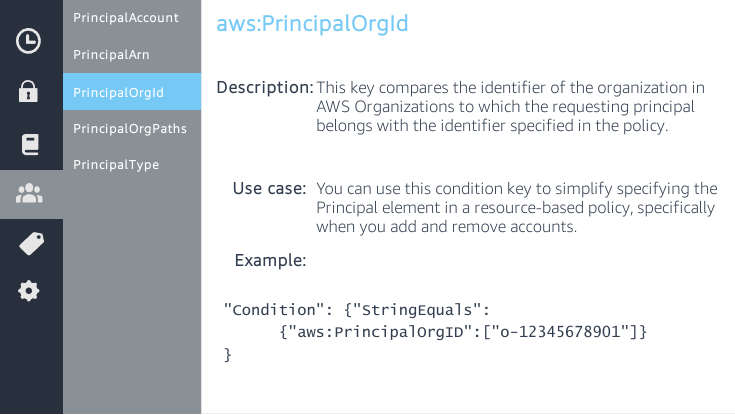
Condition <object>: when to apply.
-
Principal
For Identity-based policy the principal is not specified because it’s the identity the policy is attached to but you can further restrict the action the principal can perform.
A NotPrincipal field can replace Principal if you want to exclude listed principals from the policy.
{
  "NotPrincipal": {
    "AWS": "arn:aws:iam:000000000000:group/security"
  },
  "Effect": "Deny",
  "Action": ["S3:ListBuckets", "S3:ListObjects", "S3:GetObject"],
  "Resource": [
    "arn:aws:s3:::this-security-bucket",
    "arn:aws:s3:::this-security-bucket/*"
  ]
}${aws:username} is a variable that, for each user, contains their username{
"Version": "2012-10-17",
"Statement": [
{
"Effect": "Allow",
"Action": [
"ec2:StartInstances",
"ec2:StopInstances"
],
"Resource": "arn:aws:ec2:*:*:instance/*",
"Condition": {
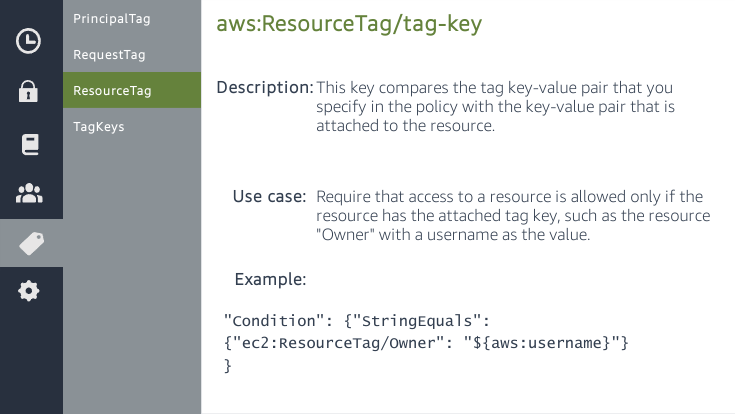
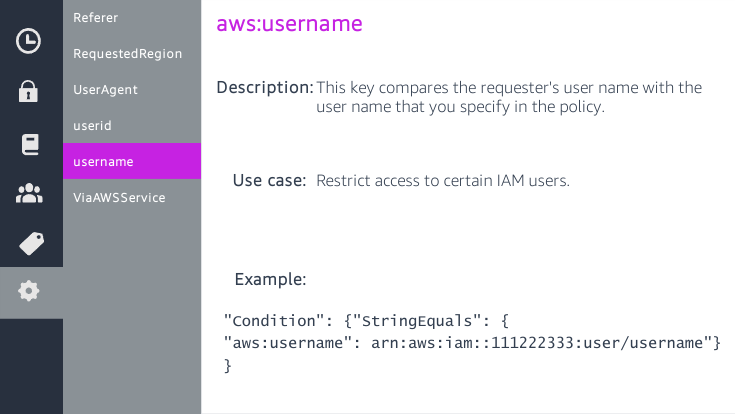
"StringEquals": {"aws:ResourceTag/Owner": "${aws:username}"}
}
},
{
"Effect": "Allow",
"Action": "ec2:DescribeInstances",
"Resource": "*"
}
]
}-queue. The user MUST have a tag attached named team.{
"Version": "2012-10-17",
"Statement": {
"Sid": "AllQueueActions",
"Effect": "Allow",
"Action": "sqs:DeleteQueue",
"Resource": "arn:aws:sqs:us-east-2::${aws:PrincipalTag/team}-queue"
}
}For Resource-based policies you have the Principal key:
.AWS Accounts
{
  "Principal": {
    "AWS": "arn:aws:iam:000000000000:root"
  }
}{
"Principal": {
"AWS": "000000000000"
}
}{
"Principal": {
"AWS": "arn:aws:iam:000000000000:user/user-name"
}
}{
"Principal": {
"AWS": [
"arn:aws:iam:000000000000:user/user-name1",
"arn:aws:iam:000000000000:user/user-name2"
]
}
}{
"Principal": {
"Federated": "www.amazon.com"
}
}{
"Principal": {
"Federated": "arn:aws:iam:0000000000000:saml-provider/provider-name"
}
}{
"Principal": {
"AWS": "arn:aws:iam:0000000000000:role/role-name"
}
}{
"Principal": {
"Service": [
"ec2.amazonaws.com",
"amplify.amazonaws.com"
]
}
}Identity-based policy example
{
  "Version": "2012-10-17",
  "Statement": [
    {
      "Sid": "FirstStatement",
      "Effect": "Allow",
      "Action": ["iam:ChangePassword"],
      "Resource": "*"
    },
    {
      "Sid": "SecondStatement",
      "Effect": "Allow",
      "Action": "s3:ListAllMyBuckets",
      "Resource": "*"
    },
    {
      "Sid": "ThirdStatement",
      "Effect": "Allow",
      "Action": [
        "s3:List*",
        "s3:Get*"
      ],
      "Resource": [
        "arn:aws:s3:::confidential-data",
        "arn:aws:s3:::confidential-data/*"
      ],
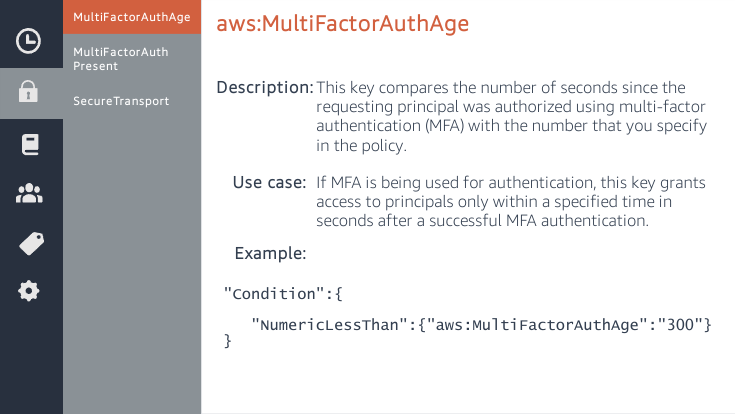
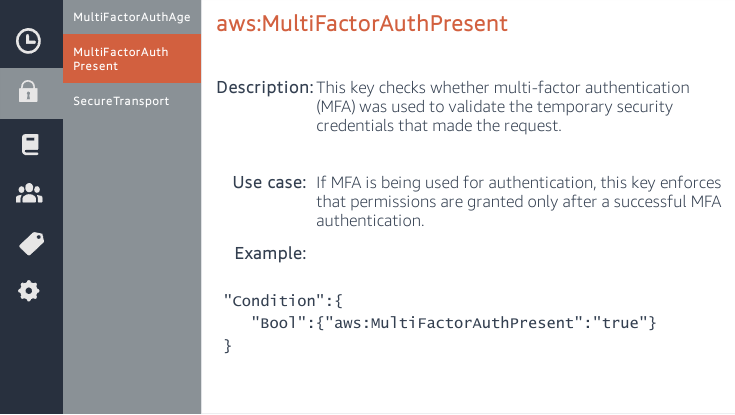
      "Condition": {"Bool": {"aws:MultiFactorAuthPresent": "true"}}
    }
  ]
}
Resource-based policy example
{
  "Version": "2012-10-17",
  "Statement": [{
    "Sid": "1",
    "Effect": "Allow",
    "Principal": {"AWS": ["arn:aws:iam::account-id:root"]},
    "Action": "s3:*",
    "Resource": [
      "arn:aws:s3:::mybucket",
      "arn:aws:s3:::mybucket/*"
    ]
  }]
}
Policy Actions
Policy actions are classified as:
-
List: Permission to list resources within the service to determine whether an object exists, but cannot see the contents of a resource.
-
Read: Permission to read but not edit the contents and attributes of resources in the service.
-
Write: Permission to create, delete, or modify resources in the service.
-
Permissions management: Permission to grant or modify resource permissions in the service.
-
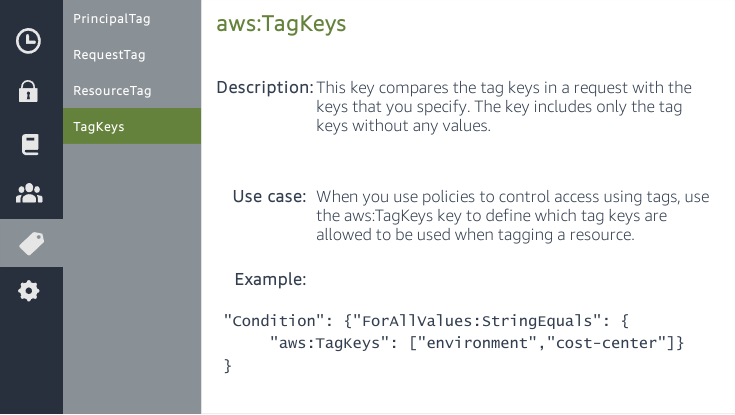
Tagging: Permission to perform actions that only change the state of resource tags.
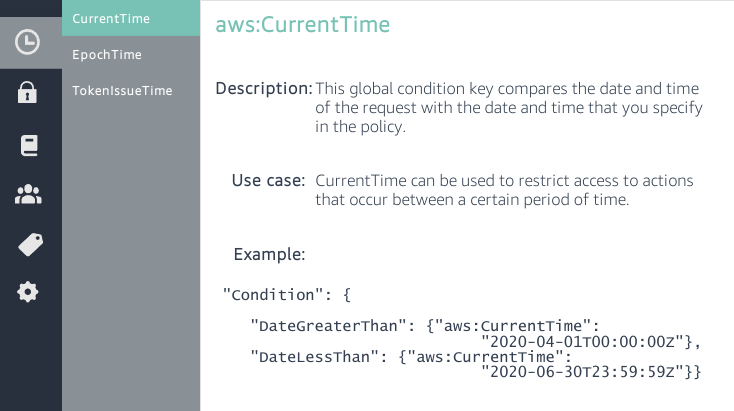
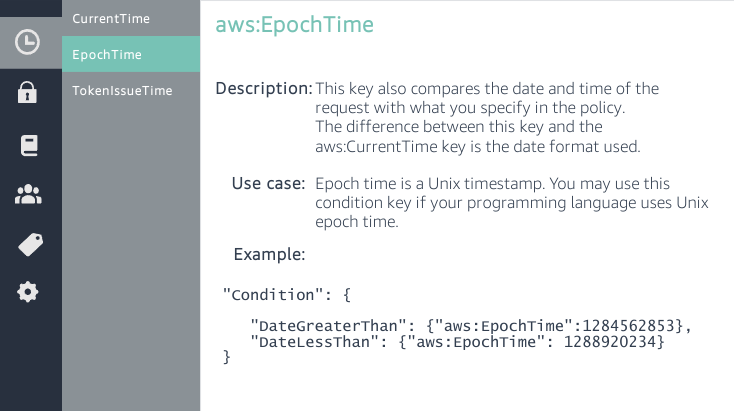
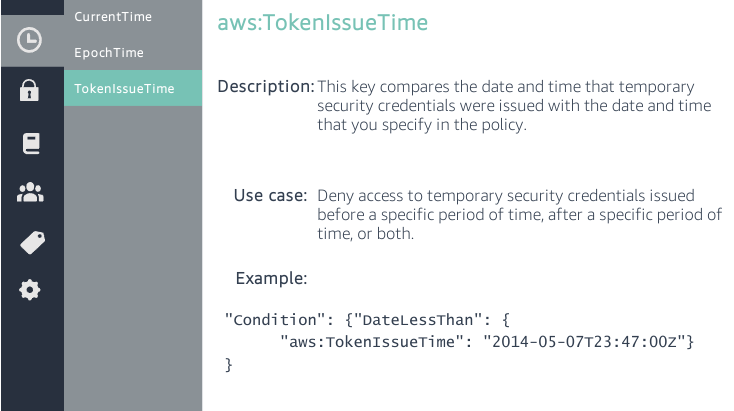
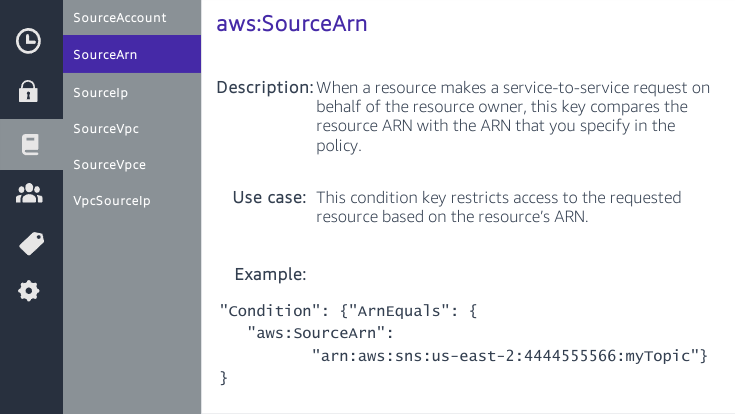
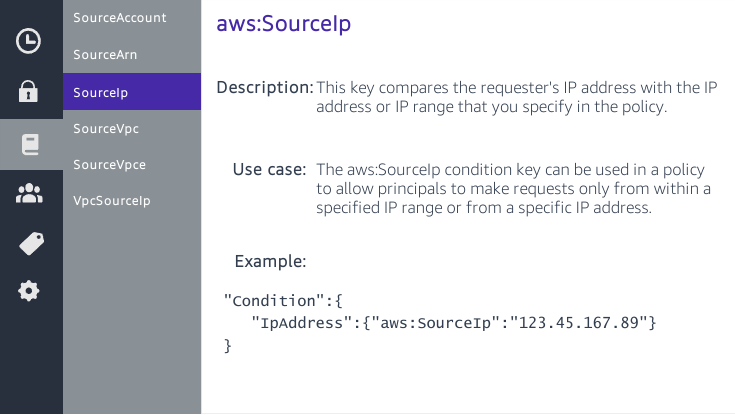
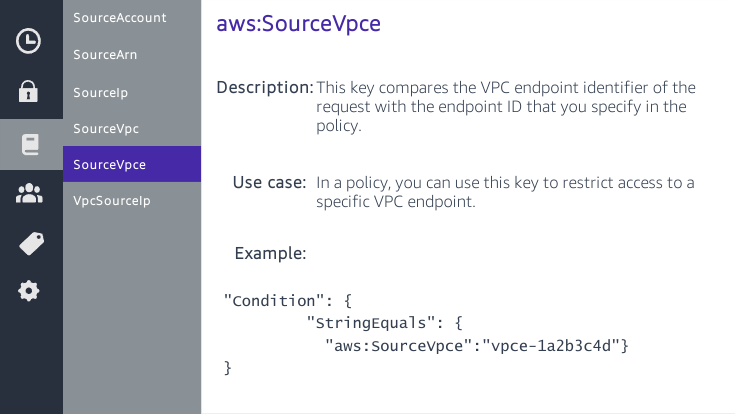
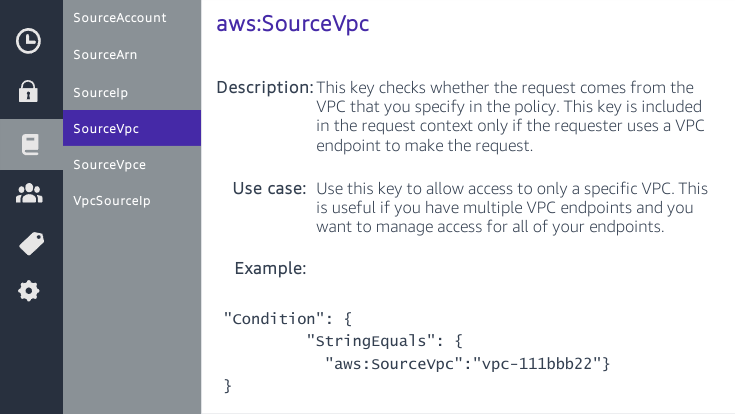
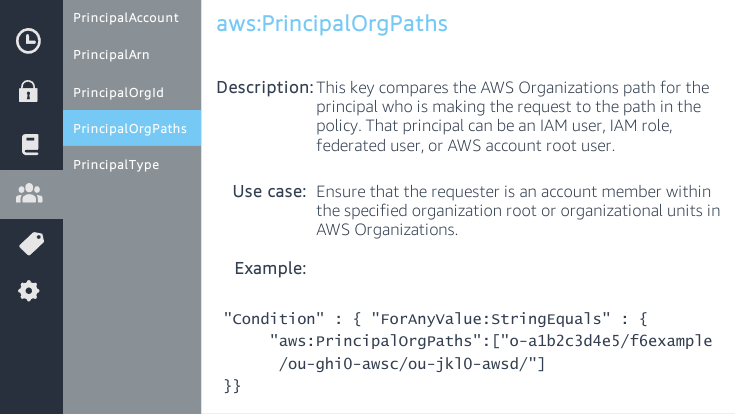
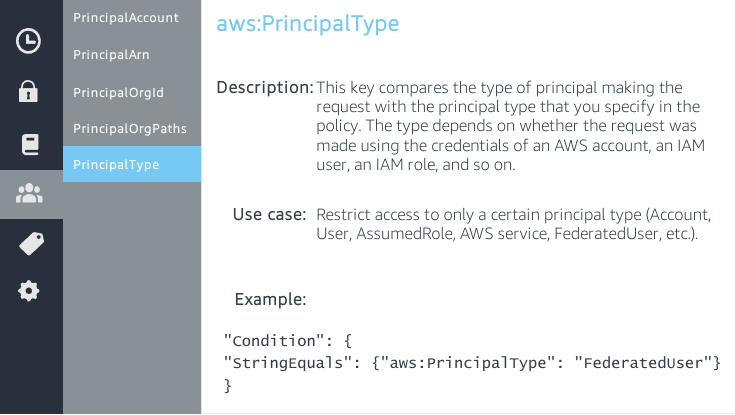
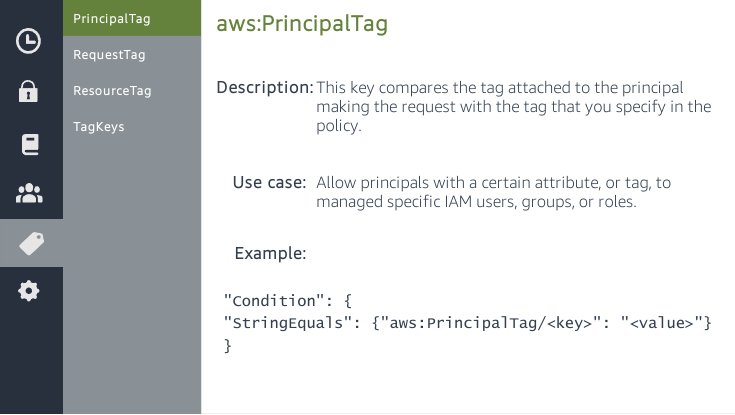
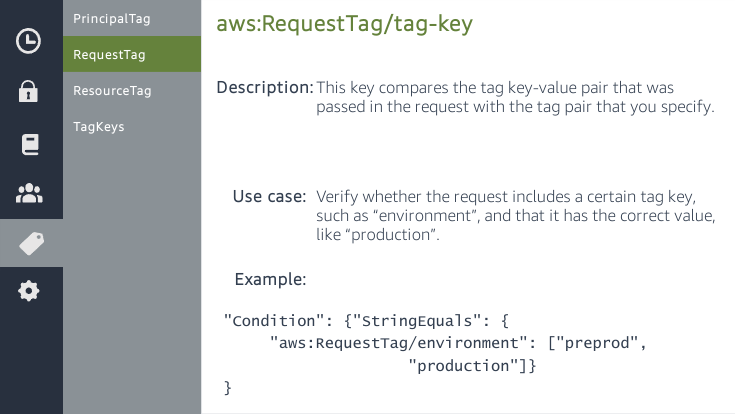
Guardrails Vs Grants
Guardrails:
-
SCPs
-
Permission Boundaries
-
Session Policies
Grants:
-
Identity-based
-
Resource-based
-
ACLs
Attribute Based Access Control (ABAC)
Attribute-based access control (ABAC) is an authorization strategy that defines permissions based on attributes. In AWS, these attributes are called tags.
You can create a single ABAC policy or small set of policies for your IAM principals. These ABAC policies can be designed to allow operations when the principal’s tag matches the resource tag.
(RBAC) The disadvantage to using the traditional RBAC model is that when employees add new resources, you must update policies to allow access to those resources.
Advantages over RBAC:
-
ABAC permissions scale with innovation.
-
ABAC requires fewer policies.
-
Using ABAC, teams can change and grow quickly.
-
Granular permissions are possible using ABAC.
-
Use employee attributes from your corporate directory with ABAC.