Kinesis
Kinesis is a service for ingesting huge amounts of data coming from different sources and send it to several consumers or perform analytics on them in real time, with the exception of Amazon Data Firehose which is not a true real-time service.
Kinesis Data Streams
Kinesis Data Streams can support very high ingestion rates.
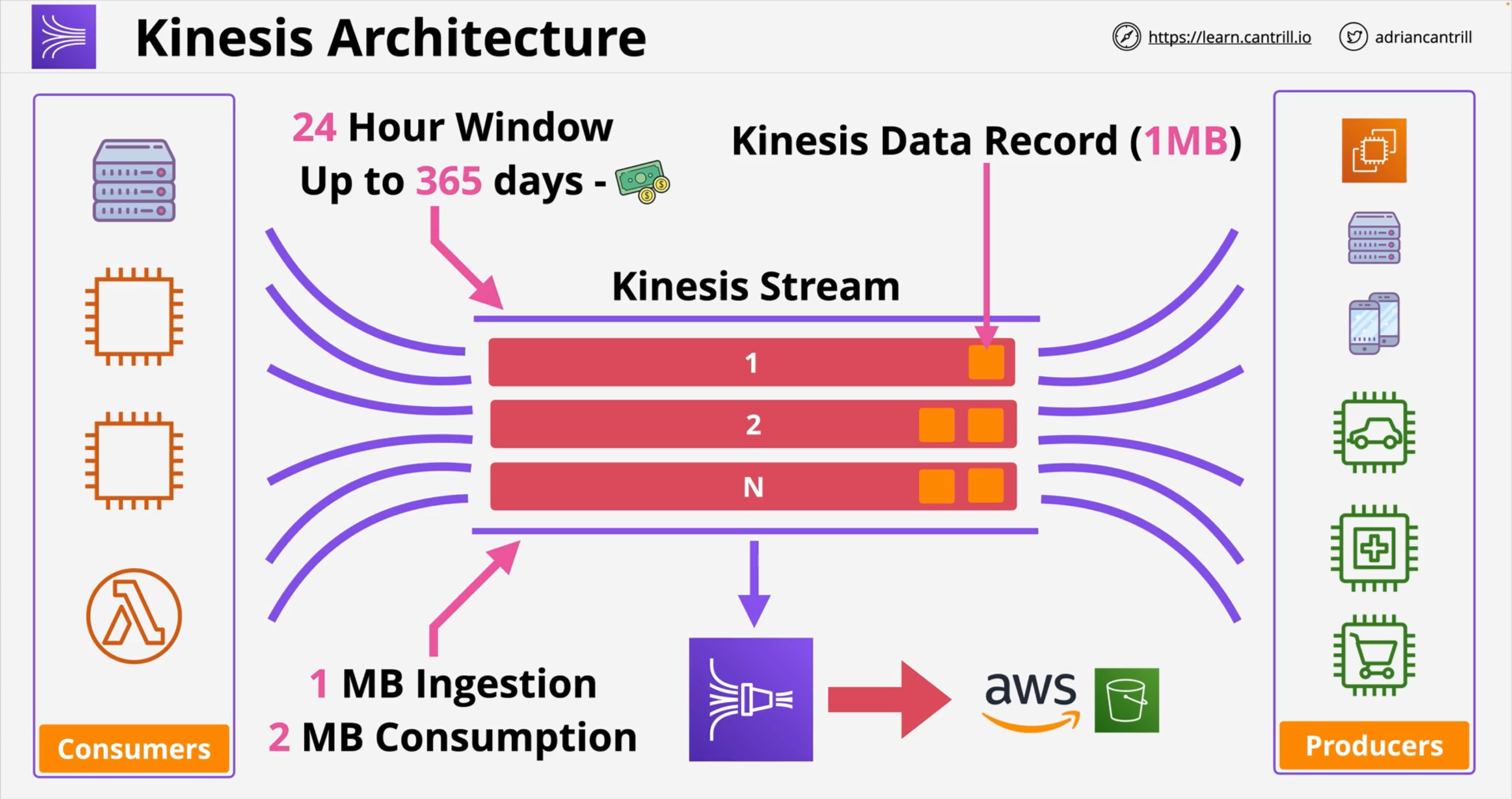
Data is ingested into Kinesis Data Streams by Producers.
Each Data Streams stream is made up of Shards (1 ⇒ n) that can be either pre-provisioned or adjusted dynamically. Each shard has an ingestion throughput of 1 MB/s (or 1000 messages/s) PER SHARD, and a send throughput of 2 MB/s PER SHARD, so you need to plan how many shards you’ll need if you don’t want to pay additinoal fees for auto-scaling. Each Shard has a partition identifies so that when producers send data they also speficy a partition key to select the destination shard.
Produces send Records to the stream, and each record contains a partition key and a blob (up to 1 MB) of data. Producers can be:
-
Applications/clients using the AWS SDK
-
Applications/clients using the KPS (Kinesis Producer Library)
-
A Kinesis Agent
-
Other AWS services
-
Third party integrations like Debezium, Apache Flink, Fluentd, Kafka Connect and others
Consumers will then consume data:
-
Applications/clients using the AWS SDK
-
Applications/clients using the KPS (Kinesis Producer Library)
-
Amazon Data Firehose
-
Kinesis Data Analytics
-
Other AWS services
-
Third party integrations like Apache Druid, Talend, Apache Flink, Kafka Confluent Platform, Kinesumer and others.
Records coming FROM Data Streams contain:
-
A Partition Key
-
A Sequence Number
-
The data blob
Data retention
Retention can be set to anything between 1 and 365 days (default 24h). Within the retention period you can replay data. Data is Immutable, meaning it cannot be deleted in Kinesis Data Streams to ensure integrity.
Read Capacity
Usually the read throughput is 2MB/s/shard shared across all consumers.
You can enable Enhanced Fan-Out so that each consumer has a dedicated throughput.
Capacity Modes
-
On-demand: data streams with an on-demand mode require no capacity planning and automatically scale to handle gigabytes of write and read throughput per minute. With the on-demand mode, Kinesis Data Streams automatically manages the shards in order to provide the necessary throughput.
-
Write: up to 200 MB/s or 200.000 records/s
-
Read: 400 MB/s per consumer for up to 2 default consumers;
Enhanced Fan-Out (EFO) supports up to 20 consumers with dedicated throughput.
-
-
Provisioned: data streams with a provisioned mode require capacity planning and require you to specify the number of shards and the amount of data throughput you want to provision. The total capacity of a data stream is the sum of the capacities of its shards. You can increase or decrease the number of shards in a data stream as needed.
Amazon Data Firehose
Amazon Data Firehose is a fully managed service for delivering (near?) real-time streaming data to destinations.
Available sources:
-
Read:
-
Kinesis Stream
-
Amazon Managed Streaming for Apache Kafka (MSK)
-
-
Direct PUT:
-
AWS SDK
-
AWS Lambda
-
AWS CloudWatch Logs
-
AWS CloudWatch Events
-
AWS Eventbridge
-
AWS Cloud Metric Streams
-
AWS IOT
-
Amazon Simple Email Service
-
Amazon SNS
-
AWS WAF web ACL logs
-
Amazon API Gateway - Access logs
-
Amazon Pinpoint
-
Amazon MSK Broker Logs
-
Amazon Route 53 Resolver query logs
-
AWS Network Firewall Alerts Logs
-
AWS Network Firewall Flow Logs
-
Amazon Elasticache Redis SLOWLOG
-
Kinesis Agent (linux)
-
Kinesis Tap (windows)
-
Fluentbit
-
Fluentd
-
Apache Nifi
-
Snowflake
-
Available destinations:
-
S3
-
Amazon Redshift (Copy through S3)
-
Amazon OpenSearch Service
-
Amazon OpenSearch Serverless
-
Splunk
-
Custom HTTP endpoint or HTTP endpoints owned by supported third-party service providers:
-
Datadog
-
Dynatrace
-
LogicMonitor
-
MongoDB
-
New Relic
-
Coralogix
-
Elastic
-
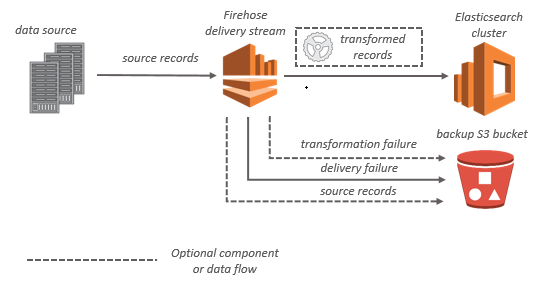
A Firehose Stream is at the centre of this service, with producers sending data to it (up to 1 MB per record). Data is BUFFERED and sent once the Buffer Size or the Buffer Interval is reached.
You can also configure Amazon Data Firehose to transform your data before delivering it and keep ORIGINAL data in a separate bucket along with FAILURES. The buffer size when transformation using Lambda is 1 MB, it can be adjusted but remember that Lambda max payload size for incoming requests in synchronous mode is 6 MB.
Buffering
Amazon Data Firehose buffers incoming streaming data in memory to a certain size (buffering size) and for a certain period of time (buffering interval) before delivering it to the specified destinations. You can configure the buffering size and the buffer interval while creating new delivery streams or update the buffering size and the buffering interval on your existing delivery streams. The values for Buffering Size and Buffering Interval depend on the destination.
Buffer Max Size: 128 MB
Buffer Max Interval 900s
For most destinations the defaults are 5 MB and 300s.
Kinesis Data Streams Vs. Amazon Data Firehose
Kinesis Data Streams |
Amazon Data Firehose |
|
Purpose |
Low latency streaming for large scale ingestion |
Data transfer service to load streaming data to S3, Redshift, OpenSearch, Splunk + third-party tools |
Provisioning |
Managed but requires planning for shards configuration in provisioned mode |
Fully managed |
Real-time |
yes |
near |
Replay |
yes |
no |