RDS
Show slides
RDS is not a Database as a Service (DBaaS), you don’t pay for a database.
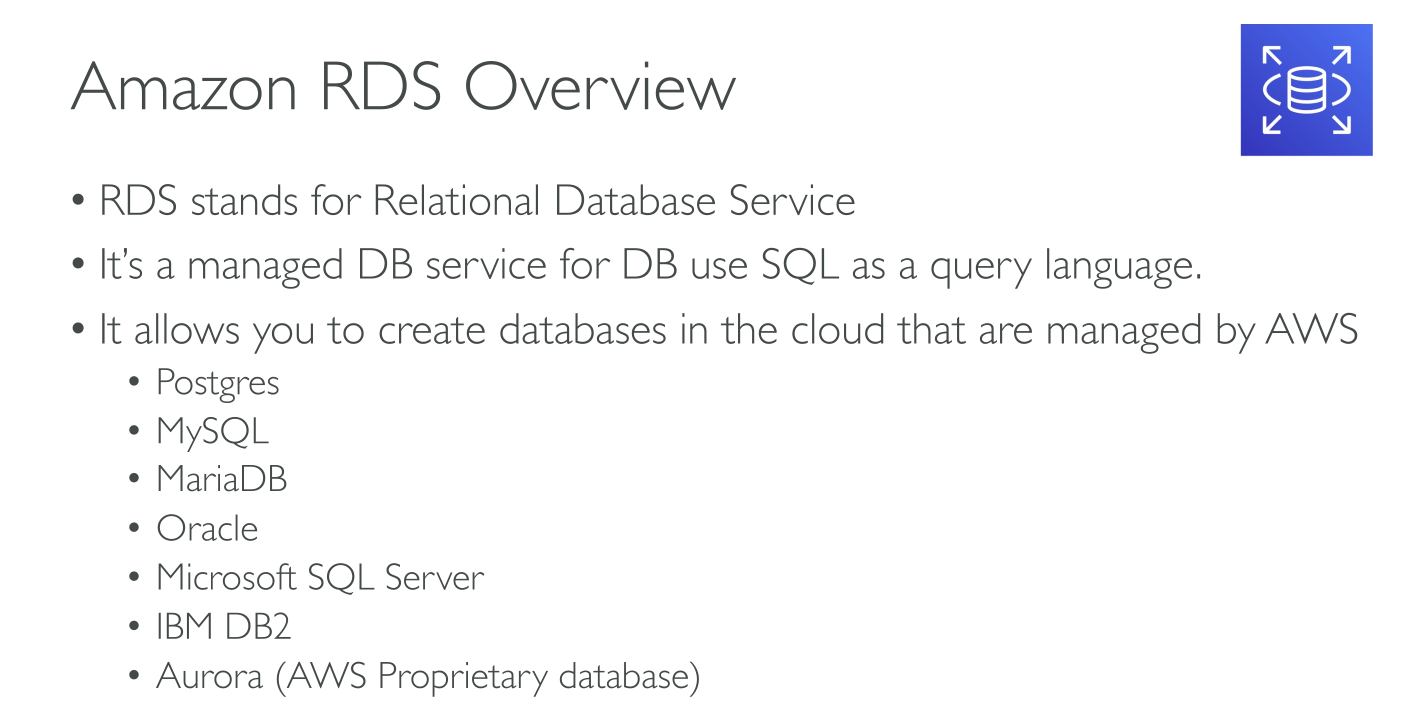
RDS is actually a Database Server as a Service (DBSaaS), because a database server is what you get and you can have multiple databases on that server.
Supported engines:
-
MySQL
-
MariaDB
-
PostgreSQL
-
Oracle
-
Microsoft SQL Server
-
IBM Db2
-
Aurora
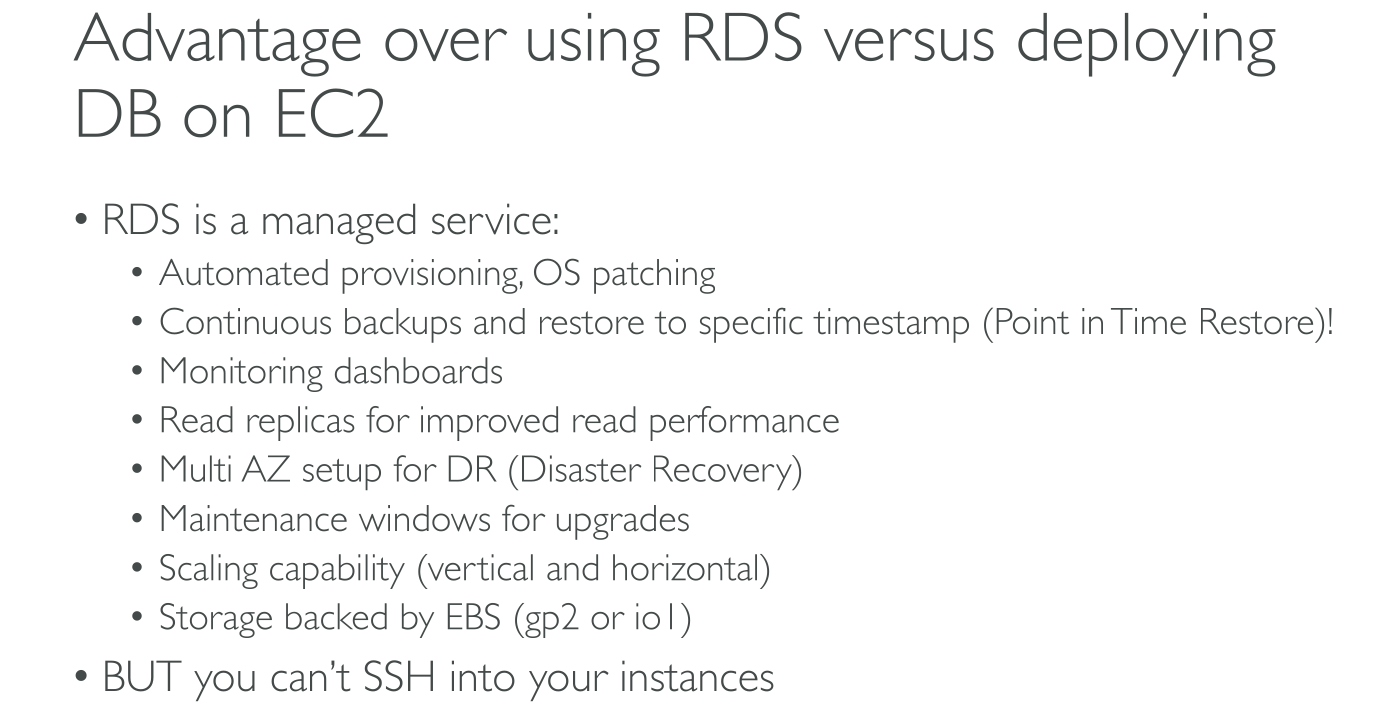
Advantages over on-prem/EC2:
-
RDS manages:
-
backups
-
Monitoring dashboards
-
software patching
-
automatic failure detection and recovery
-
-
You can turn on automated backups, or manually create your own backup snapshots. You can use these backups to restore (Point-In-Time restore) a database. The Amazon RDS restore process works reliably and efficiently.
-
You can get high availability with a primary instance and a synchronous secondary instance that you can fail over to when problems occur. You can also use read replicas to increase read scaling.
-
You can use AWS Identity and Access Management (IAM) to define users and permissions. You can also help protect your databases by putting them in a virtual private cloud (VPC).
|
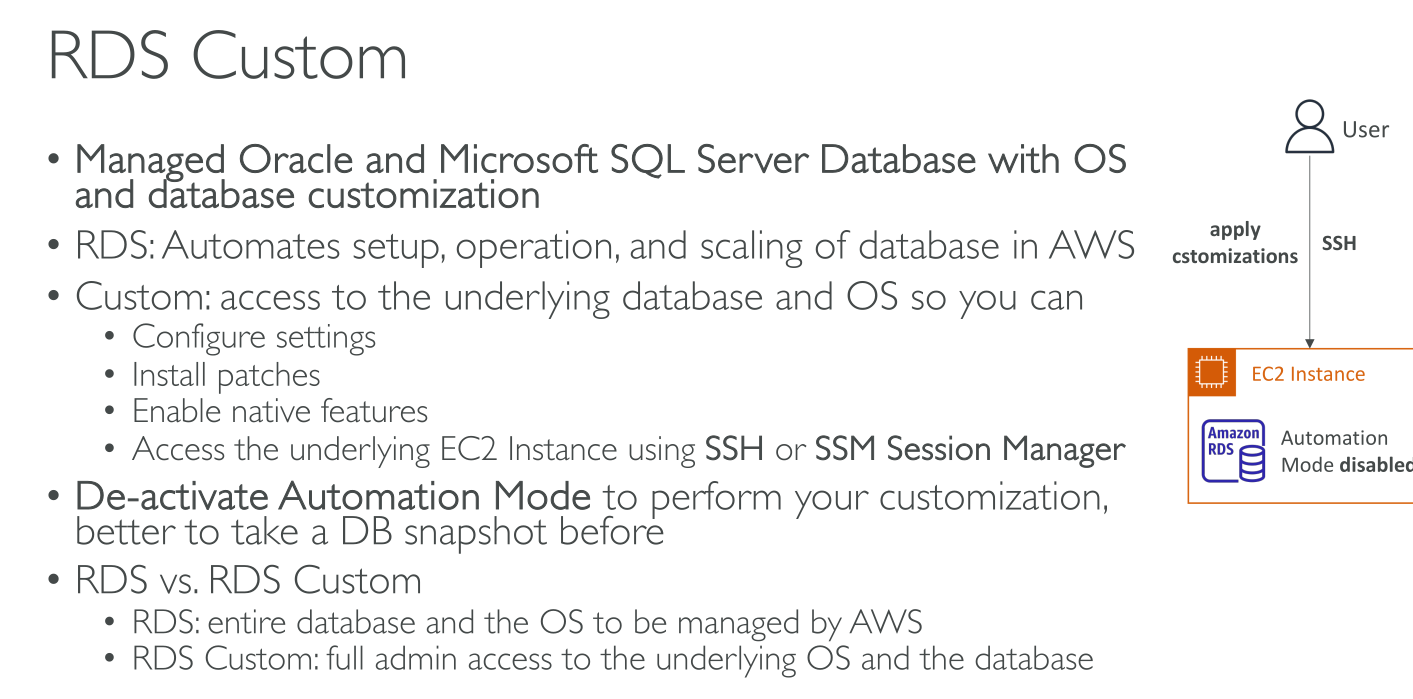
Amazon RDS Custom for Oracle and Microsoft SQL Server: Amazon RDS Custom is an RDS management type that gives you full access to your database and operating system using SSH, RDP ans Session Manager for connecting.
As opposed to normal RDS, instances run inside the AWS account! While when using the former you’re not able to see EC2 instances running. Also EBS volumes and backups are visible inside the account with RDS Custom. |
Database Instance Classes
-
General purpose: db.m[3-7][gi]* (Ex. db.m6g, db.m5, db.m6i)
-
Memory optimized: db.[x-z][1-2][gdi]* (Ex. db.x2g, db.z1d, db.x1)
-
Compute optimized: db.c6gd
-
Burstable-performance: db.t4g …
-
Optimized reads: db.r6gd, db.r6id
Storage
You can create Db2, MySQL, MariaDB, Oracle, and PostgreSQL RDS DB instances with up to 64 tebibytes (TiB) of storage. You can create SQL Server RDS DB instances with up to 16 TiB of storage. For this amount of storage, use the Provisioned IOPS SSD and General Purpose SSD storage types. RDS for Db2 only supports the gp3 General Purpose SSD storage type and the Provisioned IOPS SSD storage type
-
General Purpose (SSD):
-
gp3: you can customize storage performance independently of storage capacity. Storage performance is the combination of I/O operations per second (IOPS) and how fast the storage volume can perform reads and writes (storage throughput). On gp3 storage volumes, Amazon RDS provides a baseline storage performance of 3000 IOPS and 125 MiB/s. For every RDS DB engine except RDS for SQL Server, when the storage size for gp3 volumes reaches a certain threshold, the baseline storage performance increases to 12,000 IOPS and 500 MiB/s. This is because of volume striping, where the storage uses four volumes instead of one. RDS for SQL Server doesn’t support volume striping, and therefore doesn’t have a threshold value.
-
gp2: When your applications don’t need high storage performance, you can use General Purpose SSD gp2 storage. Baseline I/O performance for gp2 storage is 3 IOPS for each GiB, with a minimum of 100 IOPS. Individual gp2 volumes below 1,000 GiB in size also have the ability to burst to 3,000 IOPS for extended periods of time.
-
-
Provisioned IOPS (PIOPS):
-
io2 Block Express: to achieve up to 256,000 I/O operations per second (IOPS). The throughput of io2 Block Express volumes varies based on the amount of IOPS provisioned per volume (size-indipendent) and on the size of the IO operations being run.
-
The ratio of IOPS to allocated storage (in GiB) must be not more than 1000:1. For DB instances not based on the AWS Nitro System, the ratio is 500:1.
-
-
io1: up to 256,000 I/O operations per second (IOPS). The throughput of io1 volumes varies based on the amount of IOPS provisioned per volume (size-indipendent) and on the size of the IO operations being executed.
-
The ratio of IOPS to allocated storage* (in GiB) must be from 1–50 on RDS for SQL Server, and 0.5–50 on other RDS DB engines.
-
-
-
Magnetic:
-
No scaling with Microsoft SQL Server
-
No conversion to other storage types with Microsoft SQL Server
-
No storage autoscaling
-
No support for Elastic volumes
-
Max 3TiB, 1000 IOPS
-
Increasing DB instance storage capacity
|
Scaling storage for Amazon RDS for Microsoft SQL Server DB instances is supported only for General Purpose SSD or Provisioned IOPS SSD storage types. |
You can’t make further storage modifications for either six (6) hours or until storage optimization has completed on the instance, whichever is longer.
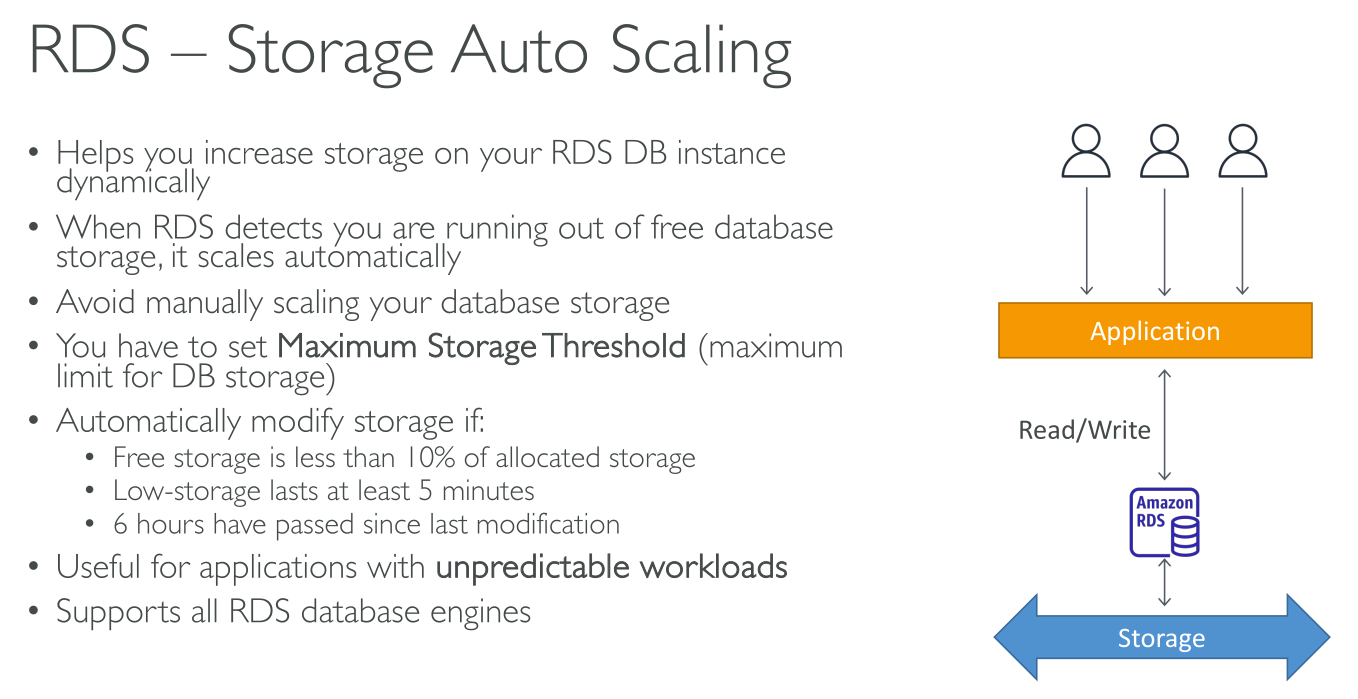
DB Storage Autoscaling
For all DB engines.
Automatic storage scaling when:
-
Free available space is <= to 10%
-
Low-storage condition persists for 5 minutes
-
> 6 hours have passed since the last storage optimization or the instance is not in "storage-optimization" status
How much (whichever is greater):
-
10 GiB
-
10% of the currently allocated space
-
Predicted storage growth exceeding the current allocated storage size in the next 7 hours based on the FreeStorageSpace metrics from the past hour
The maximum storage threshold is the limit that you set for autoscaling the DB instance:
-
You must set the maximum storage threshold to at least 10% more than the current allocated storage. We recommend setting it to at least 26% more to avoid receiving an event notification that the storage size is approaching the maximum storage threshold.
-
For a DB instance that uses Provisioned IOPS (io1 or io2 Block Express) storage, the ratio of IOPS to maximum storage threshold (in GiB) must be within a certain range.
-
You can’t set the maximum storage threshold for autoscaling-enabled instances to a value greater than the maximum allocated storage for the database engine and DB instance class.
Read replicas
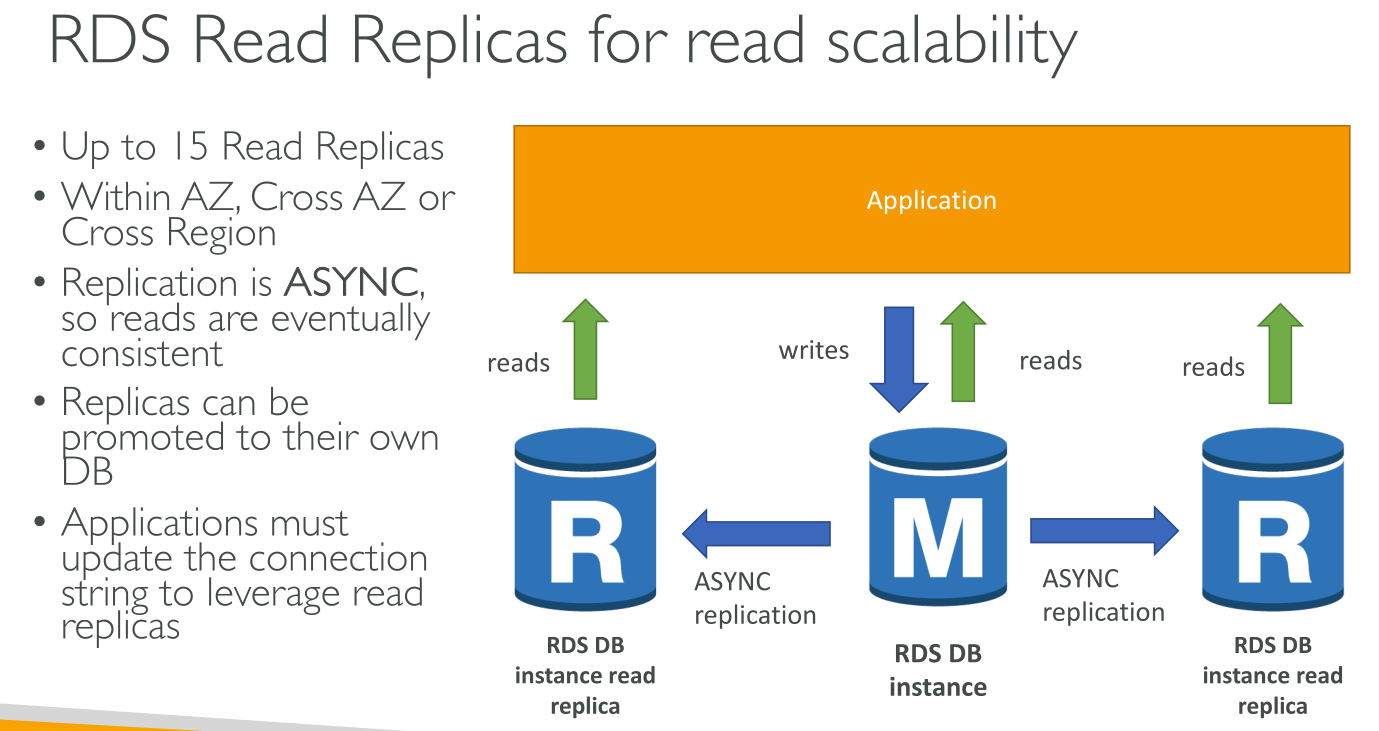
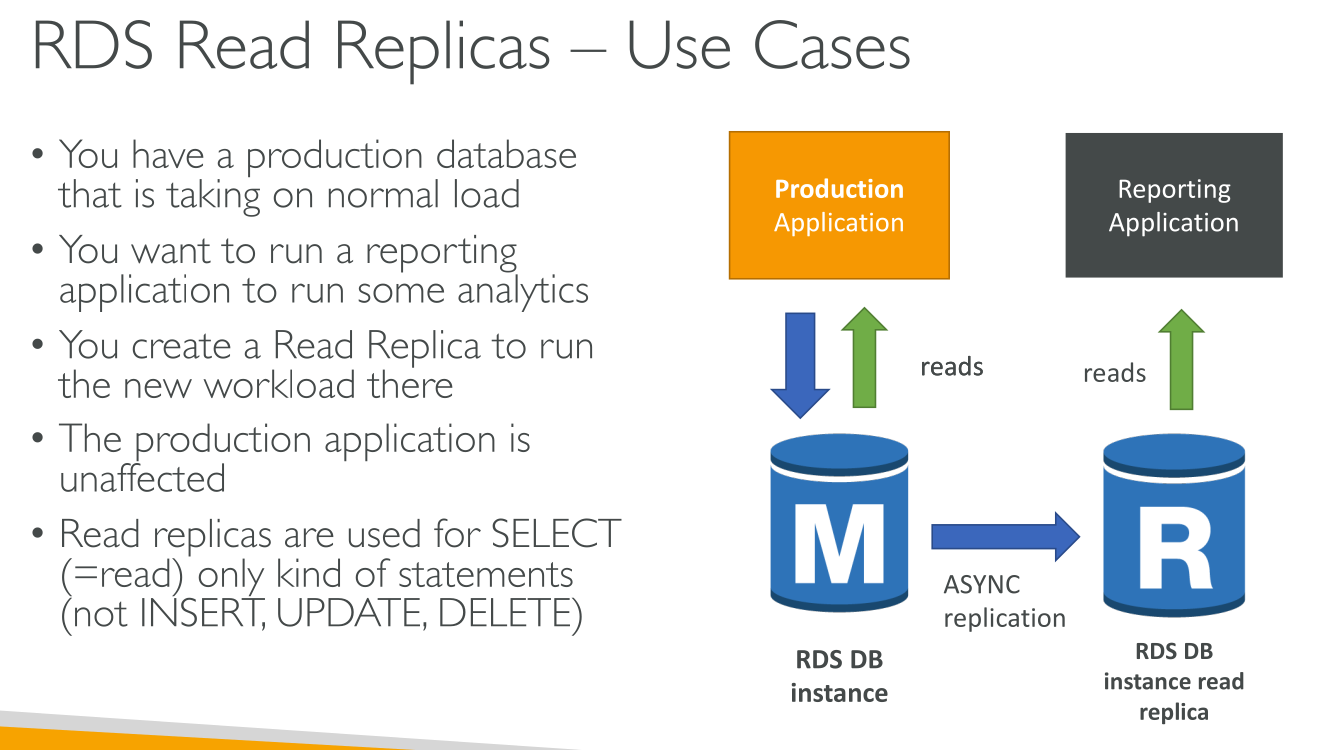
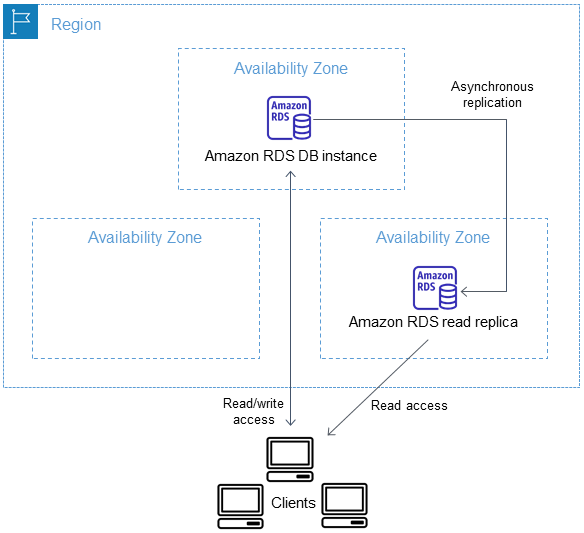
A read replica is a read-only copy of a DB instance. You can reduce the load on your primary DB instance by routing queries from your applications to the read replica. After you create a read replica from a source DB instance, the source becomes the primary DB instance. When you make updates to the primary DB instance, Amazon RDS copies them asynchronously (!) (Reads are EVENTUALLY consistent) to the read replica.
Replicas can be promoted as new main instance in the group or to a new own instance outside the group.
Applications must update their connection string to include the read replicas! They’ll have one endpoint for writing to the main instance and one to read from the read replicas.
You can create up to 5 read-replicas per primary instance.
You can also create a read replica of read replicas, but replication lag from the primary instance to the 2nd generation replicas may start to be consistent.
RPO/RTO:
-
Read replicas offer near 0 RPO as long as data is not corrupted.
-
Read replicas offer near 0 RTO as long as data is not corrupted, only in case of failure:
-
Promoting a read replica to a primary instance takes little time.
-
In case of data corruption they’re most likely to contain corrupted data.
-
Read replicas use cases
-
Scaling beyond the compute or I/O capacity of a single DB instance for read-heavy database workloads.
-
Serving read traffic while the source DB instance is unavailable. In some cases, your source DB instance might not be able to take I/O requests, for example due to I/O suspension for backups or scheduled maintenance. In these cases, you can direct read traffic to your read replicas.
-
Business reporting or data warehousing scenarios where you might want business reporting queries to run against a read replica, rather than your production DB instance.
-
Implementing disaster recovery. You can promote a read replica to a standalone instance as a disaster recovery solution if the primary DB instance fails.
How replicas work
Amazon RDS takes a snapshot of the source instance and creates a read-only instance from the snapshot. Amazon RDS then uses the asynchronous replication method for the DB engine to update the read replica whenever there is a change to the primary DB instance.
The read replica operates as a DB instance that allows only read-only connections.
|
An exception is the RDS for Oracle DB engine, which supports replica databases in mounted mode. A mounted replica doesn’t accept user connections and so can’t serve a read-only workload. The primary use for mounted replicas is cross-Region disaster recovery. |
Read replicas in Multi-AZ
You can configure a read replica for a DB instance that also has a standby replica configured for high availability in a Multi-AZ deployment. Replication with the standby replica is synchronous. Unlike a read replica, a standby replica can’t serve read traffic.
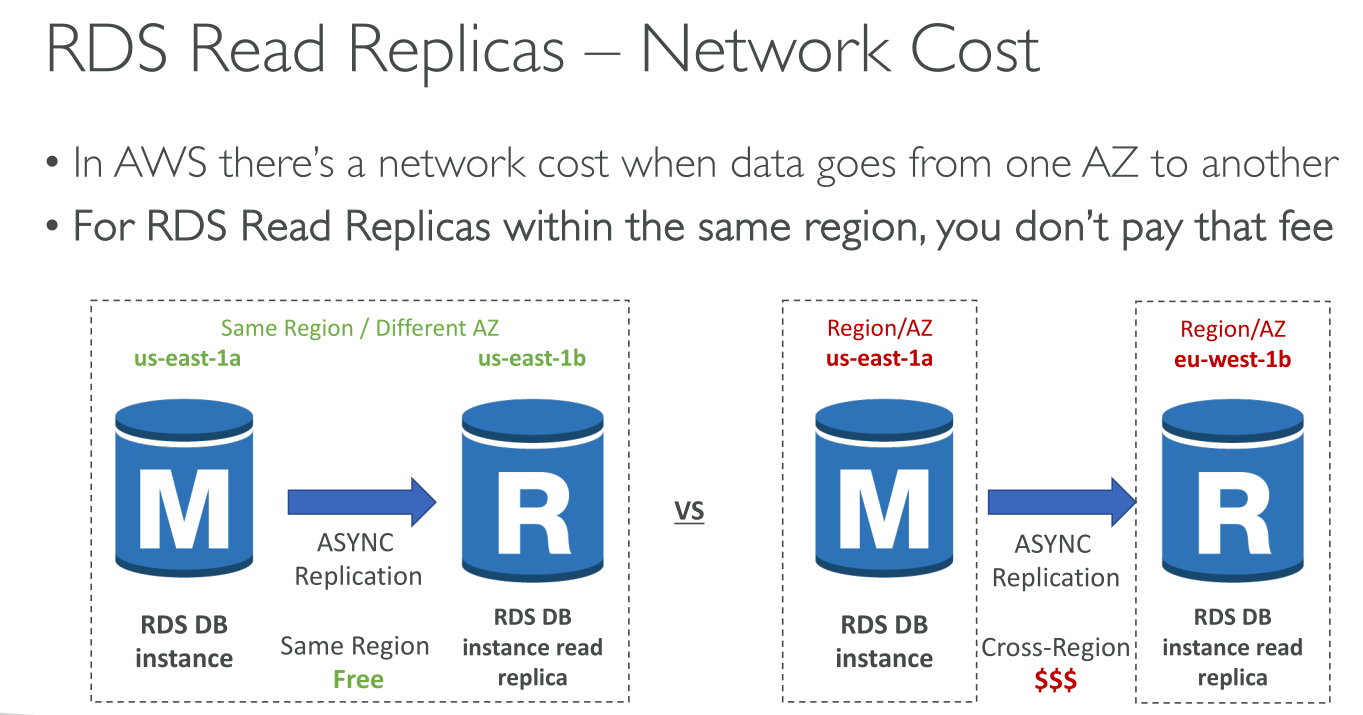
Traffic flows among AZs at no cost within a region. There usually is a fee for this.
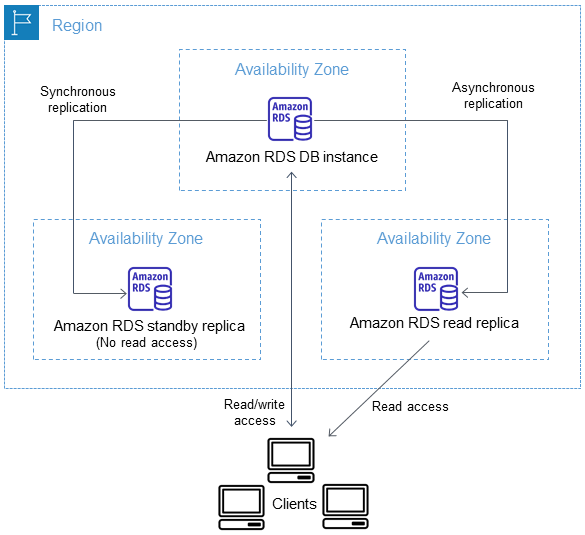
Read replicas cross-region
Amazon RDS establishes any AWS security configurations needed to enable the secure channel, such as adding security group entries and enforces encryption in transit.
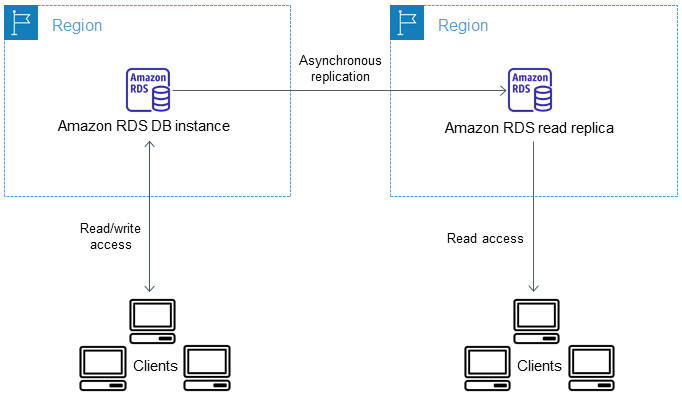
The data transferred for cross-Region replication incurs Amazon RDS data transfer charges. These cross-Region replication actions generate charges for the data transferred out of the source AWS Region:
-
When you create a read replica, Amazon RDS takes a snapshot of the source instance and transfers the snapshot to the read replica AWS Region.
-
For each data modification made in the source databases, Amazon RDS transfers data from the source AWS Region to the read replica AWS Region.
Promoting a read replica to be a standalone DB instance
If a source DB instance has several read replicas, promoting one of the read replicas to a DB instance has no effect on the other replicas. When you promote a read replica, RDS reboots the DB instance before making it available.
Use cases
-
Implementing failure recovery. If you are aware of the ramifications and limitations of asynchronous replication and you still want to use read replica promotion for data recovery, you can:
-
Promote the read replica.
-
Direct database traffic to the promoted DB instance.
-
Create a replacement read replica with the promoted DB instance as its source.
-
-
Upgrading storage configuration. If your source DB instance isn’t on the preferred storage configuration, you can create a read replica of the instance and upgrade the storage file system configuration. This option migrates the file system of the read replica to the preferred configuration. You can then promote the read replica to a standalone instance (This option is only available if your source DB instance is not on the latest storage configuration, or if you’re modifying the DB instance class within the same request).
-
Sharding. You can create read replicas corresponding to each of your shards (smaller databases) and promote them when you decide to convert them into standalone shards.
-
Performing DDL operations (MySQL, MariaDB). DDL operations, such as creating or rebuilding indexes, can take time and impose a significant performance penalty on your DB instance. You can perform these operations on a MySQL or MariaDB read replica once the read replica is in sync with its primary DB instance. Then you can promote the read replica and direct your applications to use the promoted instance.
Multi-AZ
-
When the deployment has one standby DB instance, it’s called a Multi-AZ DB INSTANCE deployment. A Multi-AZ DB instance deployment has one standby DB instance that provides failover support, but doesn’t serve read traffic.
-
When the deployment has two standby DB instances, it’s called a Multi-AZ DB CLUSTER deployment. A Multi-AZ DB cluster deployment has standby DB instances that provide failover support and can also serve read traffic.
It’s possible to combine read replicas and multi-az for disaster recovery.
Turning on Multi-AZ
Upon enabling Multi-AZ you can choose to enable it immediately or in the next maintenance window
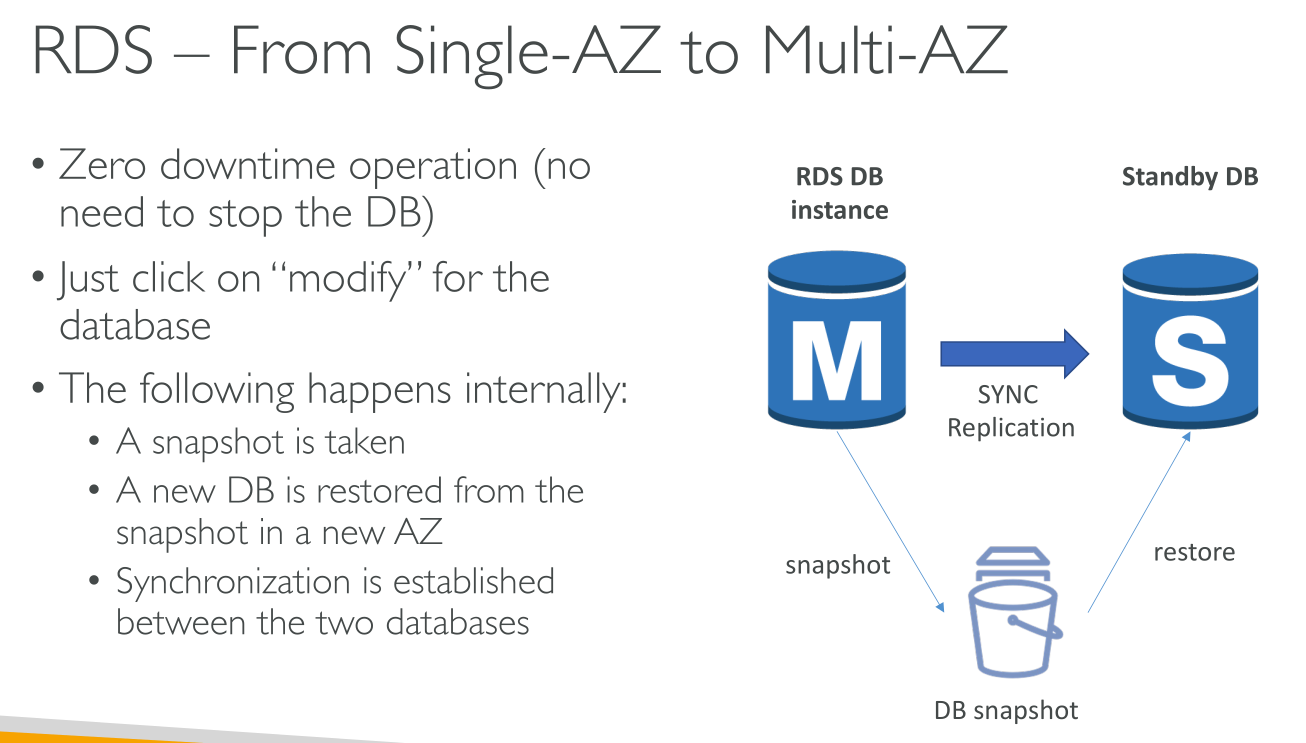
Switching to Multi-AZ is a zero-downtime operation, it can be done modifying the DB. What happens is:
-
A snapshot is created
-
A new Stand-by replica is restored from the snapshot
-
Synchronization
Multi-AZ Instance Deployment
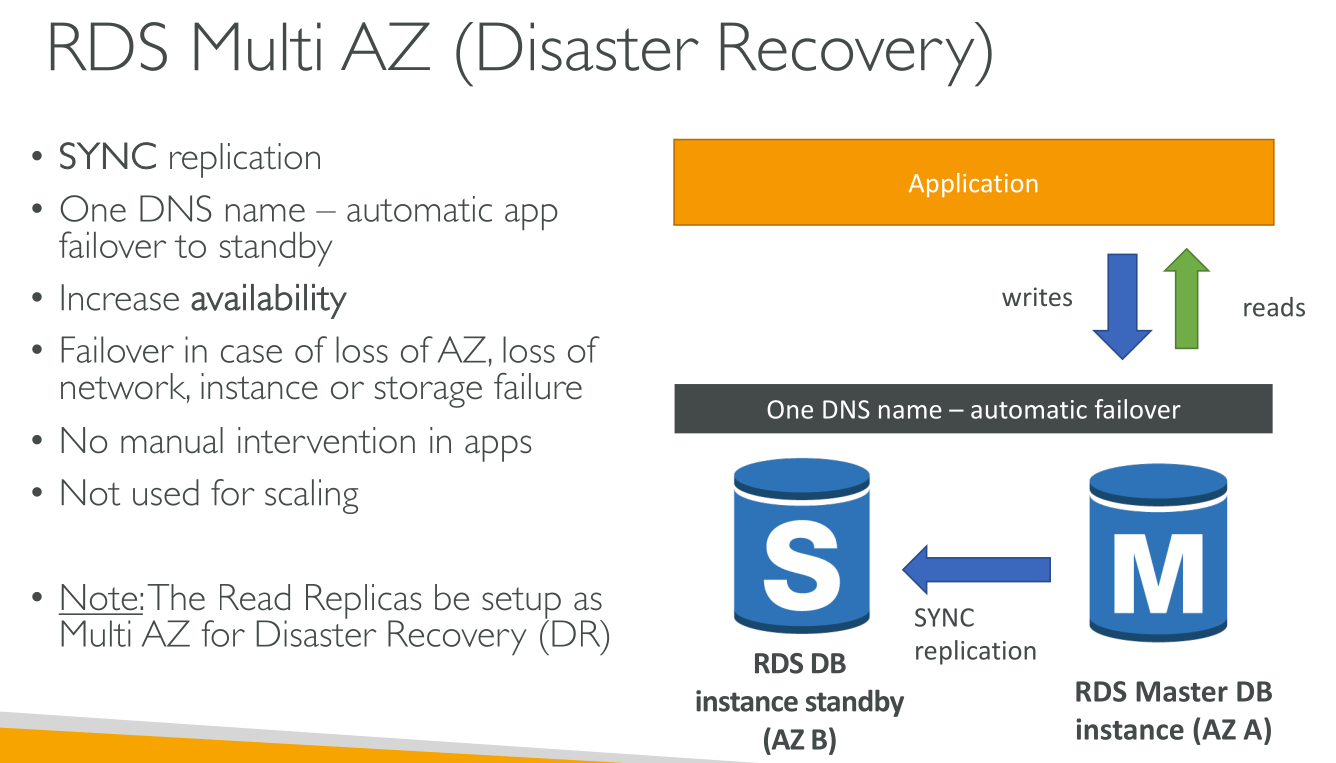
The primary DB instance is synchronously (!) replicated across Availability Zones to one standby replica to provide data redundancy and minimize latency spikes during system backup. Running a DB instance with high availability can enhance availability during planned system maintenance. It can also help protect your databases against DB instance failure and Availability Zone disruption.
Multi-AZ instance deployment only includes ONE stand-by replica.
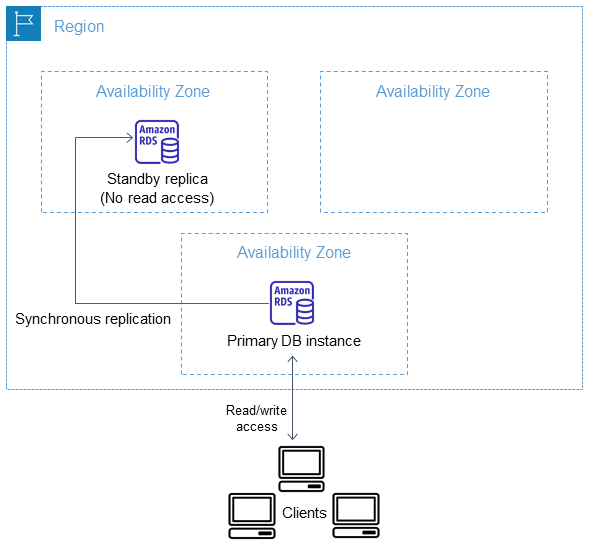
You get one CNAME record that points to the primary instance.
At no time you can use the stand-by replica, whose purpose is failover. You can, though, make backups from the stand-by replica. This does not load the primary instance. Backups are stored in S3, and therefore region resilient.
|
The high availability option isn’t a scaling solution for read-only scenarios. You can’t use a standby replica to serve read traffic. To serve read-only traffic, use a Multi-AZ DB cluster or a read replica instead. |
|
DB instances using Multi-AZ DB instance deployments can have increased write and commit latency compared to a Single-AZ deployment. This can happen because of the synchronous data replication that occurs. |
Upon enabling Multi-AZ:
-
snapshot of the primary DB instance’s Amazon Elastic Block Store (EBS) volumes.
-
new volumes for the standby replica from the snapshot. These volumes initialize in the background, and maximum volume performance is achieved after the data is fully initialized.
-
Turns on synchronous block-level replication between the volumes of the primary and standby replicas.
|
Using a snapshot to create the standby instance avoids downtime when you convert from Single-AZ to Multi-AZ, but you can experience a performance impact during and after converting to Multi-AZ. This impact can be significant for workloads that are sensitive to write latency. To avoid the performance impact on the DB instance currently serving the sensitive workload, create a read replica and enable backups on the read replica. Convert the read replica to Multi-AZ, and run queries that load the data into the read replica’s volumes (on both AZs). Then promote the read replica to be the primary DB instance. |
Failover
If a planned or unplanned outage of your DB instance results from an infrastructure defect, Amazon RDS automatically switches to a standby replica in another Availability Zone if you have turned on Multi-AZ. It takes 60-120 seconds.
The failover mechanism automatically changes the Domain Name System (DNS) record of the DB instance to point to the standby DB instance. As a result, you need to re-establish any existing connections to your DB instance. In a Java virtual machine (JVM) environment, due to how the Java DNS caching mechanism works, you might need to reconfigure JVM settings. In general, you should remove DNS caching inside your application.
Multi-AZ Cluster Deployment
A Multi-AZ DB cluster deployment is a semisynchronous (! | It means that data is considered committed when one of the two read replicas receive and stores it), high availability deployment mode of Amazon RDS with two readable replica DB instances. A Multi-AZ DB cluster has a writer DB instance and two reader DB instances in three separate Availability Zones in the same AWS Region. Multi-AZ DB clusters provide high availability, increased capacity for read workloads, and lower write latency when compared to Multi-AZ DB instance deployments.
If you need more than 2 readers you need to use Aurora.
Cluster deployment for Multi-AZ is NOT just for failover. It combines Multi-AZ Instance deployment with Read Replicas.
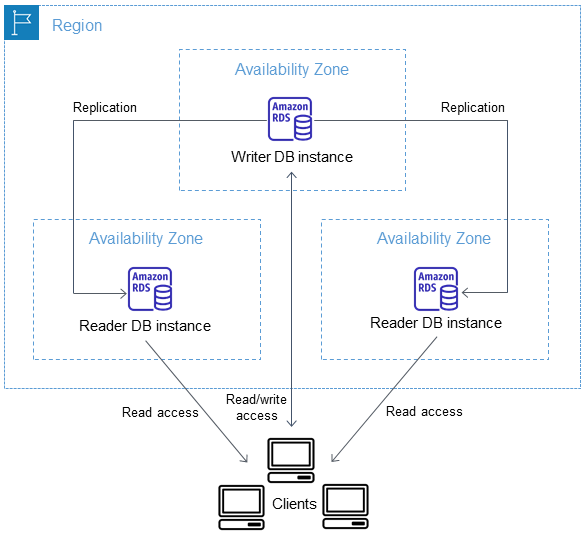
instance classes: db.m5d, db.m6gd, db.m6id, db.m6idn, db.r5d, db.r6gd, db.x2iedn, db.r6id, and db.r6idn, and db.c6gd.
Cluster deployment runs on a much faster hardware. It leverages Graviton CPUs and local NVME storage. Data is first written to local high speed storage and then flushed to EBS. You get the speed of local storage on NVME and the resilience of EBS.
Differently than Aurora, each instance in the cluster still has its own local storage.
Replication in cluster mode happens using a transaction log, which is more efficient.
Failover happens in ~35 seconds + the time it takes to reconcile using the transaction log.
Multi-AZ Cluster Endpoints
-
Cluster Endpoint (Writer Endpoint): the only one that can perform write operations such as DDL and DML statements. This endpoint can also perform read operations. Ex.
mydbcluster.cluster-123456789012.us-east-1.rds.amazonaws.com -
Reader Endpoint: provides support for read-only connections to the DB cluster. Each Multi-AZ DB cluster has one reader endpoint. The reader endpoint sends each connection request to one of the reader DB instances. Ex.
mydbcluster.cluster-ro-123456789012.us-east-1.rds.amazonaws.com -
Instance Endpoint: connects to a specific DB instance within a Multi-AZ DB cluster. there is one instance endpoint for each of the reader DB instances in the DB cluster. Ex.
mydbinstance.123456789012.us-east-1.rds.amazonaws.com. Not recommended for usage, only for testing and fault finding.
Having a dedicated endpoint for reading that doesn’t include the write instance means you can scale reads without loading the write instance.
Blue/Green Deployments for RDS
A blue/green deployment copies a production database environment to a separate, synchronized staging environment. By using Amazon RDS Blue/Green Deployments, you can make changes to the database in the staging environment without affecting the production environment. For example, you can upgrade the major or minor DB engine version, change database parameters, or make schema changes in the staging environment. When you’re ready, you can promote the staging environment to be the new production database environment, with downtime typically under one minute.
Upgrading a DB instance engine version
When Amazon RDS supports a new version of a database engine, you can choose how and when to upgrade your database DB instances.
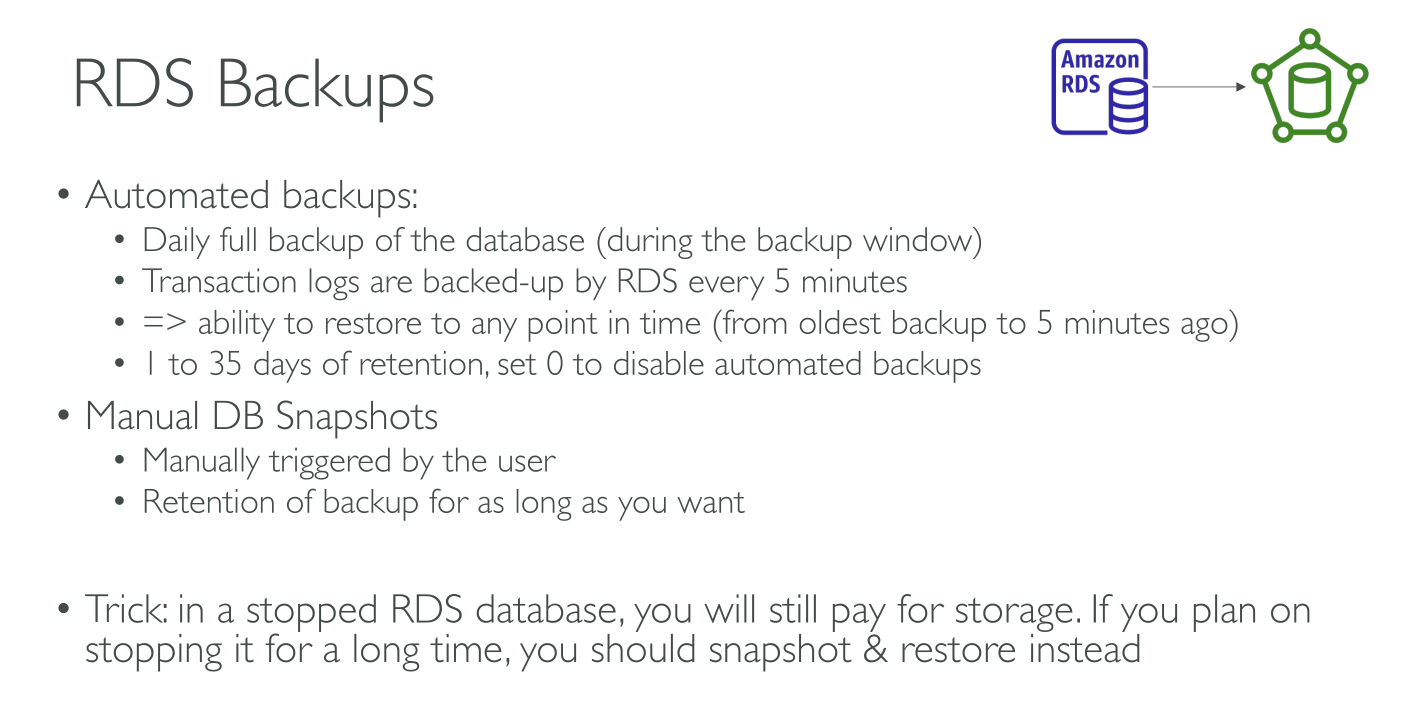
Automated Backups and Snapshots
They’re both stored on S3 so data gains region resilience.
However, associated buckets are NOT visible in the account, backups can only be restored.
Snapshots and backups are taken from the stand-by instance when it’s available, so despite the I/O pause they cause in the machines, data access is unaffected. It is if no stand-by replica is available and the backup/snapshot is taken from the primary instance.
Both snapshots and automated backups are taken at the instance volume level, including all databases in it.
They’re incremental with the exception, of course, of the first full snapshot/backup.
The first full snapshot can take long with the subsequent ones being quicker. An exception to this are instances with a lot of changes.
Cross-region replication: For added disaster recovery capability, you can configure your Amazon RDS database instance to replicate snapshots/backups and transaction logs to a destination AWS Region of your choice. DB snapshot copy charges apply to the data transfer. After the DB snapshot is copied, standard charges apply to storage in the destination Region. This has to be explicitly enabled within the automated backups. You will also be paying for S3 in the source and destination region.
Automated Backups
Amazon RDS creates and saves automated backups of your DB instance or Multi-AZ DB cluster during the daily backup window of your DB instance.
Transaction logs are backed up every 5 minutes. Point-In-Time restore can happen up to the last 5 minutes within the retention period.
|
When you delete an instance you can choose to retain its backups but they will STILL EXPIRE based on the retention period! If you want to retain data for longer create a final snapshot before deleting the instance. |
Backup window: During the automatic backup window, storage I/O might be suspended briefly while the backup process initializes (typically under a few seconds). You might experience elevated latencies for a few minutes during backups for Multi-AZ Instance Deployments or single instance DBs.
Retention period: You can set the backup retention period of a DB instance to between 0 and 35 days. Setting it to 0 disables automated backups. Setting a retention period of 35 days means you have 5 minutes granularity overe the past 35 days.
Snapshots
They’re manual and performed against an instance.
They don’t expire, even after deleting the instance you’ll have them available. So they retention is unlimited.
Restoring a backup
-
You can restore an RDS backup/snapshot into a new database
-
You can restore a MySQL database from S3.
When you restore a backup a new RDS instance is created with a new endpoint. So you need to update the application.
RPO in restoring:
-
Snapshots: Data from the last snapshot to the failure is lost. May result in suboptimal RPO.
-
Automated backups: thanks to saving transactions logs every 5 minutes, the RPO should be < 5 min. What happens is that the last snapshot in the backup sequence is restored (~24h before failure in bad luck, backups are daily and are performed in the backup window) and then all the transaction logs are replayed up to, at worst, 5 minutes before the failure.
Restore does not happen fast, it can take a while and your RTO might not allow the time it takes.
Best practices
-
Use metrics to monitor your memory, CPU, replica lag, and storage usage.
-
Enable automatic backups and set the backup window to occur during the daily low in write IOPS.
-
If your client application is caching the Domain Name Service (DNS) data of your DB instances, set a time-to-live (TTL) value of less than 30 seconds. The underlying IP address of a DB instance can change after a failover. Caching the DNS data for an extended time can thus lead to connection failures. Your application might try to connect to an IP address that’s no longer in service.
-
Allocate enough RAM so that your working set resides almost completely in memory. The working set is the data and indexes that are frequently in use on your instance.
-
Tune your queries.
Billing
You costs depend on:
-
Instance type and size
-
Multi-AZ being enabled or not
-
Storage type and amount
-
Data transferred to the internet
-
Backups and snapshots: You get as much free backup and snapshots storage as your data in GB. Beyond that, the chosen storage pricing applies.
-
Licensing for certain DB engines
For On demand: While your DB instance is stopped, you’re charged for provisioned storage, including Provisioned IOPS. You are also charged for backup storage, including storage for manual snapshots and automated backups within your specified retention window. You aren’t charged for DB instance hours.
Security
-
TLS/SSL in transit is an option and can be set to be mandatory on a per-user basis.
-
Encryption at rest is supported using KMS and uses EBS volume encryption and host encryption. A Data key is created by KMS and is the used by the virtualization host to encrypt data before sending it to EBS.
-
KMS uses data keys to encrypt storage, logs, snapshots and replicas.
-
Encryption can’t be disabled.
-
For MSSQL and Oracle TDE is supported
-
Oracle can leverage CloudHSM
-
Snapshots are encrypted too if encryption is enabled.
IAM User authentication
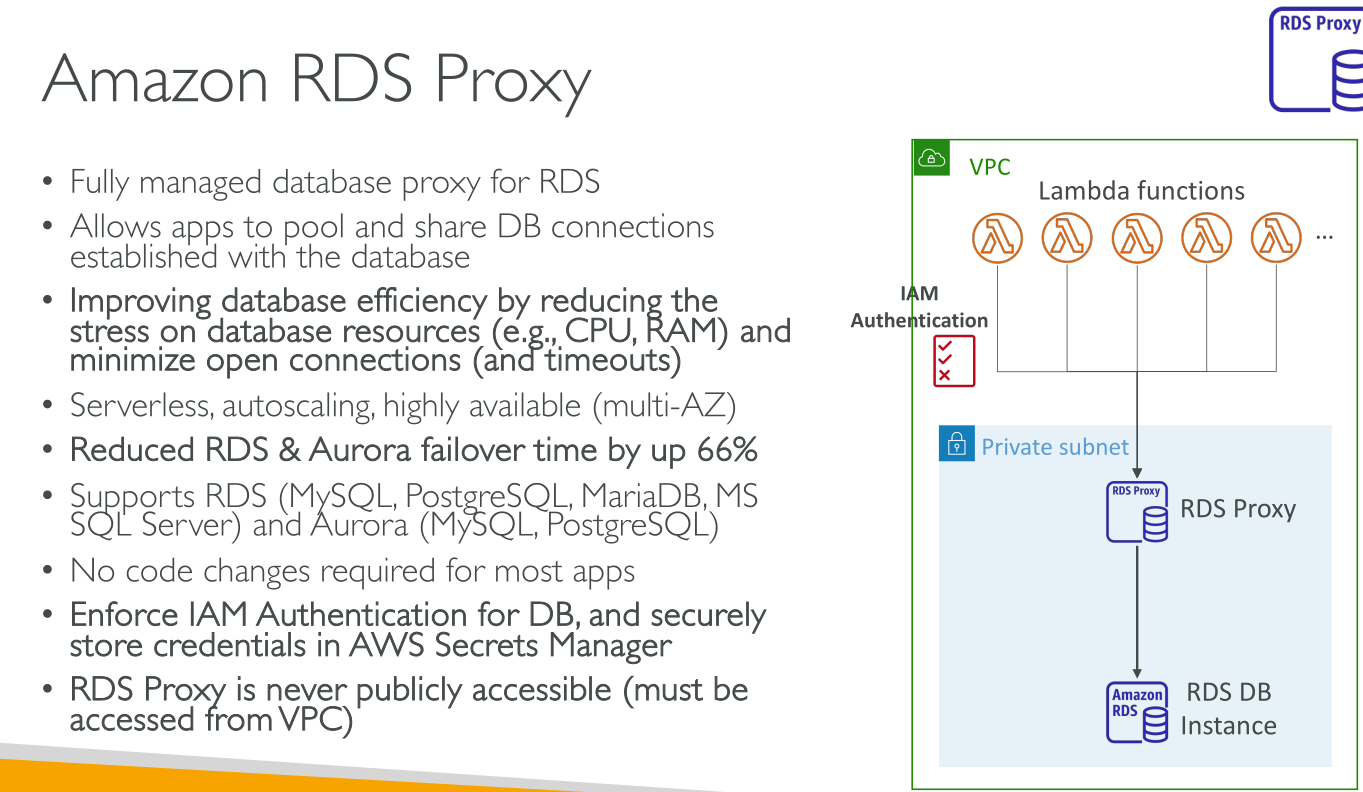
You create a local DB user account configured to use an AWS authentication token. You attach a role to the IAM user: the role contains a mapping between the IAM User and the database user. Upon assuming the role a 15 minutes token is generated, and it can be used to log in to the database without requiring a password.
This just covers for AUTHENTICATION; permissions inside the database are handled by the DB engine and must be configured inside it.
Example RDS Architecture
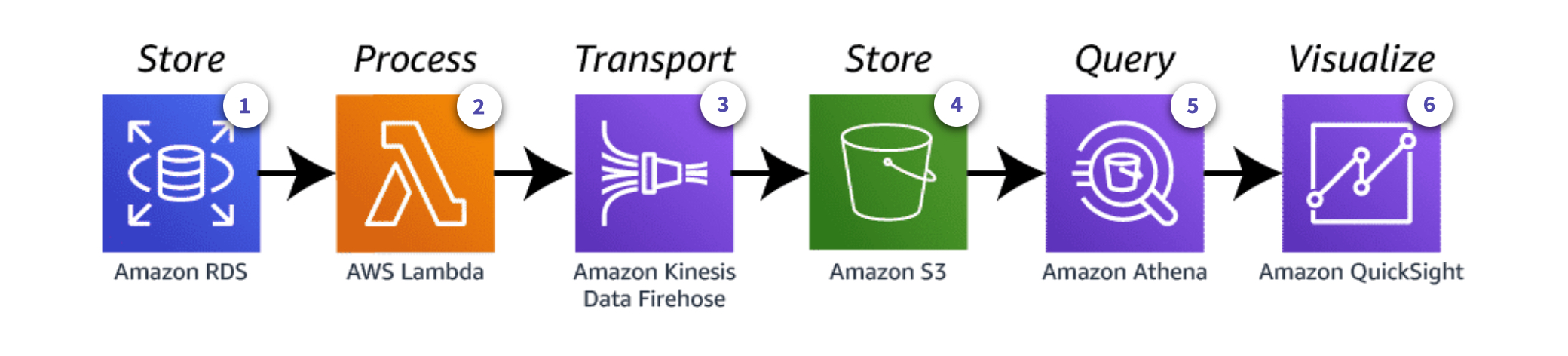
In this architecture:
-
RDS uses the
lambda_extensionfor Postgres. -
A Lambda Function is invoked, which sends newly inserted record data to Kinesis Data Firehose.
-
Kinesis Data Firehose can send data to several services, in this case S3.
-
S3 stores incoming records in a bucket
-
Athena is used to query data from the bucket
-
QuickSight visualizes the data