Lambda Functions
A compute service that lets you run code without provisioning or managing servers. You are responsible only for your code.
Each time an event occurs lambda stores the event in the event parameter of the handler function while calling it. While writing your code do not rename the handler function. The other parameter is the context:
-
event: JSON formatted document that contains data for your function to process. It contains information about the event that caused the invocation. -
context: it contains information about the event that caused the invocation. For example the logging group associated with the current function invocation.
Concepts:
-
Trigger: a resource or configuration that invokes the function. Can be another service or an event source mapping.
-
Execution environment: it is a secure and isolated runtime environment that provides the necessary resources for the function to execute. It contains the function but can also contain layers and extensions . It manages the lifecycle of the function and persists after the function returns. It survives invocations and can accomodate more than 1 of them during its lifecycle.
-
Deployment package: it can either be a .zip file or a container OCI-compliant image that contains code and dependencies. In case of a container image, all goes in the image (along with OS and runtime).
-
Runtime: provides a language-specific environment that runs in an execution environment. The runtime relays invocation events, context information, and responses between Lambda and the function. You can use runtimes that Lambda provides, or build your own.
-
Layer: a .zip file archive that can contain additional code or other content. A layer can contain libraries, a custom runtime, data, or configuration files. Using layers reduces the size of uploaded deployment archives and makes it faster to deploy your code. Layers also promote code sharing and separation of responsibilities so that you can iterate faster on writing business logic.
You can have up to 5 layers per function and they count against the deployment size quotas (50 MB upload, 250 MB uncompressed). Contents are extracted to the/optdirectory of the runtime environment. You can make layers:-
Private to the AWS account.
-
Shared with another AWS account. If shared and public layers are deleted/revoked you functions using them can still be invoked, but you can’t update their code or configuration if you don’t stop using those layers.
-
Public
-
-
Extensions: They add functionalities to you functions. They can integrate your functions with your preferred monitoring, observability, security, and governance tools. AWS provides a number of them but you can create your own.
-
Internal extensions: run in the runtime process and share the same lifecycle as the runtime. They can be added with runtime specific mechanisms like setting the
JAVA_TOOL_OPTIONSenvironment variable. -
External extensions: runs as a separate process in the execution environment. It is initialized before the function is invoked, runs in parallel with the function’s runtime, and continues to run after the function invocation is complete.
-
-
Concurrency: the number of requests that your function is serving at any given time. If an event is received while a function is still processing the previous one, then another function (within another execution environment) is provisioned. It has a default quota of 1.000 per region but can be increased up to tens of thousands. To manage concurrencty you can use:
-
Reserved concurrency
-
Provisioned concurrency
-
-
Qualifier: a version or alias for a function. The special qualifier
$Latestindicates deployed changes without a version associated yet.-
Version: Immutable snapshot of a function code, it has a numerical qualifier.
-
Alias: Pointer to a version that can be updated to point to a different version in time. An alias can be configured to split traffic between 2 versions Weighted Alias.
-
-
Destination: an AWS resource where Lambda can send events from an asynchronous invocation.
Lambda Programming Model
You tell Lambda the entry point to your function by defining a handler in the function configuration. The runtime passes in objects to the handler that contain the invocation event and the context.
When the handler finishes processing the first event, the runtime sends it another. The function’s class stays in memory, so clients and variables that are declared outside of the handler method in initialization code can be reused. To save processing time on subsequent events, create reusable resources like AWS SDK clients during initialization. Once initialized, each instance of your function can process thousands of requests.
Your function also has access to local storage in the /tmp directory. The directory content remains when the execution environment is frozen, providing a transient cache that can be used for multiple invocations. Do not relay too much on this because the runtime environment may have been recycled in the meantime.
The runtime captures logging output from your function and sends it to Amazon CloudWatch Logs so make sure to add write permissions to CloudWatch Logs if using a custom execution role. In addition, the runtime also logs entries when function invocation starts and ends. This includes a report log with the request ID, billed duration,
initialization duration, and other details.
Furthermore:
-
Incoming requests might be processed out of order or concurrently.
-
Do not rely on instances of your function being long lived, instead store your application’s state elsewhere.
-
Use local storage and class-level objects to increase performance, but keep to a minimum the size of your deployment package and the amount of data that you transfer onto the execution environment.
Lambda Execution Environment
The function’s runtime communicates with Lambda using the Runtime API. Extensions communicate with Lambda using the Extensions API. Extensions can also receive log messages and other telemetry from the function by using the Telemetry API.
The function’s runtime and each external extension are processes that run within the execution environment. Permissions, resources, credentials, and environment variables are shared between the function and the extensions.
The execution environment has a longer lifetime than functions: it hosts them but keeps up the context, like extensions, layers, storage and environment variables waiting for the next invocation. If too much time passes without a function invocation it is frozen by the lambda service.
|
When writing your Lambda function code, treat the execution environment as stateless, assuming that it only exists for a single invocation. Lambda terminates execution environments every few hours to allow for runtime updates and maintenance — even for functions that are invoked continuously. Initialize any required state (for example, fetching a shopping cart from an Amazon DynamoDB table) when your function starts. Before exiting, commit permanent data changes to durable stores. |
Each runtime environment only runs ONE FUNCTION AT A TIME! There’s NO CONCURRENCY WITHIN the execution environment!
Execution Environment Lifecycle

Each phase starts with an event that Lambda sends to the runtime and to all registered extensions. The runtime and each extension indicate completion by sending a Next API request. Lambda freezes the execution environment when the runtime and each extension have completed and there are no pending events.
Phases:
-
Init phase: limited to 10s
-
Start all extensions (Extension init)
-
Bootstrap the runtime (Runtime init)
-
Run the function’s static code (Function init)
-
Run any beforeCheckpoint runtime hooks (Lambda SnapStart only)
-
-
Invoke phase (on event): limited to the duration of the function timeout. The default timeout is 3s but it can be extended to up to 900s (15 mins).
-
Shutdown phase: capped at 2 seconds or SIGKILL.
Lambda Functinos States
-
Pending: After Lambda creates the function.
-
Active: the only state that allows successful invocations of functions.
-
Inactive: A function becomes inactive when it has been idle long enough for Lambda to reclaim the external resources that were configured for it. When you try to invoke a function that is inactive, the invocation fails and Lambda sets the function to pending state until the function resources are recreated.
|
If you are using SDK-based automation workflows or calling Lambda’s service APIs directly, ensure that you check a function’s state before invocation to verify that it is active. |
Lambda recursive loop detection
When you configure a Lambda function to output to the same service or resource that invokes the function, it’s possible to create an infinite recursive loop.
Lambda can detect certain types of recursive loops shortly after they occur. When Lambda detects a recursive loop, it stops your function being invoked and notifies you.
Deploying Packages
For Zip file archives and layers there’s a hard limit of 50 MB in size in the upload phase, if your package is bigger upload code and dependencies to an S3 Bucket.
IaC for deploying code:
-
CloudFormation
-
AWS Serverless Application Model (SAM) CLI
Container Images
Upload to ECR == function invocation =⇒ run.
There are three ways to write a container image for Lambda:
-
Using a AWS base image for lambda: they provide a runtime, a runtime interface client and a runtime interface emulator (for local testing).
FROM public.ecr.aws/lambda/python:3.12-
Using an AWS OS-only base image, those contain an Amazon Linux distribution and the runtime interface emulator (for compiled languages or custom runtimes).
-
Using a non AWS base image: you must include a runtime interface client for your language in the image. Multi stage build is recommended to reduce the cold start.
Zip File Archives
A .zip file archive includes your application code and its dependencies.
You must also create a deployment package if your function uses a compiled language, or to add dependencies to your function.
Layers
You can use Lambda layers as a distribution mechanism for libraries, custom runtimes, and other function dependencies. They make code reusable.
You can’t use layers with container images of course.
Use Cases:
-
To reduce the size of your deployment packages.
-
To separate core function logic from dependencies.
-
To share dependencies across multiple functions. After you create a layer, you can apply it to any number of functions in your account.
Lambda extracts the layer contents into the /opt directory in your function’s execution environment.
You can have up to 5 layers per function
Layers have versions too and each version has its own ARN.
Runtimes
Runtime Management Controls
How runtime updates are delivered.
-
Auto (Default): Automatically update to the most recent and secure runtime version using Two-phase runtime version rollout:
-
First phase: Lambda applies the new runtime version whenever you create or update a function.
-
Second phase: Lambda updates any function that uses the Auto runtime update mode and that hasn’t already been updated to the new runtime version.
-
-
Function update: Update to the most recent and secure runtime version when you update your function.
-
Manual: Manually update your runtime version.
Modifying the runtime environment
-
Language-specific environment variables like
JAVA_TOOL_OPTIONS,NODE_OPTIONSandDOTNET_STARTUP_HOOKS. -
Wrapper scripts to customize the startup behavior of the function, for setting parameters that cannot be set using language-specific environment variables. You specify the script by setting the value of the
AWS_LAMBDA_EXEC_WRAPPERenvironment variable as the file system path of an executable binary or script.
They’re NOT supported on OS-only runtimes.
OS-only Runtimes
For several use cases:
-
Programming languages with no available runtime.
-
Native Ahead-of-time (AOT) compilation: for compiled languages (like Rust, C, …) or particular language-specific runtimes like GraalVM or .NET Native AOT.
You must include a runtime interface client in your binary. Lambda provides runtime interface clients for Go, .NET Native AOT, C++, and Rust (experimental). Tools likecargo lambdapackage all the necessary for you. -
Third-party runtimes.
-
Custom runtimes
Configuration
Environment Variables
You can add environment variables, which are useful to avoid hardcoding values in functions.
Environment variables are not evaluated before the function invocation.
Any value you define is considered a literal string and not expanded. Perform the variable evaluation in your function code.
Variables populated by Lambda (thus reserved:
-
_HANDLER
-
_X_AMZN_TRACE_ID
-
AWS_DEFAULT_REGION
-
AWS_REGION
-
AWS_EXECUTION_ENV
-
AWS_LAMBDA_FUNCTION_NAME
-
AWS_LAMBDA_FUNCTION_MEMORY_SIZE
-
AWS_LAMBDA_FUNCTION_VERSION
-
AWS_LAMBDA_INITIALIZATION_TYPE
-
AWS_LAMBDA_LOG_GROUP_NAME
-
AWS_LAMBDA_LOG_STREAM_NAME
-
AWS_ACCESS_KEY
-
AWS_ACCESS_KEY_ID
-
AWS_SECRET_ACCESS_KEY
-
AWS_SESSION_TOKEN
-
AWS_LAMBDA_RUNTIME_API
-
LAMBDA_TASK_ROOT
-
LAMBDA_RUNTIME_DIR
Versions
Versions are snapshots of code and configuration with their own ARN. Whenever you make changes without creating a version, that unpublished state is referred to as $Latest.
You can apply a resource-based policy to a single version of a function.
Some configuration cannot be changed without publishing a new version:
-
Code
-
Runtime
-
Architecture
-
Memory
-
Layers
-
Dead-letter queue
-
Other
Other configuration does not require a new version:
-
Triggers
-
Destinations
-
Provisioned Concurrenct
-
Asyncronous Invocation
-
Database connections and Proxies
Versions can be appended to the function’s ARN (Qualified ARN): arn:aws:lambda:eu-north-1:123456789012:function:helloworld:42.
An ARN that doesn’t provide a version is called Unqualified ARN: arn:aws:lambda:eu-north-1:123456789012:function:helloworld. Aliases cannot accept unqualified ARNs. Unqualified ARNs implicitly invoke $Latest.
Aliases
They have an unique ARN and can only point to a function version, not to another alias.
A policy that targets an alias will not allow access to the underlying version by itself, only through the alias (which has it own arn)!.
With Weighted aliases you can perform request routing towards TWO versions as long as they have:
-
Same execution role
-
Same dead-letter queue or no dead-letter queue
-
A "published" state and are not
$Latest.
Lambda Functions URLs
Dedicated HTTP(S) endpoints for your Lambda function. The URL endpoint never changes unless you destroy and recreate it.
Function URLs are dual stack-enabled, IPv4 and IPv6. They support CORS policies.
Format:
https://<url-id>.lambda-url.<region>.on.awsYou can’t attach URLs to versions, you can only attach them to:
-
Aliases
-
$Latestqualifier
You can throttle requests by setting a Reserved concurrency limit.
The RPS (Requests Per Second) value is 10 * (concurrency limit) because each runtime environment can only handle 10 RPS.
When a client calls your function URL, Lambda maps the request to an event object before passing it to your function. Your function’s response is then mapped to an HTTP response that Lambda sends back to the client through the function URL.
Format: Amazon API Gateway payload format version 2.0.
Request object (what your function will receive and need to parse)
{
"version": "2.0",
"routeKey": "$default",
"rawPath": "/my/path",
"rawQueryString": "parameter1=value1¶meter1=value2¶meter2=value",
"cookies": [
"cookie1",
"cookie2"
],
"headers": {
"header1": "value1",
"header2": "value1,value2"
},
"queryStringParameters": {
"parameter1": "value1,value2",
"parameter2": "value"
},
"requestContext": {
"accountId": "123456789012",
"apiId": "<urlid>",
"authentication": null,
"authorizer": {
"iam": {
"accessKey": "AKIA...",
"accountId": "111122223333",
"callerId": "AIDA...",
"cognitoIdentity": null,
"principalOrgId": null,
"userArn": "arn:aws:iam::111122223333:user/example-user",
"userId": "AIDA..."
}
},
"domainName": "<url-id>.lambda-url.us-west-2.on.aws",
"domainPrefix": "<url-id>",
"http": {
"method": "POST",
"path": "/my/path",
"protocol": "HTTP/1.1",
"sourceIp": "123.123.123.123",
"userAgent": "agent"
},
"requestId": "id",
"routeKey": "$default",
"stage": "$default",
"time": "12/Mar/2020:19:03:58 +0000",
"timeEpoch": 1583348638390
},
"body": "Hello from client!",
"pathParameters": null,
"isBase64Encoded": false,
"stageVariables": null
}The response is inferred by Lambda:
-
If your function returns valid JSON and doesn’t return a
statusCode, then it sets 200 as a status code,application/jsonascontent-type, the function return value as the body and setsisBase64Encodedtofalse. -
If your function returns a valid JSON with a value for
statusCode, then *you’re managing the whole response.
To return cookies add a cookies key (with a list of strings as value) to your response object, [.underline]#ond’t manually add the add-cookies headers.
Response object (that will wrap your function reponse)
{
   "statusCode": 201,
    "headers": {
        "Content-Type": "application/json",
        "My-Custom-Header": "Custom Value"
    },
    "body": "{ \"message\": \"Hello, world!\" }",
    "cookies": [
        "Cookie_1=Value1; Expires=21 Oct 2021 07:48 GMT",
        "Cookie_2=Value2; Max-Age=78000"
    ],
    "isBase64Encoded": false
}
Function URLs Security
Access to Function URLs is regulated by both AuthType parameter and resource-based policies.
AuthType:
-
NONE: the URL is public, no authentication needed. Resource-based policy must still allow usage (when the URL is created from the console the allow policy is created automatically). -
AWS_IAM: Lambda uses IAM to determine if the URL can be accessed. Each HTTP request must be signed using AWS Signature Version 4 (SigV4). Resource-based policy must still allow usage.-
If the principal making the request is in the same AWS account as the function URL, then the principal must either have 'lambda:InvokeFunctionUrl' permissions in their identity-based policy, or have permissions granted to them in the function’s resource-based policy. A resource-based policy is optional if the user already has
lambda:InvokeFunctionUrlpermissions in their identity-based policy. -
If the principal making the request is in a different account, then the principal must have both an identity-based policy that gives them
lambda:InvokeFunctionUrlpermissions and permissions granted to them in a resource-based policy on the function that they are trying to invoke.
-
Code Signing
To verify code integrity, use AWS Signer to create digitally signed code packages for functions and layers. When a user attempts to deploy a code package, Lambda performs validation checks on the code package before accepting the deployment. Because code signing validation checks run at deployment time, there is no performance impact on function execution.
It applies to both functions code and layers.
Checks:
-
Integrity
-
Expiry
-
Mismatch
-
Revocation
Actions in case of check failure:
-
Warn: Accepts the deployment. A new CloudWatch metric is issued along with a CloudTrail log entry.
-
Enforce: Reject the deployment.
Invocation Methods
Synchromous invocation
Set the invocation type to RequestResponse. The function is invoked and its return value is returned to the caller with additional data once it finishes.
|
Lambda does not wait for external extensions to complete before sending the response. |
Asynchronous invocation
Set the invocation type to Event. A response is returned immediately after Lambda puts the event in a queue. The function picks from the queue, and executes. This is not guaranteed to happen immediately.
Lambda performs retries on errors (Default: 2. Can be configured 0-2) waiting first 1 min and then 2 mins. If retries fail too, the event is sent to a dead-letter queue.
If retries fail due to lack of concurrency (Error 429) or system errors (Error 5xx) Lambda attempts to run the function again for up to 6 hours with increasing delay (1-5 mins).
Even if your function doesn’t return an error, it’s possible for it to receive the same event from Lambda multiple times because the queue itself is eventually consistent.As a best practice your function’s code should be IDEMPOTENT.
If the function can’t keep up with incoming events, events might also be deleted from the queue without being sent to the function.
Destinations
You can send invocation records to a destination. Each function can have multiple destinations. Allowed destinations:
-
SQS Standard queue: FIFO is NOT supported
-
SNS Standard topic: FIFO is NOT supported
-
Another Lambda Function
-
An Event Bus in AMAZON EventBridge
An invocation record contains JSON formatted details about request and response.
You can configure separate destinations for events that are processed successfully, and events that fail all processing attempts.
Dead-Letter queues
Alternatively, you can configure a dead-letter queue for discarded events. For dead-letter queues, Lambda only sends the content of the event, without details about the response. Supported dead-letter destinatinos:
-
SQS Standard queue: FIFO is NOT supported
-
SNS Standard topic: FIFO is NOT supported
On failures in sending events/invocation records Lambda sends a DestinationDeliveryFailures metric to Amazon CloudWatch. This can happen due to:
-
Misconfiguration (like setting a FIFO queue/topic as destination)
-
Permissions errors
-
Size limits
A dead-letter queue acts the same as an on-failure destinatio*n in that it is used when an event fails all processing attempts or expires without being processed. *However, a dead-letter queue is part of a function’s version-specific configuration, so it is locked in when you publish a version.
|
When you set reserved concurrency to zero for an asynchronously invoked function, Lambda begins sending new events to the configured dead-letter queue or the on-failure event destination, without any retries. To process events that were sent while reserved concurrency was set to zero, you must consume the events from the dead-letter queue or the on-failure event destination. |
You can use AWS X-Ray to see a connected view of each request as it’s queued.
If Lambda can’t send a message to the dead-letter queue, it deletes the event and emits the DeadLetterErrors metric.
Event Source Mapping
A Lambda resource that reads items from stream and queue-based services and invokes a function with batches of records.
Services that use event source mappings to invoke lambda functions:
-
DynamoDB
-
Kinesis
-
Amazon MQ
-
Managed Streaming for Apache Kafka (Amazon MSK)
-
Self-managed Apache Kafka
-
Simple Queue Service (Amazon SQS)
-
DocumentDB (with MongoDB compatibility) (Amazon DocumentDB)
|
The Lambda function execution role must have the permissions to read its sources even though the function does not directly read from them and the Event source mapping does on its behalf! |
|
Lambda event source mappings process each event at least once, and duplicate processing of records can occur. To avoid potential issues related to duplicate events, we strongly recommend that you make your function code idempotent. |
Usual triggers (S3, SNS, Api Gateway): When you create a trigger using the Lambda console, the console interacts with the corresponding AWS service to configure the event notification on that service. The trigger is actually stored and managed by the service that generates the events, not by Lambda.
Event source mappings are Lambda resources created and managed within the Lambda service
Lambda invokes your function when one of the following:
-
The batching window reaches its maximum value: can be incremented with 1-sec increments.
-
For Kinesys, DynamoDB and SQS it defaults to 0, so only batch size or payload size apply.
-
For MSK, Self-managed Kafka, MQ and DocumentDB it defaults to 500 ms.
-
-
The batch size is met.
-
The payload size reaches 6 MB: this is a Hard limit and cannot be modified.
Lambda Event Filtering
You can use event filtering to control which records from a stream or queue Lambda sends to your function. For example, you can add a filter so that your function only processes Amazon SQS messages containing certain data parameters.
Lambda doesn’t support event filtering for Amazon DocumentDB.
You can define up to five different filters for a single event source mapping. With a quota increase you can have up to 10.
Resources
You can use AWS Lambda Power Tuning to find the right resource amounts for your lambda.
CPU scales with memory allocation.
Memory
Memory can range between 128 MB and 1.769 MB (which gives access to 1 vCPU) with 1 MB increments.
Storage
Storage is available in the /tmp directory. It is temporary and unique to each execution environment.
It can range between 512 MB and 10.240 MB with 1 MB increments.
It is encrypted at rest.
Use cases for augmenting storage:
-
ETL
-
ML
-
Data Processing
-
Graphic Processing
EFS Access
You can use the default AmazonElasticFileSystemClientReadWriteAccess managed policy or give the execution role:
-
elasticfilesystem:ClientMount
-
elasticfilesystem:ClientWrite (not required for read-only connections)
While the user that configures the Lambda Function needs:
-
elasticfilesystem:DescribeMountTargets
You need to create a file system in Amazon EFS with a mount target in every Availability Zone that your function connects to.
For best performance, create an access point with a non-root path, and limit the number of files that you create in each directory
You can mount a filesystem from another account if:
-
Peering is configured
-
Security groups in the other accounts are configured for inbound traffic from your account
-
DNS Hostnames is enabled in both VPC
-
A File system policy on the target filesystem grants access to your account
Scaling
Concurrency: number of in-flight requests that your AWS Lambda function is handling at the same time.
For each concurrent request, Lambda provisions a separate instance of your execution environment. As your functions receive more requests, Lambda automatically handles scaling the number of execution environments until you reach your account’s concurrency limit (Default 1.000 per AWS Region, quota increase up to tens of thousands).
When Lambda finishes processing the first request, this execution environment can then process additional requests for the same function, so Lambda can resuse the execution environment. But Lambda may need to provision multiple execution environment instances in parallel to handle all incoming requests. When your function receives a new request, one of two things can happen:
-
If a pre-initialized execution environment instance is available, Lambda uses it to process the request.
-
Lambda creates a new execution environment instance.
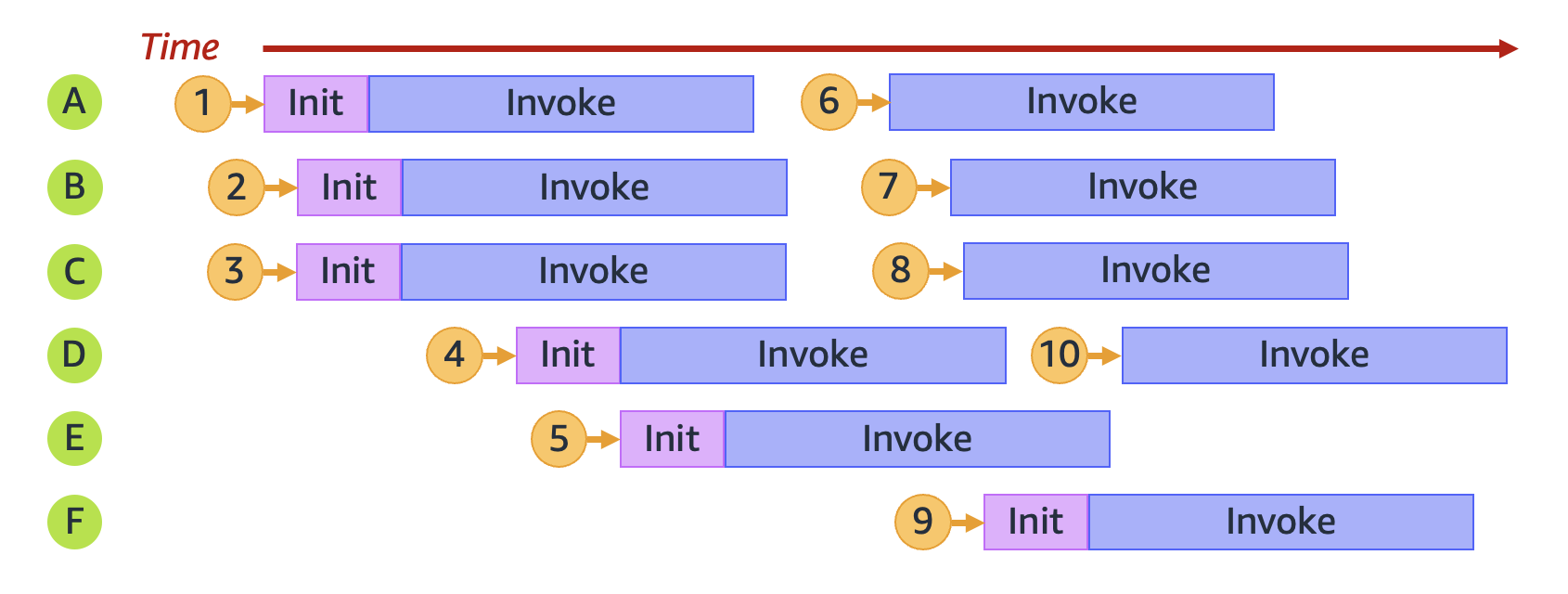
To calculate concurrency theoretically the following formula applies:
Concurrency = (average requests per second) * (average request duration in seconds)
So to handle in a second 200 RPS, a function that takes averagely 50 ms to complete would need (200 RPS * 0.05 secs/request) = 10 concurrent instances of the function (= runtime environments).
The problem is that each runtime environment can only handle no more than 10 RPS, as if the function you only complete in 100ms (0.1s).
The real concurrency value to handle 200 RPS with a function that takes 50ms to complete is: 200 * 0.1 = 20.
In other words functions that take 100ms or less won’t bring concurrency advantage to your application because each runtime environment can only handle as much as 10 RPS.
Reserved Concurrency
Reserve a portion of your regional concurrency for a lambda function, preventing other function to use it and your function to go above that limit. Other functions will share the remaining portion.
Comes at no cost
Provisioned Concurrency
Pre-initialize a number of runtime environments that will stay always-up to avoid cold start. Lambda will replace environments after some time but you are guaranteed to have a fixed number always running.
It takes 1-2 for provisioning and it can provision up to 6.000 runtime environments per minute (1.000/10s).
Additional charges are applied.
Networking
Lambdas support IPv6.
In Lambda policies is possible to use condition keys to limit the VPCs that functions can be attached to.
Flow Logs can be used for observability purposes.
Networking with VPC (Function → VPC)
A Lambda function ALWAYS runs inside a VPC owned by the Lambda service. If your Lambda function needs to access the resources in your account VPC, configure the function to access the VPC. The function can’t access the internet unless your VPC provides access.
Lambda provides managed resources named Hyperplane ENIs, which your Lambda function uses to connect from the Lambda VPC to an ENI in your account VPC. There’s no additional charge for using a VPC or a Hyperplane ENI. There are charges for some VPC components, such as NAT gateways.
Multiple Lambda functions can share a network interface, if the functions share the same subnet and security group.
To privately connect to AWS services you can use:
-
A VPC Endpoint
-
A NAT Gateway
To give your function access to the internet, route outbound traffic to a NAT gateway in a public subnet.
Permissions:
-
Use AWSLambdaVPCAccessExecutionRole, which comes with the required permissions.
-
Provide:
-
ec2:CreateNetworkInterface
-
ec2:DescribeNetworkInterfaces: only works if it’s allowed on all resources ("Resource": "\*").
-
ec2:DescribeSubnets
-
ec2:DeleteNetworkInterface: if you don’t specify a resource ID for it in the execution role, your function may not be able to access the VPC. Either specify a unique resource ID, or include all resource IDs, for example, "Resource": "arn:aws:ec2:us-west-2:123456789012:*/*".
-
ec2:AssignPrivateIpAddresses
-
ec2:UnassignPrivateIpAddresses
-
ec2:DescribeSecurityGroups
-
ec2:DescribeSubnets
-
ec2:DescribeVpcs
-
Condition keys to resctrict VPC access:
-
lambda:VpcIds
-
lambda:SubnetIds
-
lambda:SecurityGroupIds
Privately connect to Lambda service
You can use VPC Endpoints (powered by AWS PrivateLink) to access the Lambda API from a private subnet.
Shared Subnets and VPC Peering
The account that owns the VPC (owner) shares one or more subnets with other accounts (participants) that belong to the same AWS Organization. To access private resources, connect your function to a private shared subnet in your VPC. The subnet owner must share a subnet with you before you can connect a function to it.
Hyperplane ENIs
Hyperplane ENIs provide NAT capabilities from the Lambda VPC to your account VPC.
For each subnet, Lambda creates a network interface for each unique set of security groups. Functions in the account that share the same subnet and security group combination will use the same network interfaces. Connections made through the Hyperplane layer are automatically tracked, even if the security group configuration does not otherwise require tracking
The function remains in pending state while Lambda creates the required resources. When the Hyperplane ENI is ready, the function transitions to active state and the ENI becomes available for use. Lambda can require several minutes to create a Hyperplane ENI.
Each interface supports up to 65,000 connections/ports
|
If a Lambda function remains idle for 30 days, Lambda reclaims the unused Hyperplane ENIs and sets the function state to idle. The next invocation causes Lambda to reactivate the idle function. |
Use Cases
-
Serverless Applicatinos (with S3, API Gateway)
-
File processing (with S3, S3 Events)
-
Database Triggered (DynamoDB, see Event Source Mapping)
-
Serverless CRON (with EventBridge/CloudWatch Events)
-
Stream processing: application activity tracking, transaction order processing, clickstream analysis, data cleansing, log filtering, indexing, social media analysis, Internet of Things (IoT) device data telemetry, and metering.
-
Web applications
-
IoT backends
-
Mobile backends
Shared Responsibility Model
-
Lambda is responsible for applying runtime updates to all functions configured to use the Auto runtime update mode.
-
For functions configured with the Function update runtime update mode, you’re responsible for regularly updating your function.
-
For functions configured to use the Manual runtime update mode, you’re responsible for updating your function to use the latest runtime version. We strongly recommend that you use this mode only to roll back the runtime version as a temporary mitigation.
-
If you’re using container images to deploy your functions, then Lambda is responsible for publishing updated base images. In this case, you’re responsible for rebuilding your function’s container image from the latest base image and redeploying the container image.
Best Practices
Code
-
Separate the Lambda handler from your core logic.
-
Take advantage of execution environment reuse: Initialize SDK clients and database connections outside the function handler, and cache static assets locally in the /tmp directory. Don’t use the execution environment to store user data, events, or other information with security implications.
-
Use environment variables to pass operational parameters.
-
Control the dependencies in your function’s deployment package.
-
Minimize your deployment package size. If using the SDK, selectively depend on the modules which pick up components of the SDK you need.
-
Minimize the complexity of your dependencies: Prefer simpler frameworks.
-
Avoid using recursive code where lambdas call themselves.
-
Write idempotent code.
-
Avoid using the Java DNS cache.