RDS Aurora
Show slides
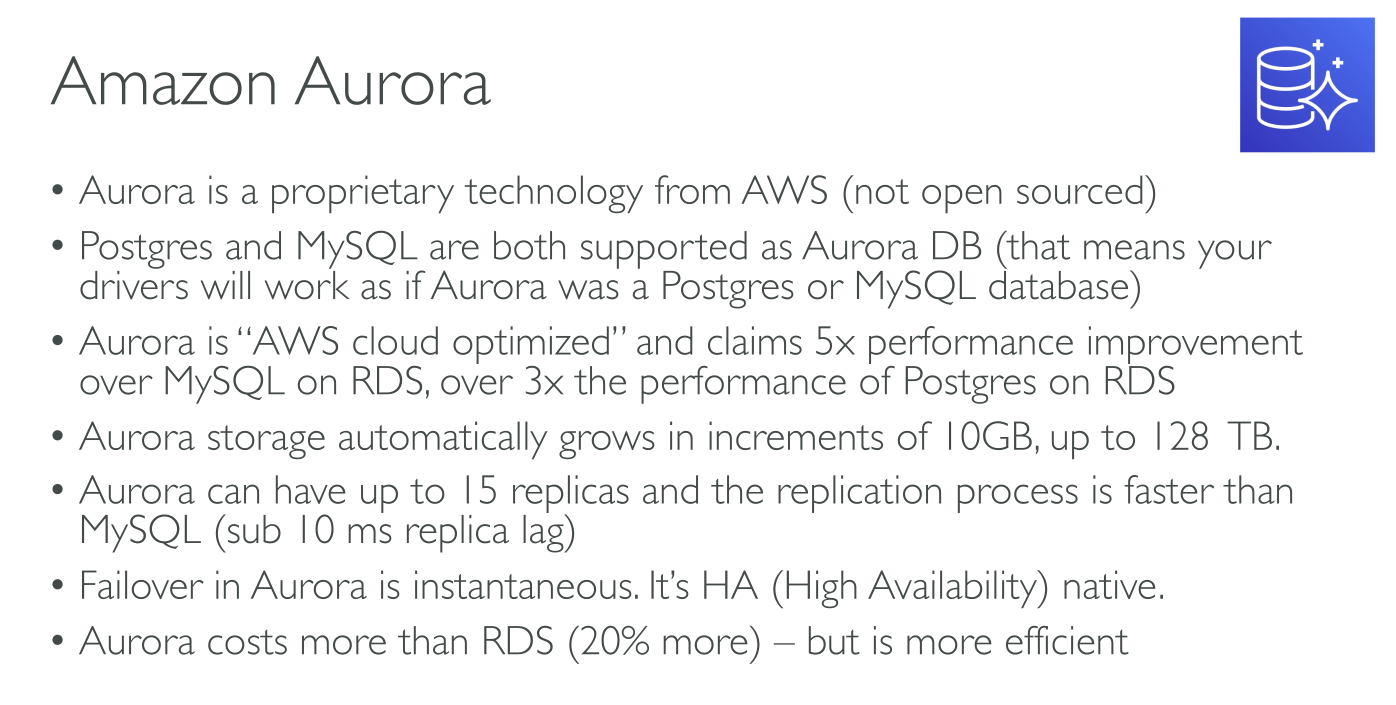
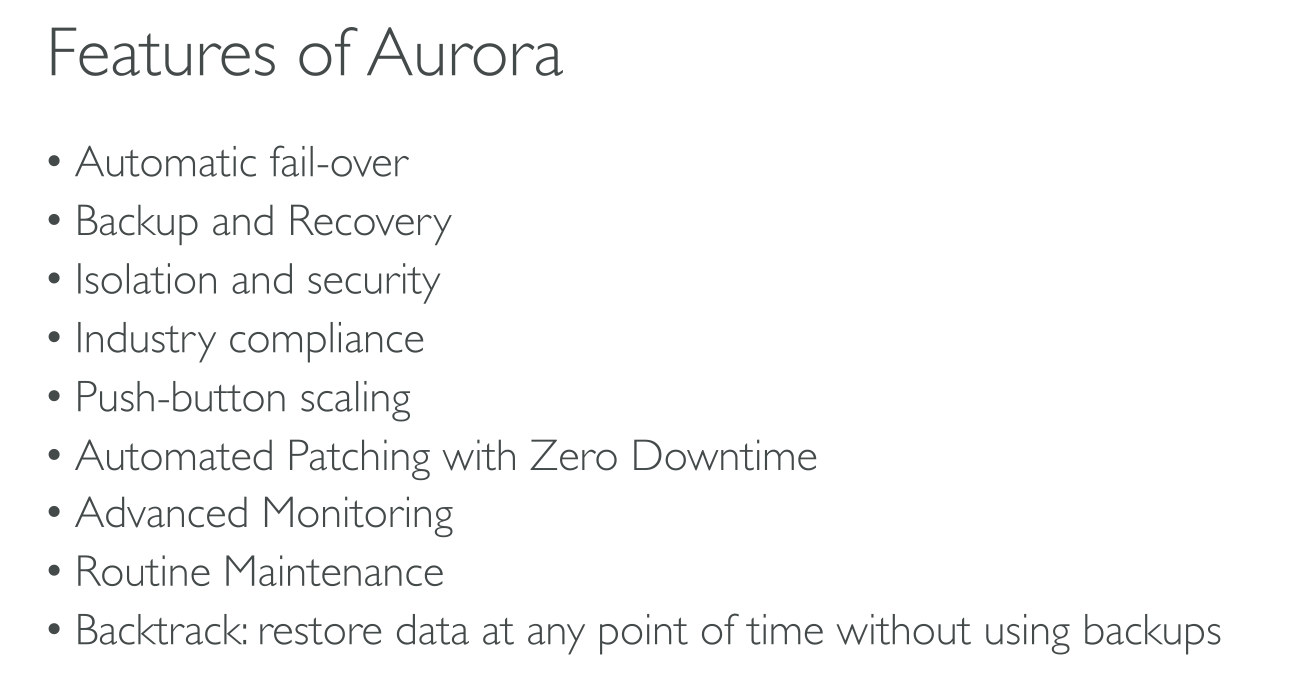
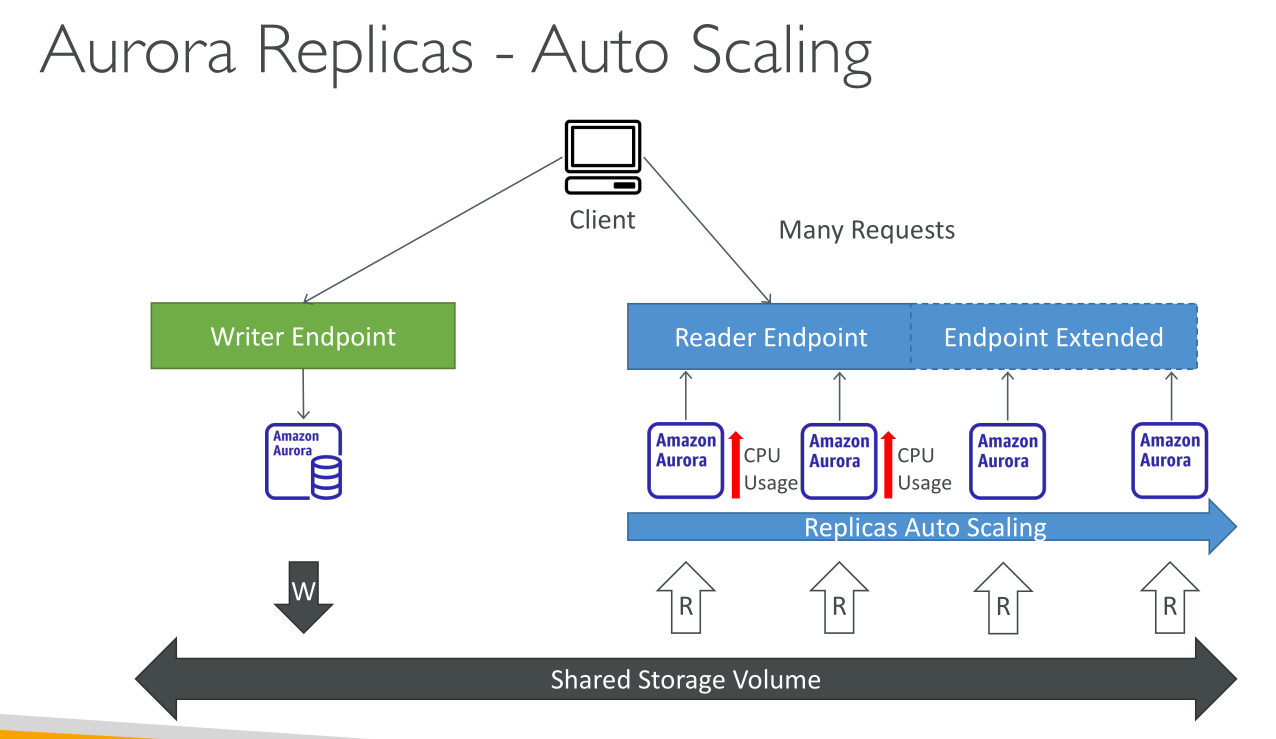
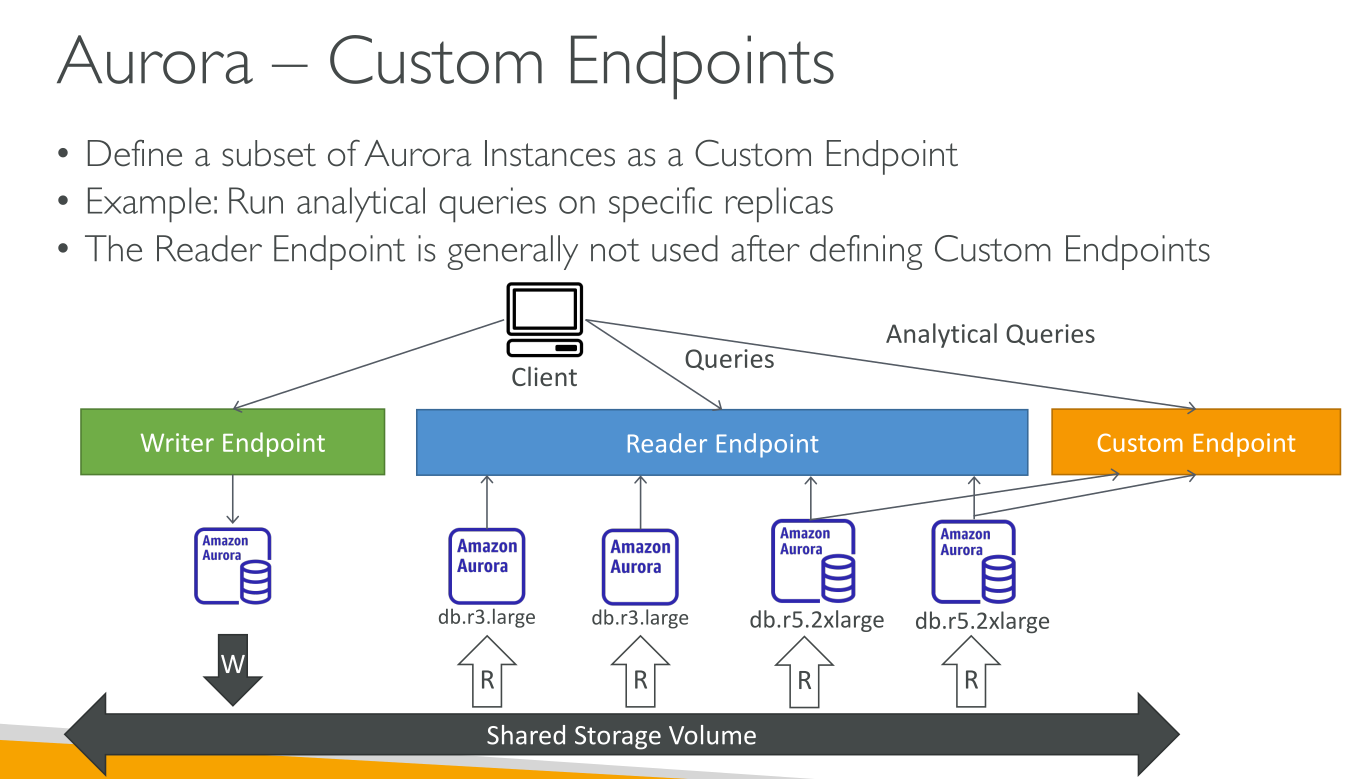
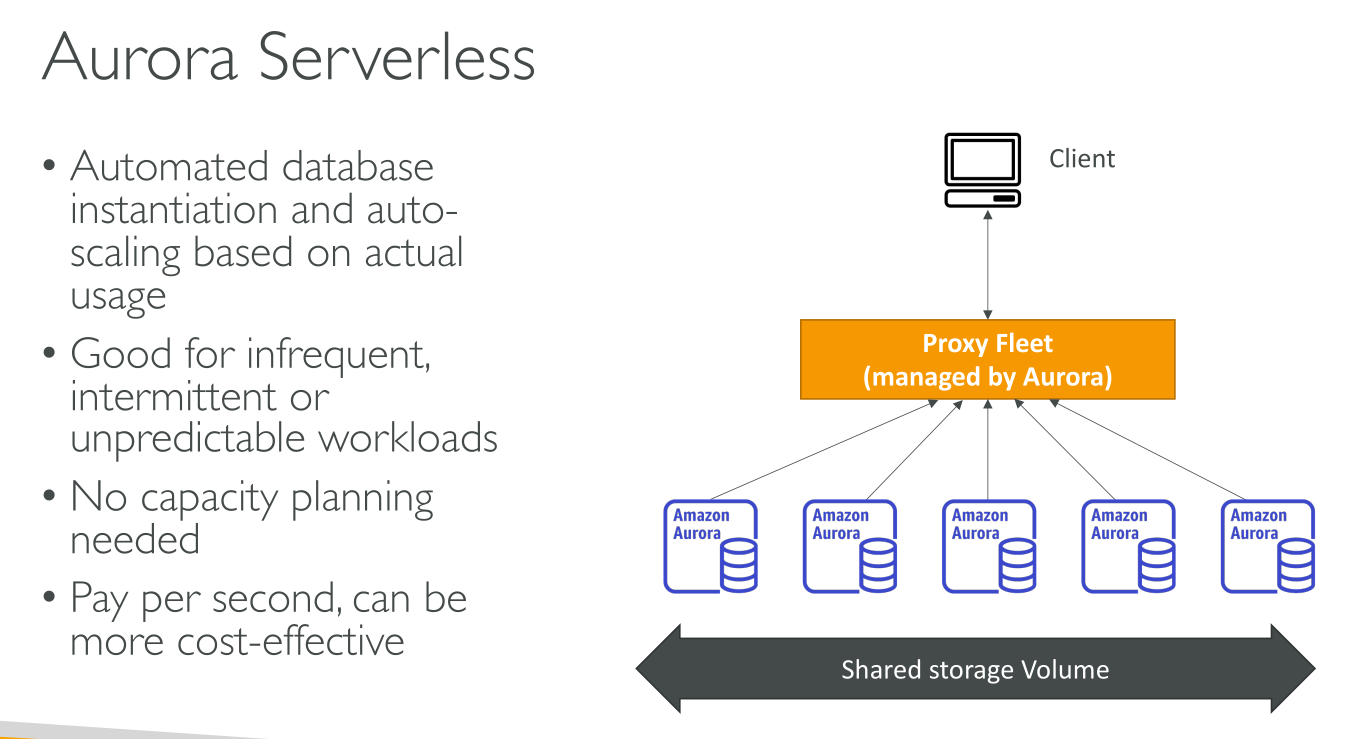

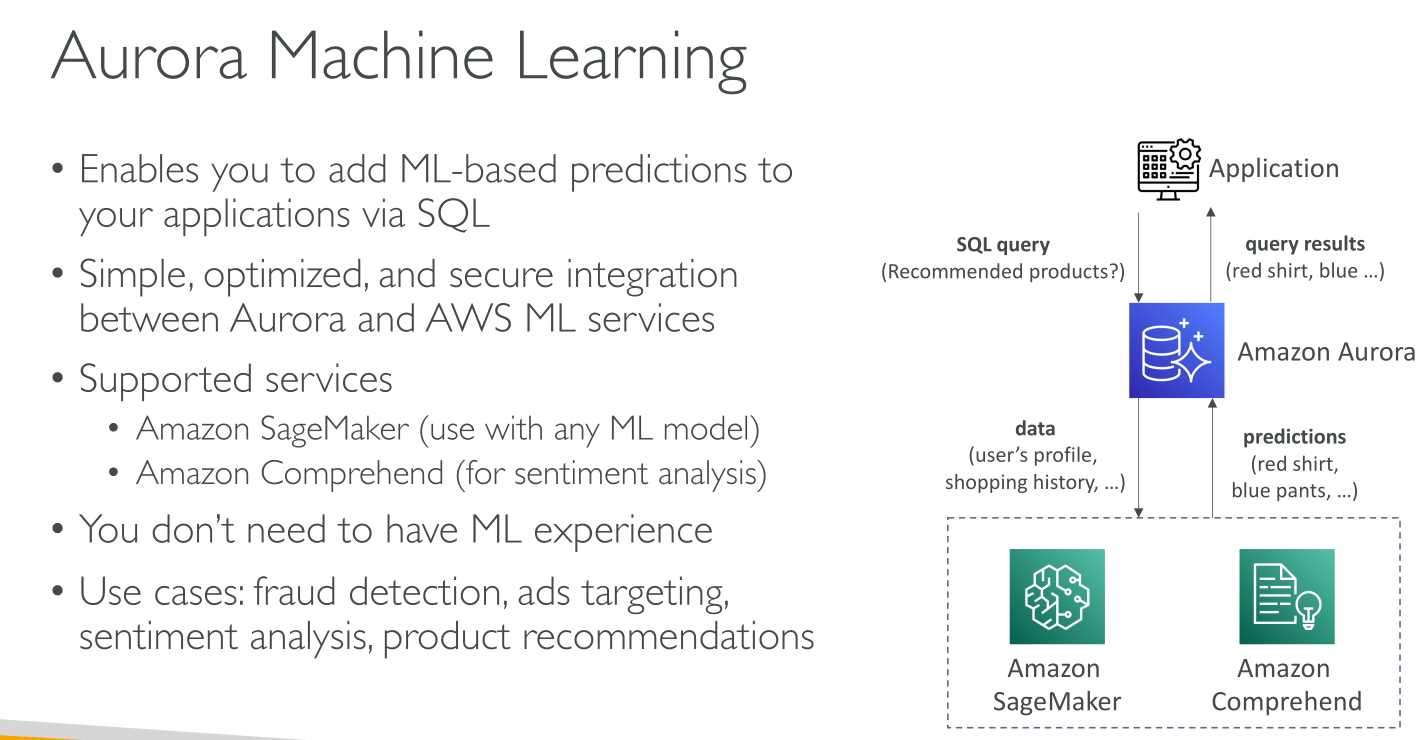
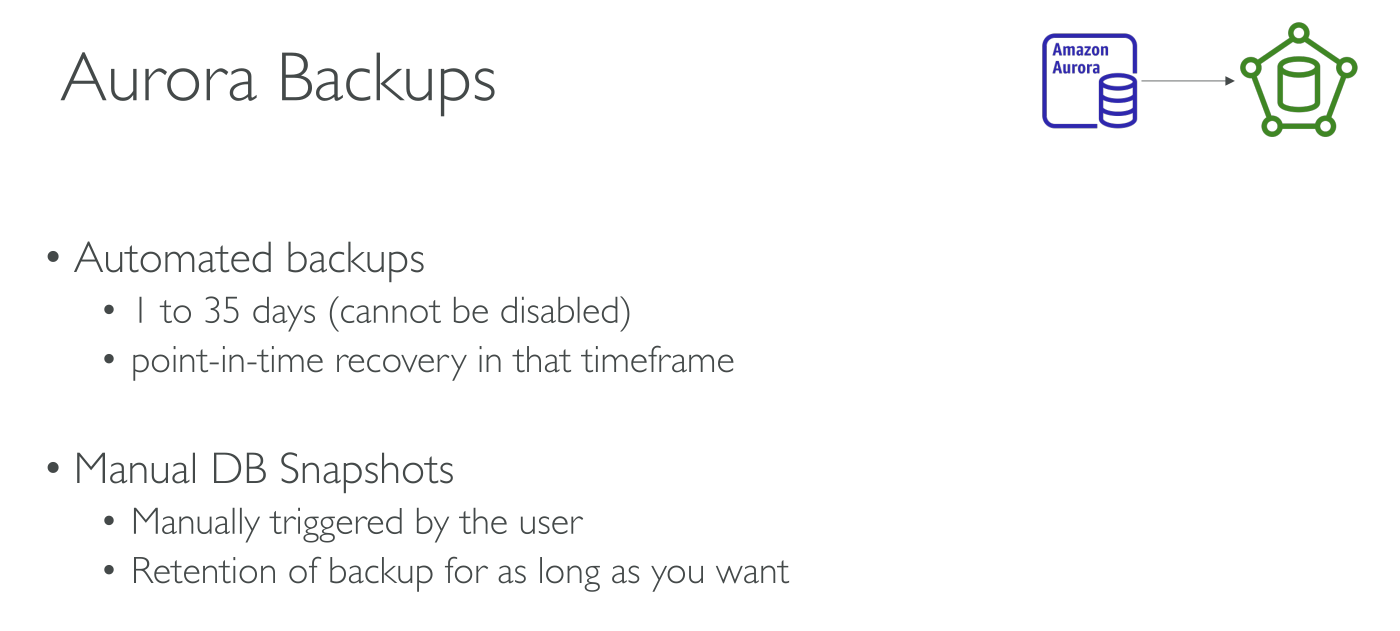
With some workloads, Aurora can deliver up to 5x the throughput of MySQL and up to 3x the throughput of PostgreSQL without requiring changes to most of your existing applications. Aurora includes a high-performance storage subsystem. Its MySQL- and PostgreSQL-compatible database engines are customized to take advantage of that fast distributed storage. The underlying storage grows automatically as needed. An Aurora cluster volume can grow to a maximum size of 128 tebibytes (TiB) or 64 TiB, depending on the DB engine version.
Amazon RDS is responsible for hosting the software components and infrastructure of DB instances and DB clusters. You are responsible for query tuning.
You can use push-button migration tools to convert your existing RDS for MySQL and RDS for PostgreSQL applications to Aurora.
Flavors:
-
Provisioned
-
Serverless (v1 and v2)
Engines:
-
MySQL-compatibile
-
PostgreSQL-compatibile
Aurora Clusters
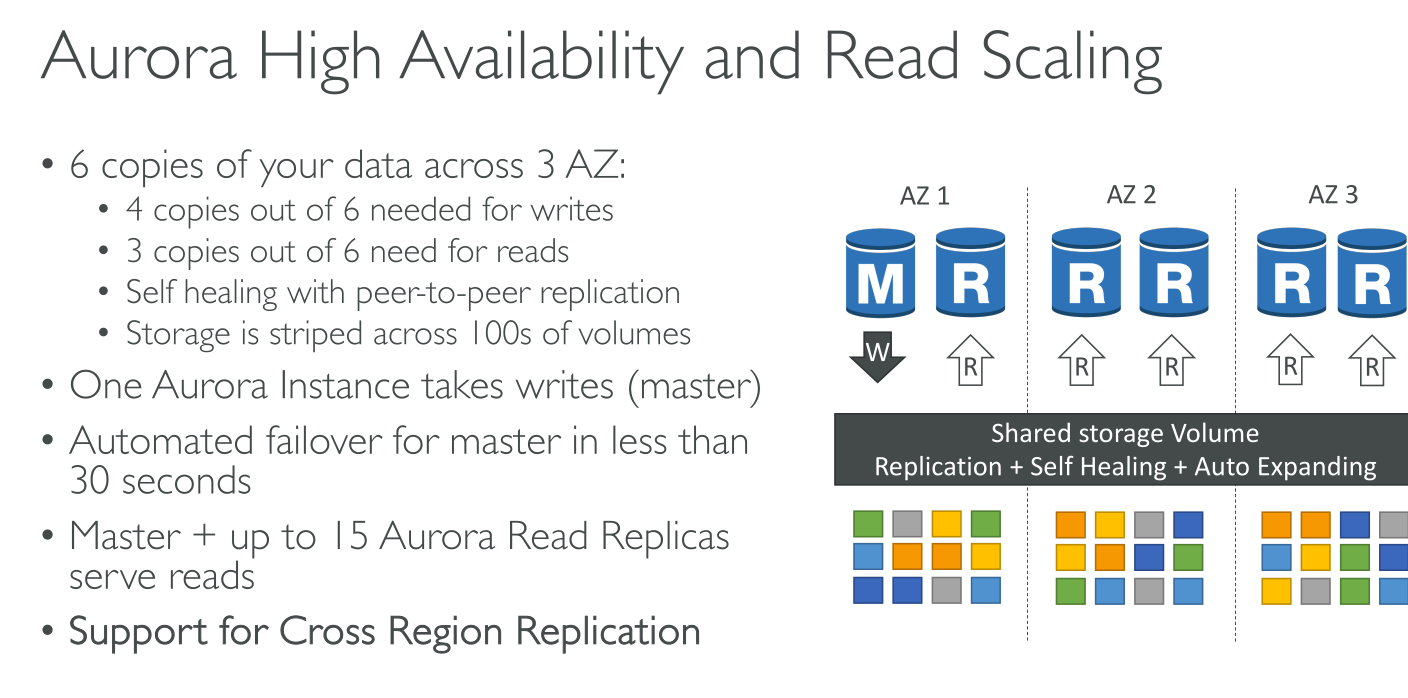
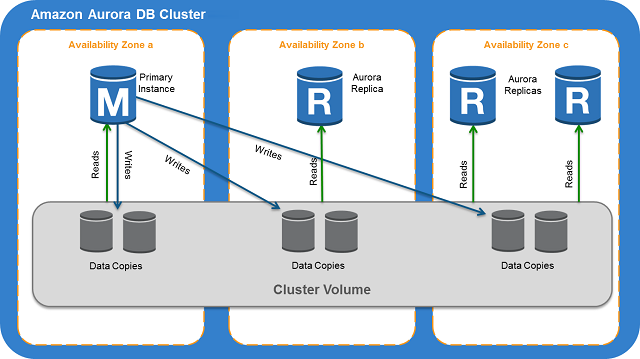
An Aurora cluster volume is a virtual database storage volume that spans multiple Availability Zones, with each Availability Zone having a copy of the DB cluster data.
Instances:
-
Primary DB instance: unique, Read/Write.
-
Replicas: 0 or more in separate AZs, max 15 Read Only that can act as failover.
Connecting
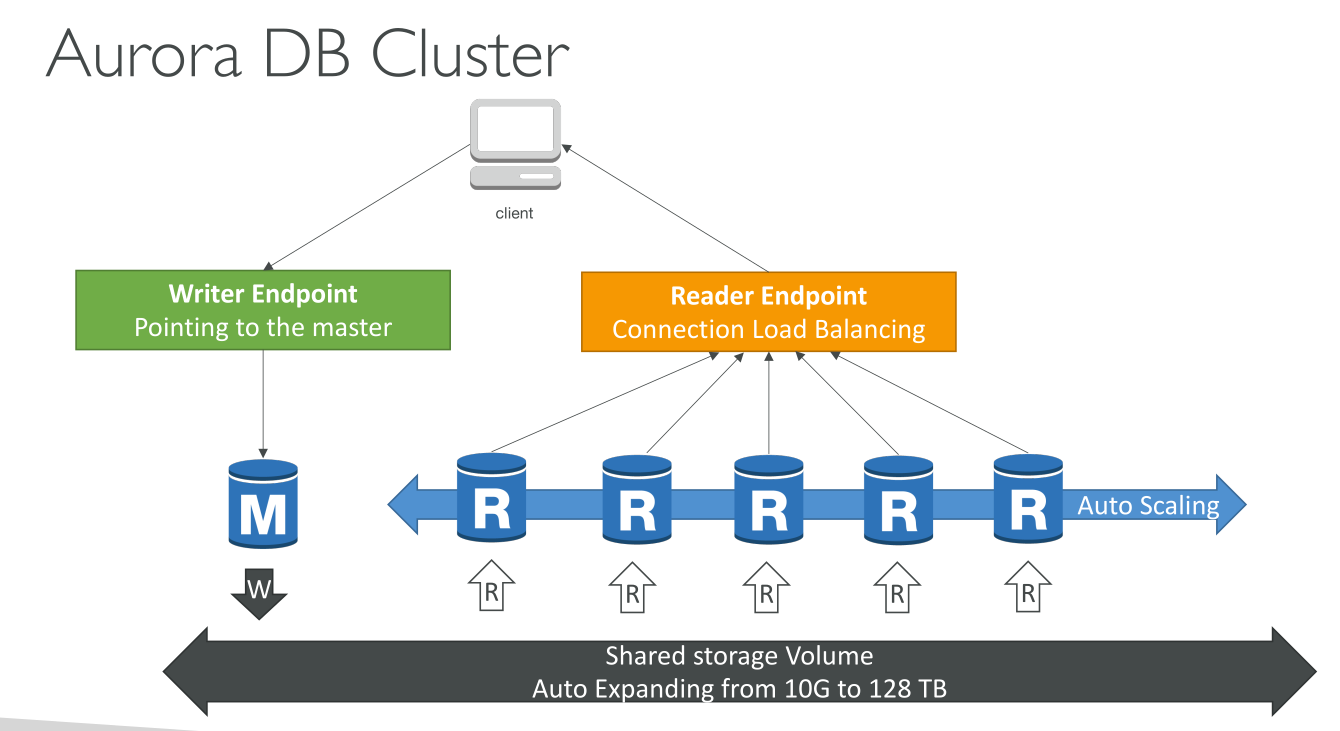
Each connection is handled by a specific DB instance. When you connect to an Aurora cluster, the host name and port that you specify point to an intermediate handler called an endpoint. Aurora uses the endpoint mechanism to abstract these connections. Thus, you don’t have to hardcode all the hostnames or write your own logic for load-balancing and rerouting connections when some DB instances aren’t available.
to perform DDL statements you can connect to whichever instance is the primary instance. To perform queries, you can connect to the reader endpoint, with Aurora automatically performing load-balancing among all the Aurora Replicas.
-
Cluster endpoint (Writer endpoint): This endpoint is the only one that can perform write operations such as DDL statements. Each Aurora DB cluster has one cluster endpoint and one primary DB instance. The cluster endpoint provides failover support for read/write connections to the DB cluster. If the current primary DB instance of a DB cluster fails, Aurora automatically fails over to a new primary DB instance. E.g.
mydbcluster.cluster-c7tj4example.us-east-1.rds.amazonaws.com:3306 -
Reader Endpoint: provides load-balancing support for read-only connections to the DB cluster.
-
Custom endpoint: represents a set of DB instances that you choose. You define which instances this endpoint refers to, and you decide what purpose the endpoint serves. E.g.
myendpoint.cluster-custom-c7tj4example.us-east-1.rds.amazonaws.com:3306-
An Aurora DB cluster has no custom endpoints until you create one.
-
You can create up to five custom endpoints for each provisioned Aurora cluster.
-
You can’t use custom endpoints for Aurora Serverless v1 clusters.
-
The custom endpoint provides load-balanced database connections based on criteria other than the read-only or read/write capability of the DB instances.
-
-
Instance endpoint: connects to a specific DB instance within an Aurora cluster.
Storage
Aurora data is stored in the cluster volume, which is a single, virtual volume that uses solid state drives (high IOPS and low latency SSDs). A cluster volume consists of 2 copies of the data across three Availability Zones in a single AWS Region. The amount of replication is independent of the number of DB instances in your cluster. It contains:
-
User data
-
Schema objects
-
Internal metadata (system tables and the binary log)
Aurora uses separate local storage for nonpersistent, temporary files.
Aurora cluster volumes automatically grow as the amount of data in your database increases.
Data replication happens at the storage level, not at the engine level. This allows for more efficient, performant and reliale operations. The instance consumes no resources to propagate the changes! Only the master can write, and replicas, when queried, will find updated data.
The maximum size for an Aurora cluster volume is 128 tebibytes (TiB) or 64 TiB, depending on the DB engine version. You don’t get to allocate storage, it grows as needed.
Even though an Aurora cluster volume can grow up to 128 tebibytes (TiB), you are only charged for the space that you use in an Aurora cluster volume. In earlier Aurora versions, the cluster volume could reuse space that was freed up when you removed data, but the allocated storage space would never decrease, you would pay the same (this is called high water mark. Now when Aurora data is removed, such as by dropping a table or database, the overall allocated space decreases by a comparable amount. Thus, you can reduce storage charges by dropping tables, indexes, databases, and so on that you no longer need.
Storage configurations
-
Aurora Standard: Cost-effective pricing for many applications with moderate I/O usage. In addition to the usage and storage of your DB clusters, you also pay a standard rate per 1 million requests for I/O operations. It is the best choice when your I/O spending is less than 25% of your total Aurora database spending.
-
Aurora I/O-Optimized: Improved price performance and predictability for I/O-intensive applications. You pay only for the usage and storage of your DB clusters, with no additional charges for read and write I/O operations.
High Availability
The Amazon Aurora architecture involves separation of storage and compute.
-
Aurora data: Aurora stores copies of the data in a DB cluster across multiple Availability Zones in a single AWS Region.
-
After you create the primary (writer) instance, you can create up to 15 read-only Aurora Replicas. When a problem affects the primary instance, one of these reader instances takes over as the primary instance. You can customize the order in which your Aurora Replicas are promoted to the primary instance after a failure by assigning each replica a priority.
High availability across AWS Regions with Aurora global databases
You can set up Aurora global databases. Each Aurora global database spans multiple AWS Regions, enabling low latency global reads and disaster recovery from outages across an AWS Region.
One primary region and up to 5 read-only secondary regions with up to 16 read replicas each.
Latency is tipically under 1s, because replication happens at the storage layer so it does not impact DB performance.
Advantages:
-
Global reads with local latency
-
Scalable secondary Aurora DB clusters
-
Fast replication from primary to secondary Aurora DB clusters
-
Recovery from Region-wide outages
Limitations: features (no serverless v1, only MySQL and PostgreSQL), machine types, and regions.
Write forwarding
With write forwarding enabled, secondary clusters in an Aurora global database forward SQL statements that perform write operations to the primary cluster. The primary cluster updates the source and then propagates resulting changes back to all secondary AWS Regions. The write forwarding configuration saves you from implementing your own mechanism to send write operations from a secondary AWS Region to the primary Region. Aurora handles the cross-Region networking setup.
Cloning
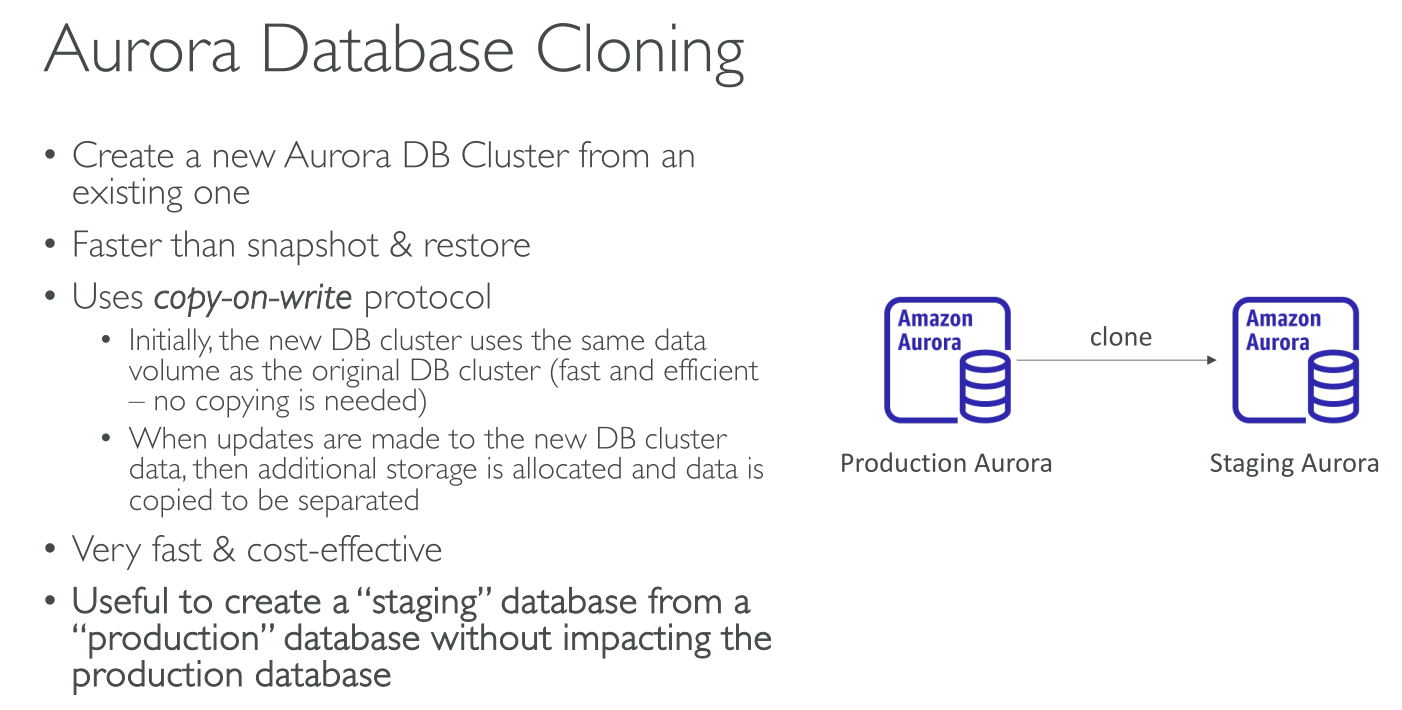
By using Aurora cloning, you can create a new cluster that initially shares the same data pages as the original, but is a separate and independent volume. The new cluster with its associated data volume is known as a clone. Creating a clone is faster and more space-efficient than physically copying the data using other techniques, such as restoring a snapshot.
Aurora uses a copy-on-write protocol to create a clone. When the clone is first created, Aurora keeps a single copy of the data that is used by the source Aurora DB cluster and the new (cloned) Aurora DB cluster. Additional storage is allocated only when changes are made to data (on the Aurora storage volume) by the source Aurora DB cluster or the Aurora DB cluster clone.
|
Initially, the clone volume shares the same data pages as the original volume from which the clone is created. As long as the original volume exists, the clone volume is only considered the owner of the pages that the clone created or modified. Thus, the VolumeBytesUsed metric for the clone volume starts out small and only grows as the data diverges between the original cluster and the clone. When you delete a source cluster volume that has one or more clones associated with it, the data in the cluster volumes of the clones isn’t changed. Aurora preserves the pages that were previously owned by the source cluster volume. Aurora redistributes the storage billing for the pages that were owned by the deleted cluster. |
Cloning use cases
-
Experiment with potential changes
-
Run workload-intensive operations
-
Create a copy of your production DB cluster for development, testing, or other purposes
Cloning limitations
-
The clone must be in the same region as the source.
-
You can’t create a clone from an Aurora DB cluster without the parallel query feature to a cluster that uses parallel query. To bring data into a cluster that uses parallel query, create a snapshot of the original cluster and restore it to the cluster that’s using the parallel query feature.
-
You can’t create a clone from an Aurora DB cluster that has no DB instances. You can only clone Aurora DB clusters that have at least one DB instance.
-
You can create a clone in a different virtual private cloud (VPC) than that of the Aurora DB cluster. If you do, the subnets of the VPCs must map to the same Availability Zones.
Auto Scaling
Aurora Auto Scaling dynamically adjusts the number of Aurora Replicas (reader DB instances) provisioned for an Aurora DB cluster.
Backups
Backups work in a similar manner as RDS:
-
Stored on S3.
-
Retention period: 1-35 days. For longer periods use snapshots (no expiry).
-
Happen in the Backup window.
Aurora also provides a free amount of backup usage. This free amount of usage is equal to the latest cluster volume size (as represented by the VolumeBytesUsed Amazon CloudWatch metric). This amount is subtracted from the calculated automated backup usage. There is also no charge for an automated backup whose retention period is just 1 day.
Restoring a backup
Like in RDS, restoring a backup creates a new cluster. But there are other options:
-
Backtrack: must be enabled, it rewinds the state of the cluster in-place.
-
Fast clones: creates a new database from an existing from its volumes using Copy-On-Write, referencin the original storage. It’s much faster and, since data is not duplicated, less expensive.
Serverless
-
Simpler than provisioned – Aurora Serverless removes much of the complexity of managing DB instances and capacity.
-
Scalable – Aurora Serverless seamlessly scales compute and memory capacity as needed, with no disruption to client connections.
-
Cost-effective – When you use Aurora Serverless v1, you pay only for the database resources that you consume, on a per-second basis, and the allocated storage.
ACUs (Aurora Capacity Units): Units of capacity, meaning CPU compute capacity and associated memory.
You can set a minimum and a maximum value of ACUs, where minimum can be 0 (zeroing compute costs) to pause the DB if not used.
It provides the same level of resilience of Aurora Provisioned, using 6 nodes of ACUs in 3 availability zones.
Architecture
The architecture is similar to Provisioned, with storage volumes shared across instances (ACUs)).
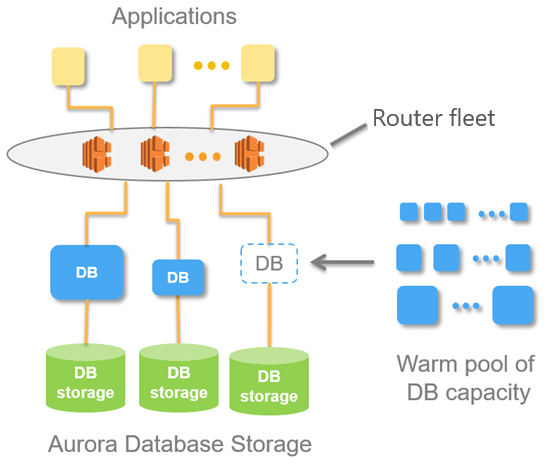
Instead of having always running machines (that you’d pay for 24/7) there’s an AWS managed warm pool of stateless ACUs. This pool is shared across customers.
When (more) capacity is needed, (more) ACUs are allocated to the cluster; they now have access to the storage.
Connection to the cluster using the provided endpoint happens through a Proxy Fleet, that brorkers connections to the right ACUs. This means that scaling can be fluid because connections are never direct to the ACUs. The fleet abstracts provisioned ACUs.
Use Cases
-
Infrequently used applications.
-
New applications where you don’t yet know what the usage of the DB will be.
-
Variable workloads.
-
Unpredictable workloads.
-
Dev and test databases, because it can pause itself.
-
Multi-tenant applications where your clients pay more the more they use the application.
Serverless v1
An on-demand autoscaling configuration for Amazon Aurora. It automatically starts up, scales compute capacity to match your application’s usage, and shuts down when it’s not in use.
Aurora Serverless v1 clusters have the same kind of high-capacity, distributed, and highly available storage volume that is used by provisioned DB clusters.
For an Aurora Serverless v1 cluster, the cluster volume is always encrypted. You can choose the encryption key, but you can’t disable encryption.
Instead of provisioning and managing database servers, you specify Aurora capacity units (ACUs). Each ACU is a combination of approximately 2 gigabytes (GB) of memory, corresponding CPU, and networking. Database storage automatically scales from 10 gibibytes (GiB) to 128 tebibytes (TiB).
-
The minimum Aurora capacity unit is the lowest ACU to which the DB cluster can scale down.
-
The maximum Aurora capacity unit is the highest ACU to which the DB cluster can scale up.
-
You can choose to pause your Aurora Serverless v1 DB cluster after a given amount of time with no activity. You specify the amount of time with no activity before the DB cluster is paused. When you select this option, the default inactivity time is five minutes. When the DB cluster is paused, no compute or memory activity occurs, and you are charged only for storage.
Use cases
-
Infrequently used applications
-
New applications: when you’re unsure of the instance size to use.
-
Variable workloads
-
Unpredictable workloads
-
Development and test databases
-
Multi-tenant applications
Limitations
Aurora Serverles v1 does NOT support:
-
Aurora global databases
-
Aurora Replicas
-
AWS Identity and Access Management (IAM) database authentication
-
Backtracking in Aurora
-
Database activity streams
-
Kerberos authentication
-
Performance Insights
-
RDS Proxy
-
Viewing logs in the AWS Management Console
-
Connections to an Aurora Serverless v1 DB cluster are closed automatically if held open for longer than one day
-
You can’t export Aurora Serverless v1 snapshots to Amazon S3 buckets.
-
You can’t use AWS Database Migration Service and Change Data Capture (CDC) with Aurora Serverless v1 DB clusters. Only provisioned Aurora DB clusters support CDC with AWS DMS as a source.
-
You can’t save data to text files in Amazon S3 or load text file data to Aurora Serverless v1 from S3.
-
You can’t attach an IAM role to an Aurora Serverless v1 DB cluster. However, you can load data to Aurora Serverless v1 from Amazon S3 by using the aws_s3 extension with the aws_s3.table_import_from_s3 function and the credentials parameter.
Serverless v2
Differences from v1:
-
you can choose whether to encrypt the cluster volume.
-
Faster, more granular, less disruptive scaling
-
Greater feature parity with provisioned than Aurora Serverless v1: it supports Reader DB instances, Multi-AZ clusters, Global databases, RDS Proxy, AWS Identity and Access Management (IAM) database authentication, and Performance Insights.
Use cases
-
Variable workloads
-
Multi-tenant applications
-
New applications
-
Mixed-use applications
-
Capacity planning – Suppose that you usually adjust your database capacity, or verify the optimal database capacity for your workload, by modifying the DB instance classes of all the DB instances in a cluster. With Aurora Serverless v2, you can avoid this administrative overhead. You can determine the appropriate minimum and maximum capacity by running the workload and checking how much the DB instances actually scale. You can modify existing DB instances from provisioned to Aurora Serverless v2 or from Aurora Serverless v2 to provisioned. You don’t need to create a new cluster or a new DB instance in such cases.
-
Development and testing – In addition to running your most demanding applications, you can also use Aurora Serverless v2 for development and testing environments. With Aurora Serverless v2, you can create DB instances with a low minimum capacity instead of using burstable db.t* DB instance classes. You can set the maximum capacity high enough that those DB instances can still run substantial workloads without running low on memory. When the database isn’t in use, all of the DB instances scale down to avoid unnecessary charges.
Security
To authenticate logins and permissions for an Amazon Aurora DB cluster, you can take either of the following approaches, or a combination of them:
-
Same approach as with a stand-alone DB instance of MySQL or PostgreSQL.
-
IAM database authentication.
-
Kerberos authentication.
Example Aurora Architectures
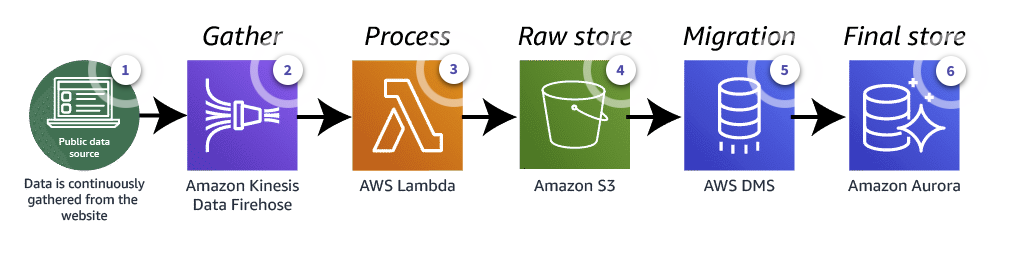
Public source data ingestion architecture
-
Data is read from a website by Amazon Data Firehose
-
Amazon Data Firehose sends data to Lambda
-
Lambda processes data turning it into a consistent format
-
Lambda stores data in the new format in a S3 bucket
-
AWS Database Migration Service takes data from the S3 bucket, transforms it and stores it in Aurora
-
Aurora stores the data and can use it to enrich existing data
Log analytics architecture
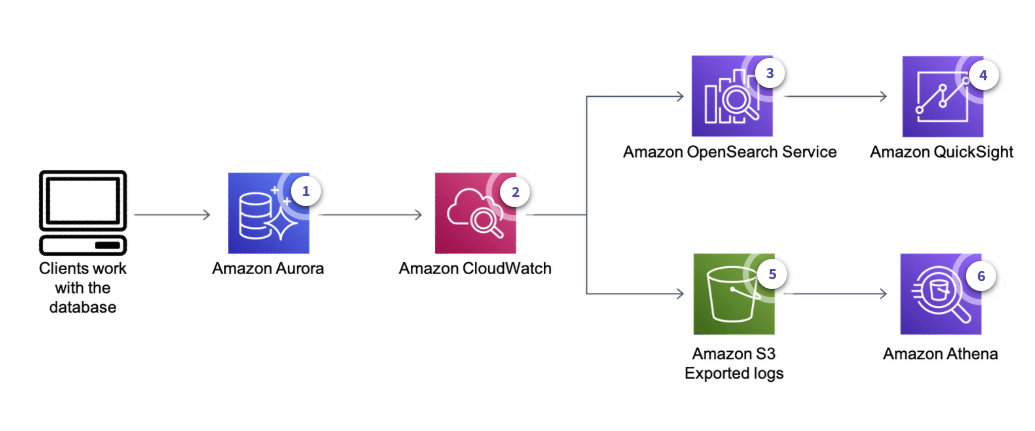
Useful to make sure clients connecting to the database get the expected responses.
-
Users or applications access the DB instance, which logs their activity (queries, responses…)
-
CloudWatch Logs collects the instance’s logging information and stores it
Now there are two paths that can be taken:
-
Data Visualization:
-
Logs from CloudWatch are stored in Amazon OpenSerarch Service
-
Amazon QuickSight can visualize OpenSearch data
-
-
Data Querying:
-
CloudWatch stores data in Amazon S3
-
Amazon Athena is used to query data
-
Billing
-
DB instance hours: depending on the instance class.
-
Storage: per GiB per month.
-
I/O: requests paid in Aurora Standard, included in Aurora I/O Optimized.
-
Backup Storage: per GiB per month. As much as 100% of consumed storage is available for backup.
-
Data transfer: per GB.
Purchasing options:
-
On-Demand: While your DB instance is stopped, you’re charged for provisioned storage, including Provisioned IOPS. You are also charged for backup storage, including storage for manual snapshots and automated backups within your specified retention window. You aren’t charged for DB instance hours.
-
Reserved Instances
-
Aurora Serverless v2