Objects
Keys
The Amazon S3 data model is a flat structure: You create a bucket, and the bucket stores objects. There is no hierarchy of subbuckets or subfolders. However, you can infer logical hierarchy using key name prefixes and delimiters. The Amazon S3 console implements folder object creation by creating a zero-byte object with the folder prefix and delimiter value as the key. These folder objects don’t appear in the console. Otherwise they behave like any other objects and can be viewed and manipulated through the REST API, AWS CLI, and AWS SDKs
Object keys are case sensitive.
If versioning is not enabled, the uniqueness of the object is given by ${bucket_name}/${object_key}
If versioning is enabled the uniqueness is given by ${bucket_name}, {object_key} and {object_version_id}.
Characters to avoid:
-
Backslash ("\")
-
Left curly brace ("{")
-
Non-printable ASCII characters (128–255 decimal characters)
-
Caret ("^")
-
Right curly brace ("}")
-
Percent character ("%")
-
Grave accent / back tick ("`")
-
Right square bracket ("]")
-
Quotation marks
-
'Greater Than' symbol (">")
-
Left square bracket ("[")
-
Tilde ("~")
-
'Less Than' symbol ("<")
-
'Pound' character ("#")
-
Vertical bar / pipe ("|")
Metadata
After you upload the object, you cannot modify object metadata. The only way to modify object metadata is to make a copy of the object and set the metadata.
-
System-defined object metadata
-
System controlled: like object creation date. Only AWS can modify them.
-
User controlled: like the storage class, SSE type if enabled (
x-amz-server-side-encryption). Can be modified by the user.
-
-
User-defined object metadata: You provide this optional information as a name-value (key-value) pair when you send a PUT or POST request to create the object. When you upload objects using the REST API, the optional user-defined metadata names must begin with x-amz-meta- to distinguish them from other HTTP headers. When you retrieve the object using the REST API, this prefix is returned.
Uploads
Limits
-
Regular upload (single object)
-
AWS SDKs, REST API, or AWS CLI: 5GB
-
AWS Console: 160GB
-
-
Multi-part upload (single object):
-
Object size: 5MiB to 5TiB.
-
Max parts number: 10.000.
-
Single part size: 5MiB to 5GiB. Last part has no minimum size limit.
-
The successful status code for an upload is 200 OK, not 201.
Coping and moving
You can create a copy of an object up to 5 GB in a single atomic operation. However, to copy an object that is larger than 5 GB, you must use a multipart upload.
CopyObject operation:
-
Create additional copies of objects.
-
Rename objects by copying them and deleting the original ones.
-
Copy or move objects from one bucket to another, including across AWS Regions (for example, from us-west-1 to eu-west-2). When you move an object, Amazon S3 copies the object to the specified destination and then deletes the source object.
-
When copying an object, you might decide to update some of the metadata values. For example, if your source object is configured to use S3 Standard storage, you might choose to use S3 Intelligent-Tiering for the object copy. You might also decide to alter some of the user-defined metadata values present on the source object. If you choose to update any of the object’s user-configurable metadata (system or user-defined) during the copy, then you must explicitly specify all of the user-configurable metadata present on the source object in your request, even if you are changing only one of the metadata values.
-
creates a copy of the object with updated settings and a new last-modified date.
-
Copied objects will not retain the Object Lock settings from the original objects.
-
Copied objects will not retain the Object Lock settings from the original objects. Objects encrypted with AWS KMS keys can’t be copied to a different Region using the S3 console. To copy objects encrypted with AWS KMS keys to a different Region, use the AWS CLI, AWS SDKs, or the Amazon S3 REST API.
-
Objects encrypted with customer-provided encryption keys (SSE-C) will fail to be copied using the S3 console. To copy objects encrypted with SSE-C, use the AWS CLI, AWS SDKs, or the Amazon S3 REST API.
-
If the bucket you are copying objects from uses the bucket owner enforced setting for S3 Object Ownership, object ACLs will not be copied to the specified destination.
Pre-Signed URLs
You can use presigned URLs to grant time-limited access to objects in Amazon S3 without updating your bucket policy. A presigned URL can be entered in a browser or used by a program to download an object. The credentials used by the presigned URL are those of the AWS user who generated the URL. A presigned URL remains valid for the period of time specified when the URL is generated.
Who can create them (and max validity):
-
IAM user - up to 7 days (12 hours from the console)
-
IAM instance profile - up to 6 hours
-
AWS Security Token Service - up to 36 hours
You may use presigned URLs to allow someone to upload an object to your Amazon S3 bucket. After upload, the bucket owner will own the object.
You can create a pre-signed URL for an object you have no access to! Who uses the URL won’t have any access either.
You can create a pre-signed URL for an object that doesn’t exist (yet?).
Don’t use a role to generate an URL, roles allow temporary credentials that expire before the URL itself does.
Data Processing
S3 Object Lambda
You can add your own code to Amazon S3 GET, LIST, and HEAD requests to modify and process data as it is returned to a request.
After you configure a Lambda function, you attach it to an S3 Object Lambda service endpoint, known as an Object Lambda Access Point. The Object Lambda Access Point uses a standard S3 access point, known as a supporting access point, to access Amazon S3. When you send a request to your Object Lambda Access Point, Amazon S3 automatically calls your Lambda function. Any data retrieved by using an S3 GET, LIST, or HEAD request through the Object Lambda Access Point returns a transformed result back to the application. All other requests are processed as normal.
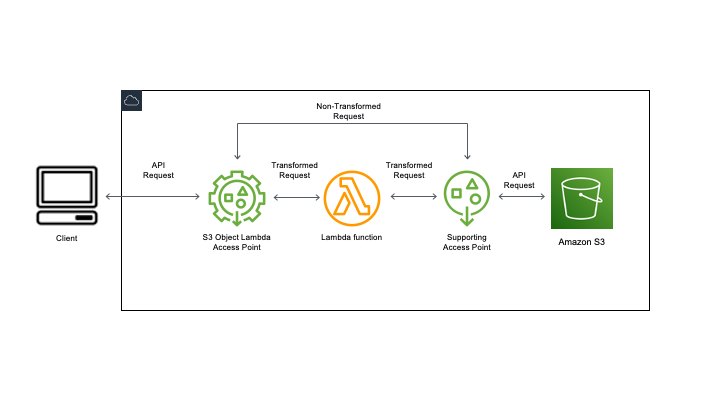
You can control access through an optional resource policy on your Object Lambda Access Point, or a resource policy on supporting access point.
Data Access
Storage Classes
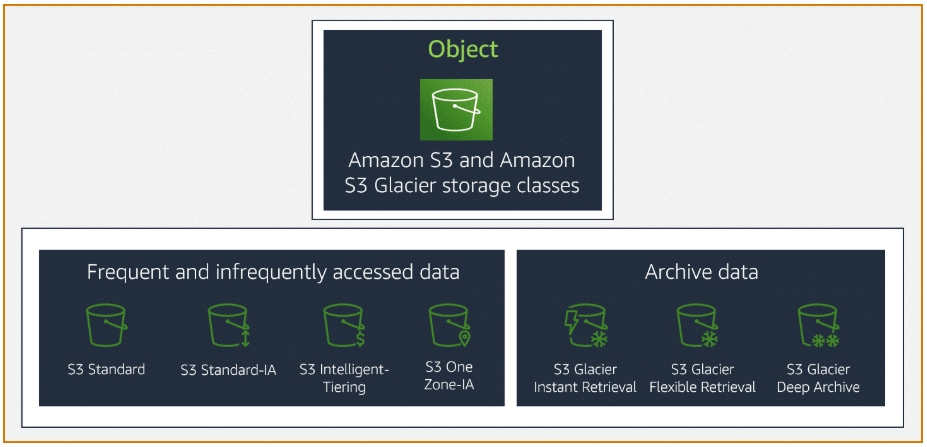
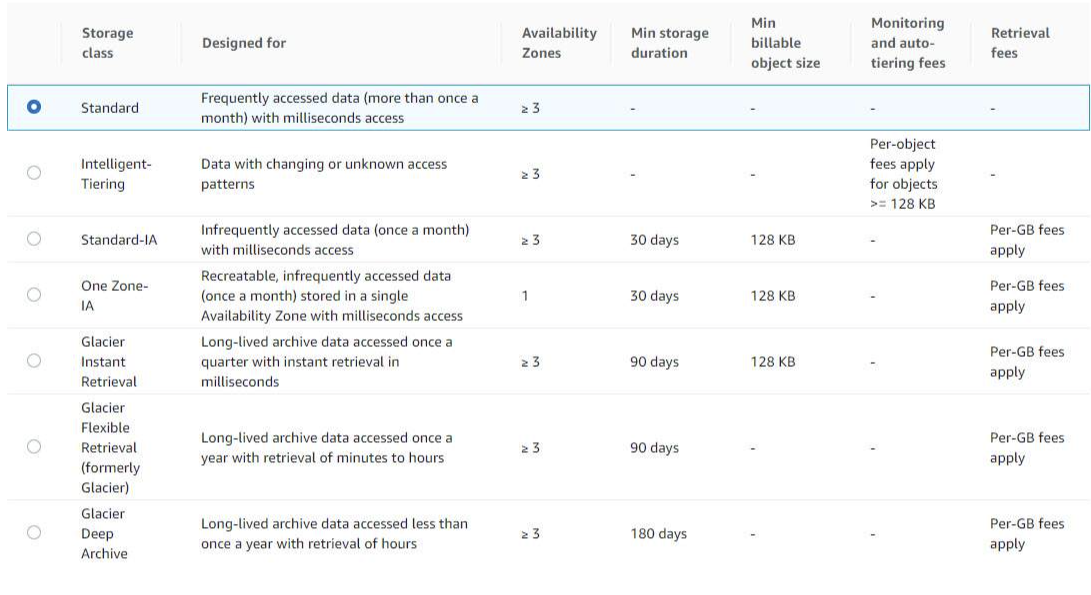
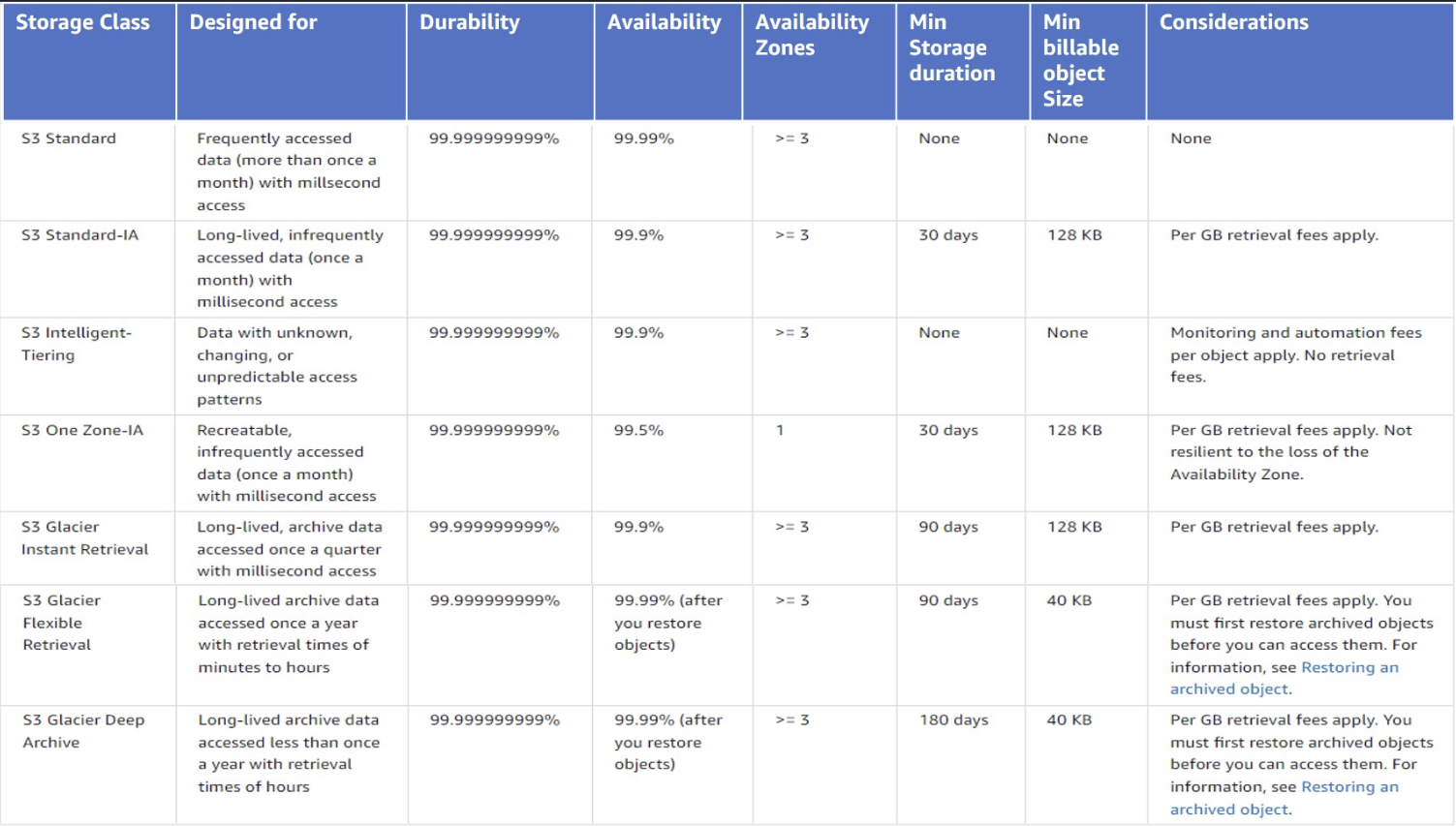
Each object in Amazon S3 has a storage class associated with it.
All the storage classes provide a durability of 99.999999999% except for RRS (99.9%).
Availability:
-
99.99%: S3 standard, Glacier Flexible Retrieval (after restoring), Glacier Deep Archive (after restoring), RSS
-
99.95%: S3 Express One-Zone
-
99.9%: S3 Standard IA, S3 Intelligent Tiering, S3 Glacier Instant Retrieval
-
99.5%: S3 One Zone-IA
Right sizing
-
What are the application’s data requirements for performance? What is your latency tolerance or do you need millisecond latency?
-
Is the data access pattern predictable or unpredictable?
-
Does the business or the data have compliance or long-term-storage requirements?
-
What SLAs are in place for your data access? Can users wait five hours for retrieval or does retrieval need to be faster?
-
What is the data access pattern?
Replaceable data with frequent access
-
S3 Standard: 99.99% availability. ⇒ Big Data analytics, mobile and gaming applications, content distribution.
-
S3 Express One Zone: 99.95% availability
-
Lowest latency
-
50% cheaper request cost
-
Single availability zone (!)
-
-
Reduced Redundancy Storage (RRS): 99.9% availability. Not recommended, standard is more cost-effective
Data with changing or unknown access patterns
S3 Intelligent Tiering: automatically moves data to the most cost-effective access tier, without performance impact or operational overhead. There’s a management fee.
It can be applied at bucket level using a prefix or tags to limit its scope.
Time requirements for objects transition can be changed.
Objects with size < 128KB will not be transitioned!.
With the exception of archive tiers:
-
Low latencies and high throughput
-
No retrieval fees
-
Monthly fee
Features:
-
99.9% availability
-
small monthly object monitoring and automation fee.
-
Access tiers (automatic):
-
Frequent Access: the first step upon enabling o uploading a file.
-
Infrequent Access: after 30 days without access.
-
Archive Instant Access: after 90 days without access.
-
-
Archive tiers (optional, they use Glacier): these override the Archive Instant Access but are a bit less expensive. And have minute-to-hour retrieval times. If the object that you are retrieving is stored in the Archive Access or Deep Archive Access tiers, first restore the object by using
RestoreObject.-
Archive Access: configurable. 90 - 270 days.
-
Standard retrieval: 3-5 hours
-
Batch retrieval: minutes
-
-
Deep Archive Access: configurable. 180 - 730 days.
-
Standard retrieval: 12 hours.
-
Batch: 9-12 hours.
-
-
Use cases:
-
Data lakes
-
Big data analytics
-
Media applications
Data with infrequent access
IA (Infrequent Access) classes provide millisecond access but retrieval is subject to a fee.
The minimum charged size is 128KB. So even 1KB objects are charged as 128KB ones.
Use cases:
-
Backups
-
Older data which might be useful
Storage classes:
-
S3 Standard IA: multiple AZs. 99.9% availability. ⇒ Disaster recovery, backups
-
S3 One Zone IA: Single zone. For non critical, replaceable data. 99.5% availability.
Archive data
Low cost data archiving with higher retrieval fees.
S3 Glacier Amazon S3 Glacier is a RESTful web service.
-
Vaults: regional resources to store archives.
https://glacier.us-west-2.amazonaws.com/111122223333/vaults/examplevault⇐https://glacier.${region}.amazonaws.com/${account_id}/vaults/${vault_name} -
Archives: An archive is similar to an Amazon S3 object, and is the base unit of storage in S3 Glacier. Each archive has a unique ID and an optional description. You can specify this optional description only during the upload of an archive. S3 Glacier assigns the archive an ID, which is unique in the AWS Region in which the archive is stored.
https://glacier.us-west-2.amazonaws.com/111122223333/vaults/examplevault/archives/NkbByEejwEggmBz2fTHgJrg0XBoDfjP4q6iu87-TjhqG6eGoOY9Z8i1_AUyUsuhPAdTqLHy8pTl5nfCFJmDl2yEZONi5L26Omw12vcs01MNGntHEQL8MBfGlqrEXAMPLEArchiveId⇐https://glacies.${region}.amazonaws.com/vaults/${vault_name}/archives/${archive_id} -
Jobs: can be a retrieval job or an inventory job.
https://glacier.us-west-2.amazonaws.com/111122223333/vaults/examplevault/jobs/HkF9p6o7yjhFx-K3CGl6fuSm6VzW9T7esGQfco8nUXVYwS0jlb5gq1JZ55yHgt5vP54ZShjoQzQVVh7vEXAMPLEjobID⇐https://glacier.${region}.amazonaws.com/${account_id}/vaults${vault_name}/jobs/${jobs_id}
Storage classes:
-
S3 Glacies Instant Retrieval: same latency and throughput as S£ Standard IA but higher retrieval costs. It has 90 days minimum storage. You pay for 90 days even if you change storage class, delete or overwrite the object earlier. The minimum object size is 128KB, meaning that smaller objects are billes as 128KB. Use cases:
-
image hosting
-
online file-sharing applications
-
medical imaging and health records
-
news media assets
-
genomics
-
-
S3 Glacier Flexible Retrieval: of course no public access.
-
retrieval:
-
Expedited (1-5 minutes if size < 250MB)
-
Standard (3-5 hours)
-
Bulk (5-12 hours), free
-
-
It offers free 5-12 hours bulk retrievals.
-
Minimum object size of 40KB.
-
90 days minimum storage. You pay for 90 days even if you change storage class, delete or overwrite the object earlier.
-
Up to 1000 transactions per second.
-
-
S3 Glacier Deep Archive:
-
retrieval:
-
Standard (12 hours)
-
Bulk (48 hours)
-
-
180 days minimum storage. You pay for 180 days even if you change storage class, delete or overwrite the object earlier.
-
40KiB minimum billable size.
-
Object Lock
S3 Object Lock can help prevent Amazon S3 objects from being deleted or overwritten for a fixed amount of time or indefinitely. Object Lock uses a write-once-read-many (WORM) model.
Versioning must be enabled to enable object lock.
Although you can’t delete a protected object version, you can still create a delete marker for that object. Placing a delete marker on an object doesn’t delete the object or its object versions. However, it makes Amazon S3 behave in most ways as though the object has been deleted.
More precisely, individual object versions are locked.
|
Object Lock Parameters
-
Retention period: the amount of time the object will stay locked (only new versions allowed).
It can be extended and can be set to a default at the bucket level. A bucket can have as3:object-lock-remaining-retention-daysvalue that specifies the max and min retention days for its objects.
Retention periods apply to individual object versions. Different versions of a single object can have different retention modes and periods. -
Legal Hold: provides the same protection as a retention period, but it has no expiration date. Instead, a legal hold remains in place until you explicitly remove it.
Legal holds are independent from retention periods and are placed on individual object versions.
Legal holds can be freely placed and removed by any user who has the s3:PutObjectLegalHold permission.
An object can have one of the two, both or none of them.
Retention Modes
-
Compliance Mode: a protected object version can’t be overwritten or deleted by any user, including the root user in your AWS account.
Its retention period cannot be shortened.
Its retention mode cannot be changed.
|
The only way to delete an object under the compliance mode before its retention date expires is to delete the associated AWS account. |
-
Governance Mode: users can’t overwrite or delete an object version or alter its lock settings unless they have special permissions (
S3:BypassGovernanceRetention,x-amz-bypass-governance-retention: true, the latter is the default for the console).
|
You can also use governance mode to test retention-period settings before creating a compliance-mode retention period. |
Storage Management
Object Lifecycle
It can be applied at bucket level using a prefix or tags to limit its scope.
Actions:
-
Transition actions: when to transition from one storage class to another. Pricing based on the transition requests.
-
Expiration actions
|
If there is any delay between when an object becomes eligible for a lifecycle action and when Amazon S3 transfers or expires your object, billing changes are applied as soon as the object becomes eligible for the lifecycle action. You won’t be charged for storage after the expiration time. The one exception to this behavior is if you have a lifecycle rule to transition to the S3 Intelligent-Tiering storage class. In that case, billing changes don’t occur until the object has transitioned to S3 Intelligent-Tiering. |
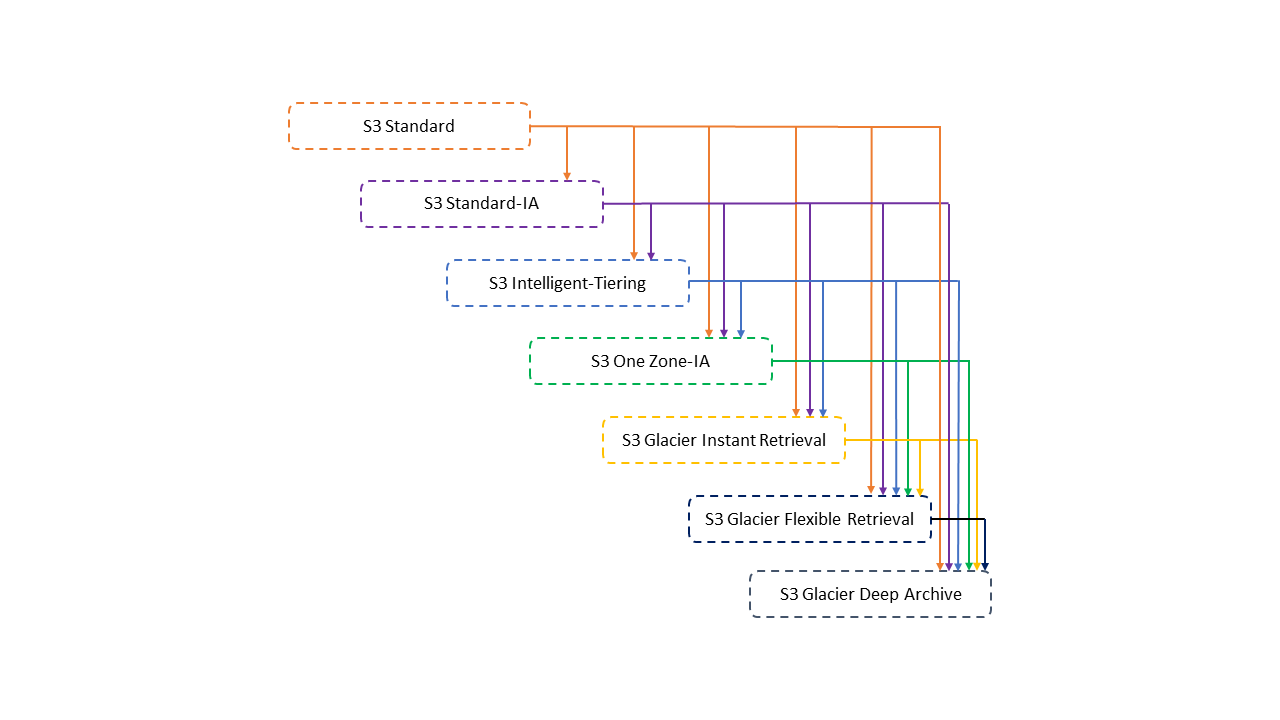
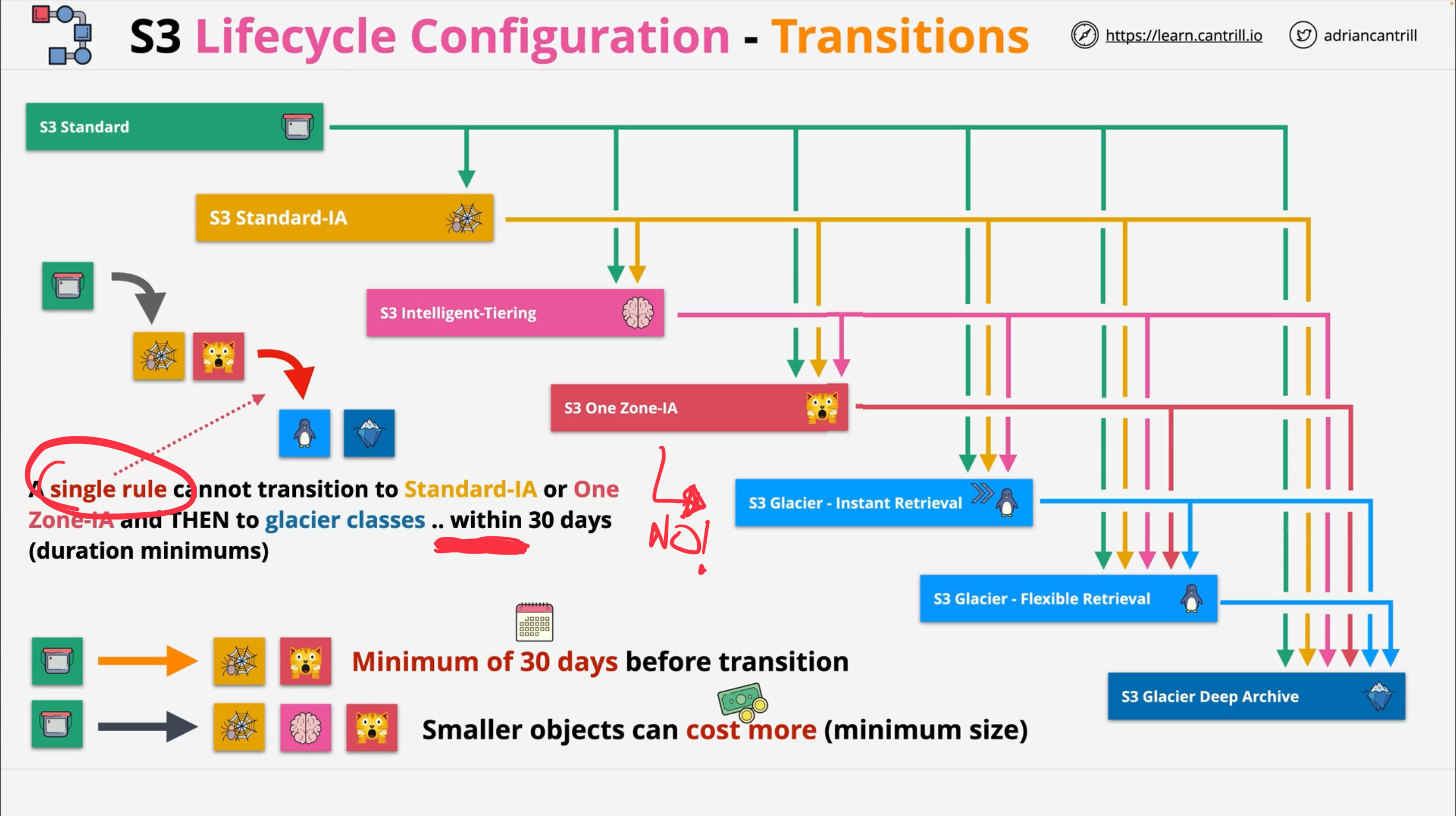
|
Unsupported transitions:
-
Any storage class to the S3 Standard storage class.
-
Any storage class to the Reduced Redundancy Storage (RRS) class.
-
The S3 Intelligent-Tiering storage class to the S3 Standard-IA storage class.
-
The S3 One Zone-IA storage class to the S3 Intelligent-Tiering, S3 Standard-IA, or S3 Glacier Instant Retrieval storage classes.
For objects smaller than 128 KiB these transitions won’t be performed:
-
S3 Standard || S3 Standard IA ⇒ S3 Intelligent Tiering, Glacier Instant Retrieval
-
S3 Standard ⇒ S3 IA (standard or one-zone)
Lifecycle configuration to delete incomplete multipart uploads
Amazon S3 supports a bucket lifecycle rule that you can use to direct Amazon S3 to stop multipart uploads that aren’t completed within a specified number of days after being initiated. Amazon S3 then stops the multipart upload and deletes the parts associated with the multipart upload.