AWS Organizations
With AWS Organizations you can manage multiple AWS Accounts with little management overhead and in a cost-effective way.
You use a standard AWS Account to create an organization but the organization doesn’t live in that account, the latter is used to create and manage the former.
The account used to create the Organization becomes the Management Account. Zero or more accounts can join, thus becoming Member Accounts.
The Organization has a ROOT that contains a Management account and an inverse tree of Member Accounts and Organizational Units.
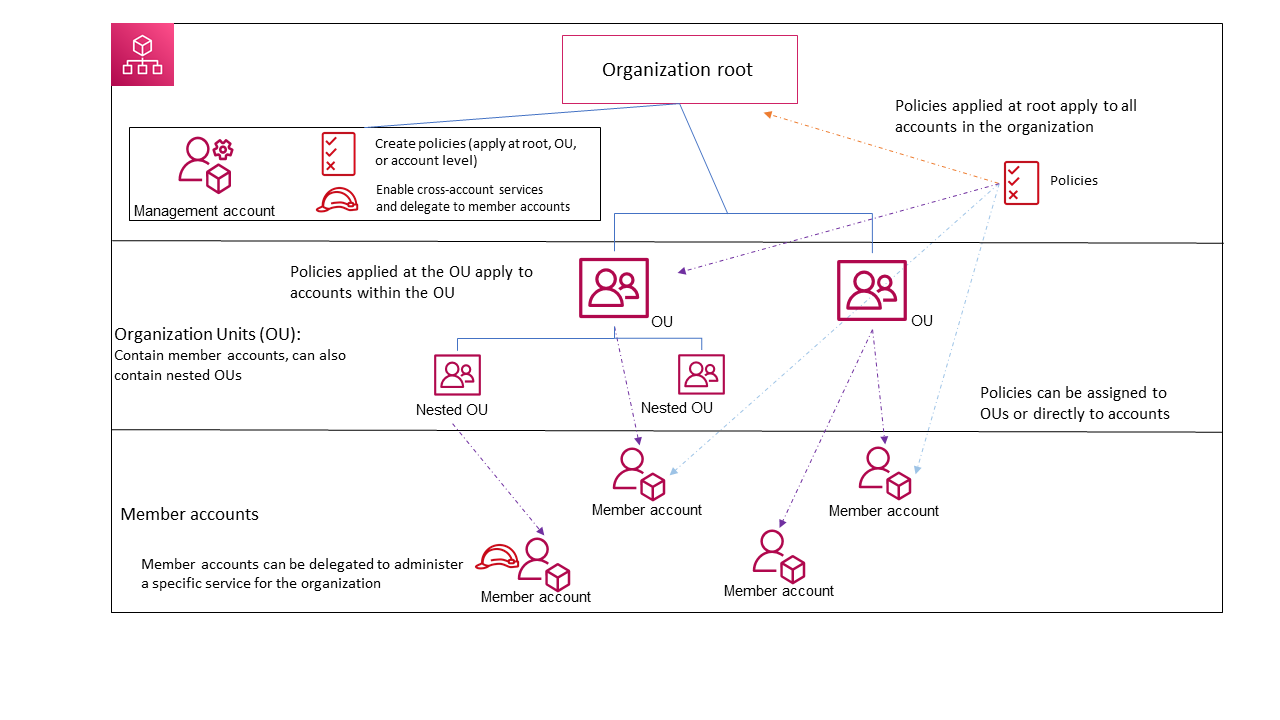
At the top of the inverted tree is the Organization Root, not the Management account!.
Organizations are an improvement from a security and best-practice perspective: you no longer need to have one user in each account, instead you create a role in them, that a user from the management account can assume. This is done via the Role Switch feature.
Member Accounts
Member accounts can be added by:
-
Creation: the member account can be created in the organization from scratch, a valid email address must be used. A role in the newly created account will exist (it’s automatically created), that allows the management account to access the member one. The name of the role is
OrganizationAccountAccessRoleand will have an AWS managed policy ofAdministratorAccess. -
Invitation: the future member account has to accept the invitation before it can join. After the invitation has been accepted you still need to manually create a role with the management account in the trust policy so it can be assumed to control the member account.
Organizational Units (OUs)
OUs are lower level containers for Member Accounts. They can be targeted by policies and can be nested.
Consolidated Billing
Member Accounts' billing is by default handled by the Management Account, which allows for a simpler and more consistent view of the billing for the whole Organization. The individual billing methods are removed for the member accounts within the organization.
This way a single monthly bill will cover for all the accounts in the Organization.
Reservations and volume discounts are also consolidated! Meaning that the whole organization benefits are pooled and each account can benefit from others' discounts and reservations.
Organization Policies
-
AI services opt-out policies: AWS AI services, such as Amazon Rekognition, Amazon Transcribe, and so on, might store and use customer content processed by those services for the development and continuous improvement of other AWS services. As an AWS customer, you can opt out of having your content stored or used for service improvements.
-
Backup policies: they give you granular control over backing up your resources at whatever level your organization requires. E.g.: you can specify in a policy attached to the organization’s root that all Amazon DynamoDB tables must be backed up.
-
Chatbot Policies: Chatbot policies in AWS Organizations enable you to control access to your organization’s accounts from chat applications such as Slack and Microsoft Teams.
-
Resource Control Policies (RCP): a type of organization policy that you can use to manage permissions in your organization. RCPs offer central control over the maximum available permissions for resources in your organization. RCPs help you to ensure resources in your accounts stay within your organization’s access control guidelines. Only available if the
all featurespack is enabled. -
Tag policies: standardize the tags attached to the AWS resources in an organization’s accounts.
Service Control Policies (SCPs)
They’re policy documents that can restrict what Member Accounts can do and where. The Management Account is NOT affected by these policies, you can’t even attach a SCP to the Management Account.
They act as boundaries, not permissions. Because the limit the permissions that can be assigned.
They must be explicitly enabled.
They can be attached to:
-
The Organization Root
-
OUs
-
Member Accounts individually
Service Control Policies are effective from the attachment point DOWNWARDS: if they’re attached to an OU, all the OUs and account below that OU will be affected. If attached to the Organizational Root they’ll affect all the Member Accounts (again, the Management Account is unaffected).
For this reason it’s best practice to use the Management Account for billing and user management purposes only.
Although the root user of any AWS account can never be restricted, SCPs allow in fact to restrict the account itself (which includes the root user) for member accounts. What’s actually happening is that SCPs are reducing the available permissions on member accounts.
SCPs expect you to provide an allow list of permissions while everything is denied by default. But as soon as you enable SCPs, AWS places a default allow all policy called FullAWSAccess on the organization to avoid disrupting your work and because as the list of services AWS provides grows, they’re allowed by default. If you want to get rid of the allow all policy, allowing for a more secure environment, you need to create your policies to allow services and then delete the default allow all. Also, a default-deny architecture comes with less admin overhead.