AWS Transfer Family
It enables transferring data to S3 and EFS via dedicated managed servers using more familiar protocols:
-
FTP
-
FTPS
-
SFTP
-
Applicability Statement 2 (AS2)
It can be deployed in Multi-AZ resilient mode and it’s scalable.
Billing is per server per hour + data trasfer.
You can use authentication via:
-
Built-in managed identities
-
Directory Service
-
Lambda/ApiGateway
-
Custom IDP (Amazon Cognito, AD, LDAP, Okta, others)
FTP/FTPS only supports Directory Service or Custom IDP.
It features a built-in serverless file workflow engine: Managed File Transfer Workflows (MFTW)
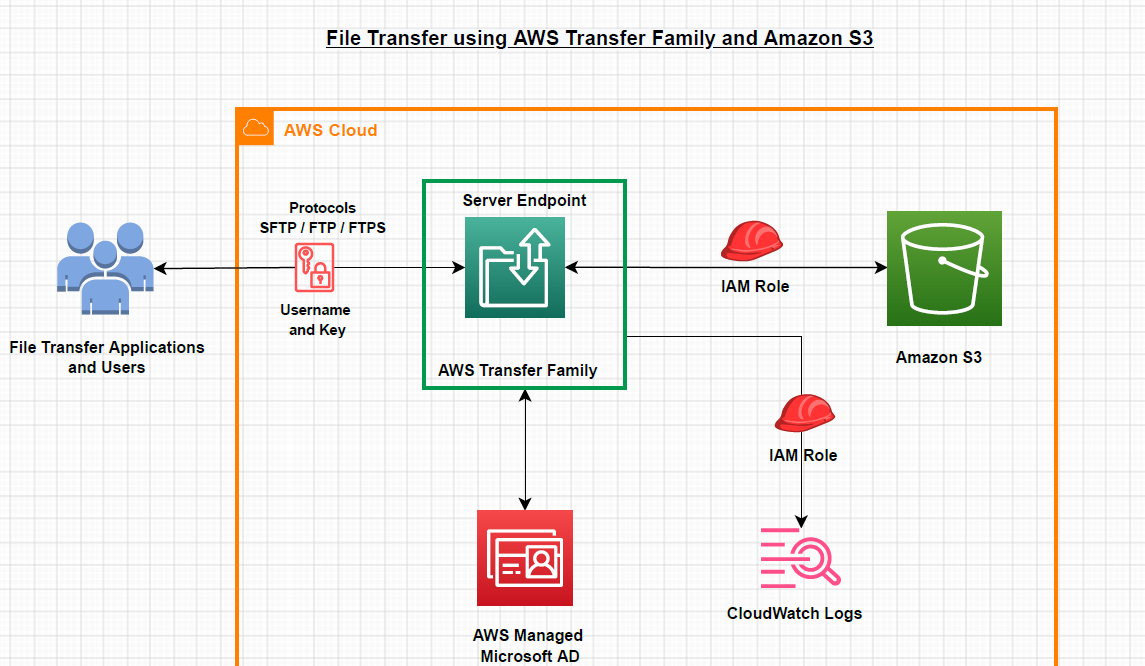
Accessing Servers
How you access the server depends on where they’re deployed.
Public
The server endpoint run in the AWS Public Zone and it’s worldwide accessible. It’s completely managed, you don’t need to configure anything.
This also means that you have no access control!
The endpoint uses a dynamic IP, so be sure to use DNS instead of the IP.
Supports:
-
SFTP