CloudFront
Architecture
Terms:
-
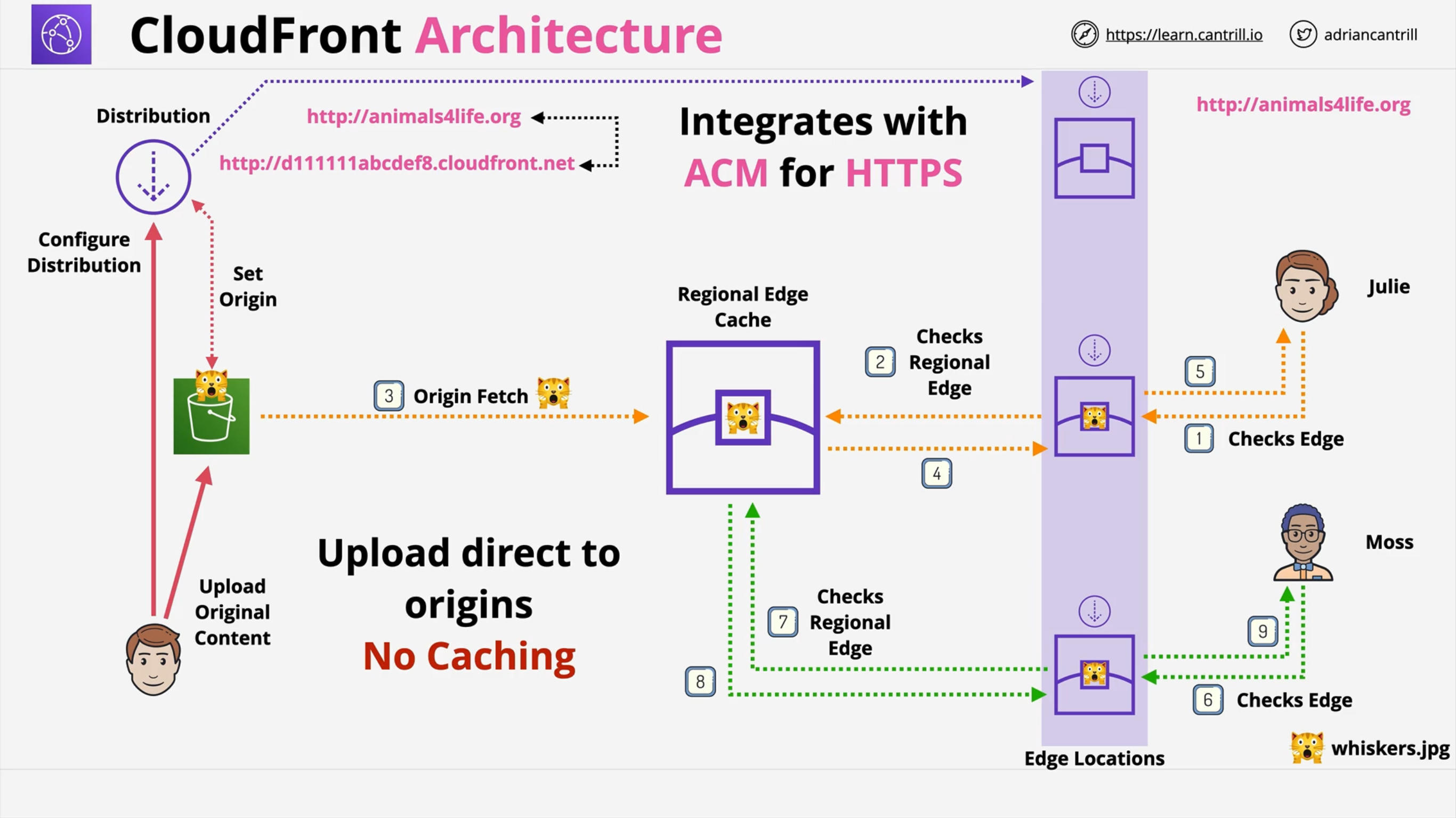
Origin: the content’s source location.
-
S3 Origin
-
Custom Origin: anything running on a web server with a publicly routable IP address.
-
-
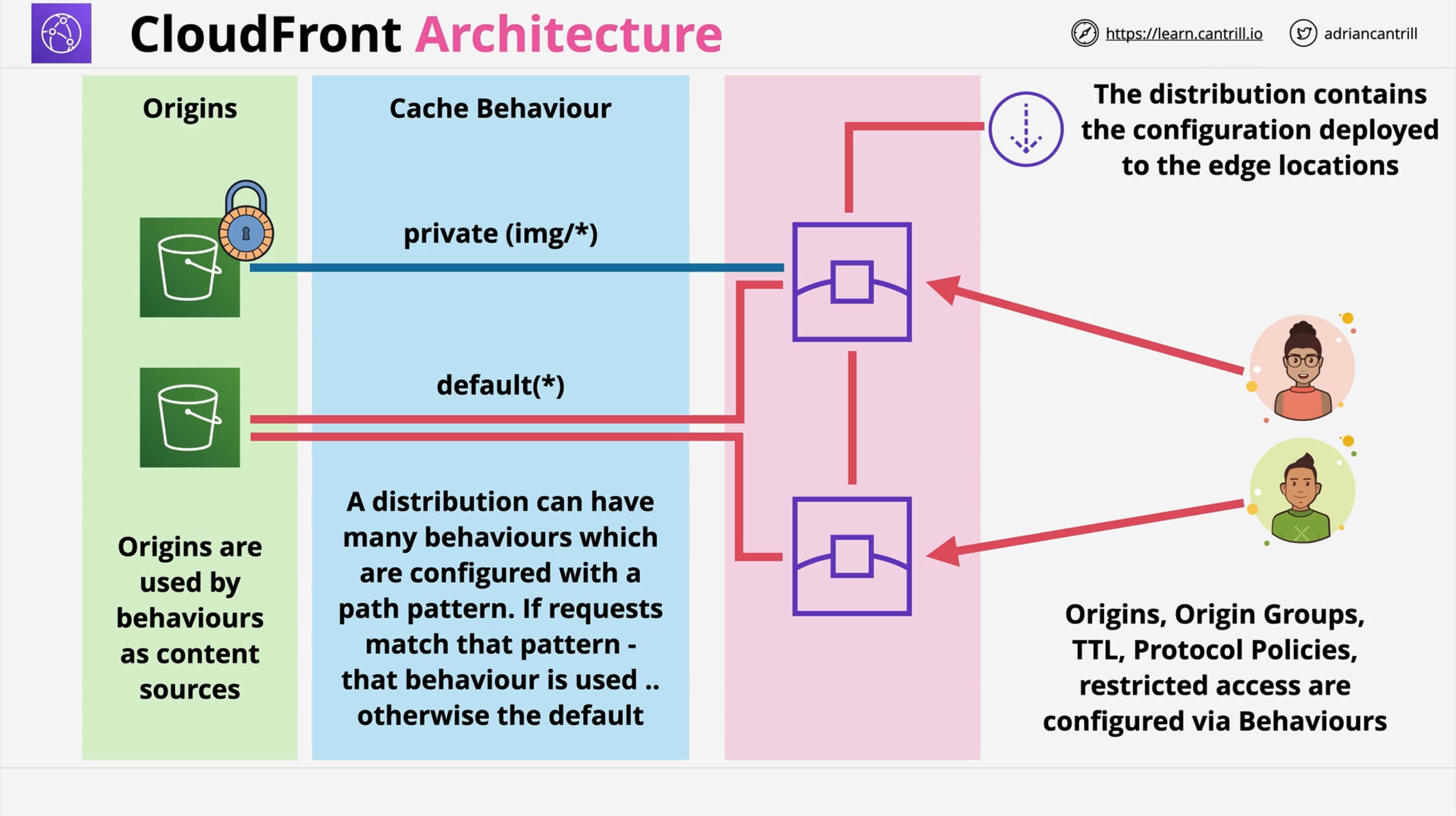
Distribution: a configuration that defines origins and 1 or more cache behaviors.
-
Edge Locations: the locations where CloudFront caches content.
-
Regional Edge Cache: a bigger cache that provides anoter layer of caching.
By default, an URL is generated (xxxxxxxxxxxxx.cloudfront.net), but you can add your custom domain. CloudFront integrates with AWS Certitificate Manager (ACM) for HTTPS.
Whenever content is requested to the edge location, in the case of a cache hit it’s returned immediately (low latency). In the case of a cache miss the regional edge cache is used. At this level, if there’s a cache hit, the content is copied to the requesting edge location. If a cache miss occurs, an origin fetch is started so that the content will be available in the regional edge cache and for the edge location that requested it.
Caching WRITE operations is NOT supported.
CloudFront provides DDoS and integrates with AWS Shield and AWS WAF.
It improves performance for both static content (images, videos, …) and dynamic content (API acceleration, dynamic site delivery)
Request/Response Flow
-
Viewer Request: User ⇒ CloudFront
-
Origin Request: CloudFront ⇒ Origin
-
Origin Response: Origin ⇒ CloudFront
-
Viewer Response: CloudFront ⇒ User
Behaviors
A Distribution has one default Behavior, but you can add custom ones.
Behavior selection happens via pattern matching, the default behavior has a pattern of *.
In a Behavior you can select:
-
Object compression
-
Viewer Protocol: HTTP and HTTPS, redirect to HTTPS, HTTPS only.
-
Allowed HTTP methods
-
Cache Policies that allow you to define Compression, a Minimum TTL, a Maximum TTL and a Default TTL. Also you can define which Headers, Query Strings and Cookies are part of the Cache Key.
-
Origin Request Policies which let you add Headers, Query Strings and Cookies in the request to the origin.
-
Restricted access using Signed URLs os Signed Cookies (⇒ KeyGroups)
-
Field-level Encription: it allows you to generate a keypair and distribute the public key to the edge locations. Then specify the set of fields in POST requests that you want to be encrypted, and the public key to use to encrypt them. You can encrypt up to 10 data fields in a request.
-
Cache directives like policies.
-
Lambda Functions association
-
Viewer Access Restrictions
The above settings only affect paths that fall in the PATTERN of the Behavior
TTL and Invalidation
Edge locations and Regional Edge Caches check with the origin if their content is still valid:
-
If the content’s age is below the TTL the origin returns a 304 Not Modified status code and the caches keep serving that content.
-
If the content’s age is above the TTL the origin returns a 200 OK status code *along with the new version of the content.
Behaviors can control TTL using Cache Policies, where you can define Minimum TTL, Maximum TTL and Default TTL for the content. Those values DO NOT affect the content by themselves, because if the Origin returns different values in its headers the latters will be applied. BUT if values returned by the origin are not within that range, they’re set to the limits' value.
Origin headers * Cache-Control: Max-Age (seconds) * Cache-Control: s-maxage (seconds) * Cache-Control: Expires (date)
For example if the Cache Policy in the Behavior sets Maximum TTL to 500 seconds, and the origin returns a Cache-Control: Max-Age=10000 header, the cache will serve the content for 500 seconds.
It follows that these settings can be set per object in the origin, but this is a way to limit those per object settings.
Origin headers can be served:
-
For Custom Origins by the web server
-
For S3 using Object Metadata
Invalidation is a parameter that you set per Distribution, not per Behavior. It immediately expires every object, regardless of their TTL, based on the invalidation pattern that you provide.
/img/*
/img/test*
/img/myimgs/*.png
/*  # Invalidates all!
It takes some time for the invalidation to propagate to the edge locations. Also, invalidation has a cost that is the same regardless of the number of objects involved.
If you want to save money you can do so by using versioned file names like mycat_v1.jpg mycat_v2.jpg. The application will point to new names and old names will never be requested again by the users' browsers, they’ll expire from the cache and never be requested again. Also logging will be more effective because the version of the file will show up.
SSL/TLS and SNI
You need to create/import a certificate in the us-east-1 region*.
You can configure how HTTPS is handled in the Viewer Protocol setting of Behaviors:
-
HTTP and HTTPS: both ok.
-
redirect to HTTPS: redirect to HTTPS.
-
HTTPS only.
You actually have two connections and they BOTH NEED VALID PUBLIC CERTIFICATES (Self-signed certificates will not work):
-
Viewer/Client ⇒ CloudFront (Viewer Protocol)
-
CloudFront ⇒ Origin (Origin Protocol)
The certificate SNI for the Viewer protocol must match the domain name of the cloudfront distribution and the origin’s certificate must match the domain name of the origin so that when cloudfront fetches from it, it’ll have no certificate error.
Whichever protocol (HTTP, HTTPS) is used as the Viewer Protocol, the same protocol is used as Origin Protocol.
SNI
SNI is an extension of the TLS protocol. It allows a single IP address to serve multiple domains by allowing to specify which domain name a client is trying to securely connect to without the need to unpack data first.
The Host header in an HTTP request is evaluated after layer 4 packets are decapulated so if a web serve needs to evaluate if the packet is directed to it and finds it’s not, information is lost. There needs to be a way to check that the connection is bein routed correctly before layer 7 in decapsulated so that packets can be sent to the right layer 7 router (web server, ingress, load balancer).
From another perspective, there’s no way for a server to provide multiple certificates since the host header is read too late.
SNI allows to have multiple HTTPS sites and certificates behind the same IP address.
In CloudFront you can choose to:
-
Use SNI only (default): no additional charge, not compatible with older browsers.
-
Use a dedicated IP at the edge locations: 600$ monthly charge. Compatible with all browser, even those not supporting SNI.
Origins
-
Amazon S3
-
Elastic Load Balancer
-
API Gateway
-
Mediastore Container
-
Mediapackage Container
-
Mediapackage V2 Endpoint
-
Custom origin’s domain name (HTTP/HTTPS), including EC2 instances with a public ip and endpoint.
|
An Amazon S3 Bucket configured for Static Website Hosting is considered a CUSTOM origin and several features will be different. |
While fetching from origins you can use custom headers, maybe for security configuration.
Security
Securing the Origins
Securing the user-facing
Private Behaviors
A Distribution can be set to either Public or Private, but you can actually define access control per behavior.
Access control is performed using signed URLs and signed cookies. To create them you need a Trusted Signer:
-
A legacy method is to have a CloudFront Key created by the root user.
-
A more modern method is to use Key Groups and use them to sign URLs and cookies.
Signed URLs:
-
They’re only valid for one object.
-
Used if the client doesn’t support cookies
-
You’re provided with a custom URL.
Signed Cookies:
-
They’re valid for groups of files or all files of a type.
-
You can preserve the URL.
CloudFront Functions and Lambda@Edge
CloudFront Functions |
Lambda@Edge |
|
Event sources |
Viewer Request, Viewer Response |
Viewer Request, Viewer Response, Origin Request, Origin Response |
Support for CloudFront KeyValueStore |
yes |
no |
Scale |
> 10.000.000 rps |
up to 10.000 rps/region |
Duration |
Submillisecond |
Up to 5s (Viewer Request/Response), up to 30s (Origin Request/Response) |
Max Memory |
2 MB |
128-10.240 MB |
Network Access |
no |
yes |
Filesystem Access |
no |
yes |
Request Body Access |
no |
yes |
Geolocation Data Access |
yes |
only in Origin Request/Response |
They can be executed in four different moments:
-
After a Viewer Request: they change what CloudFront receives from the user. They can be used to:
-
Perform A/B testing: modify a URL (an image path for example) before it’s processed by CloudFront.
-
Generate a static response, in case of maintenance or to reduce the load on the origin.
-
Perform an HTTP Redirect, for example unauthenticated users to the login page.
-
Redirect to country-specific URLs.
-
Read a form and edit information as needed
-
-
Before an Origin Request:
-
Migrate between origins without updating the distribution
-
Generate a header based on a query string parameter, keeps the same outer interface while modifying the backend.
-
Normalize query string parameters to improve cache hits
-
Content-based dynamic Origin selection
-
Serve different versions of an object based on the device/user agent.
-
County-based content serving
-
-
After and Origin Response:
-
The Origin returns an error code, but you want to return a 200 to the client
-
Translate an origin error to a redirect
-
-
Before a Viewer Response:
-
Override a response header like
X-Amz-Meta-Last-Modified→Last-Modified
-
CloudFront Functions
Ideal for lightweight, short-running functions:
-
Cache key normalization – Transform HTTP request attributes (headers, query strings, cookies, and even the URL path) to create an optimal cache key, which can improve your cache hit ratio.
-
Header manipulation – Insert, modify, or delete HTTP headers in the request or response. For example, you can add a True-Client-IP header to every request.
-
URL redirects or rewrites – Redirect viewers to other pages based on information in the request, or rewrite all requests from one path to another.
-
Request authorization – Validate hashed authorization tokens, such as JSON web tokens (JWT), by inspecting authorization headers or other request metadata.
-
Tasks that require access to the CloudFront KeyValueStore
Lambda@Edge
-
Functions that take several milliseconds or more to complete
-
Functions that require adjustable CPU or memory
-
Functions that depend on third-party libraries (including the AWS SDK, for integration with other AWS services)
-
Functions that require network access to use external services for processing
-
Functions that require file system access or access to the body of HTTP requests
Lambda Functions that execute at the Edge Location. They [.underline]#only support Node.js and Python.
They can be used for Origin Failover.
Geo Blocking
It’s possible to set up geographic restriction on accessing the distribution. This is done via either:
-
A Block list
-
An Allow list
Price Classes
The cost of data out from edge locations varies a lot depending on the countries involved.
You can reduce the locations of the edge locations you use.
Price classes:
-
All: all countries.
-
200: all but the most expensive. No South America, Australia and New Zeland.
-
100: only the cheapest. Only USA, Mexico, Canada, Europe, Israel and Türkiye.