AWS Direct Connect (Dx)
With Dx AWS provides a physical network port in a Dx location and the permissions to use it to a single customer. Nothing more.
It provides 1/10/100 Gbps direct connection to an AWS region. With a low and consistent latency (packets are never routed through the public internet) and high speed. It does not provide internet access by itself, only a private connection to an AWS region, and VPCs in it, and the AWS Public Zone services (Elastic IPs, S3, SQS, others; because that’s AWS owned infrastructure). If you want to access the internet you have to use VPC resources to do so.
You’re billed per hour and for outbound data transfer.
The provisioning time is LONG, it can take weeks for the link to be available, even months if the connection is mediated by an ISP.
Tipically, the path for data using Dx is the following: Customer premises (⇒ Service provider infrastructure) ⇒ Dx location ⇒ AWS region.
AWS don’t provide the physical connection from your datacenter to the DX Location! You have to arrange that.
You may host your on-prem hardware or part of it in a Dx Location.
Dx Locations
A Dx location is a datacenter that is [.underline]#not owned by AWS but where AWS have one or more Dx Routers. One of the ports of a Dx router is dedicated to you. But *AWS is only one of the customers of that datacenter, if you want to reach that port you have two choices:
-
Rent a cage in that datacenter and place there at least part of your infrastructure.
-
Have your ISP (within that datacenter, the Dx Location) connect to the Dx Router and bring the connection wherever your infrastructure is.
Whatever method you choose a Cross Connect will be established between the Dx Router and your/your ISP router in the Dx Location.
A Hosted Connection can be established by an AWS Partner between the Dx Location and the customer premises. Available speeds are: 50 Mbps, 100 Mbps, 200 Mbps, 300 Mbps, 400 Mbps, 500 Mbps, 1 Gbps, 2 Gbps, 5 Gbps, 10 Gbps, and 25 Gbps (only with 100Gbps ports).
Connections between regions an premises are structured as follows:
AWS Region ⇐ ⇒ Dx Location(AWS cage(AWS Dx Router) ⇐ `Cross Link ⇒ Customer/ISP/Partner cage(Customer/ISP/Partner Dx Router))) ⇐ ⇒ Customer premises
Link Aggregation Grous (LAGs) can be set up when multiple router ports are purchased between the AWS Dx Router and customer router.
VIFs
-
Private virtual interface: used to access services in a VPC (AWS Private Zone)
-
Public virtual interface: used to access services in the AWS Public Zone. Like Site-to-site VPN VGW, SQS and more.
-
Transit virtual interface
Direct Connect Gateways
Use AWS Direct Connect gateway to connect your VPCs. You associate an AWS Direct Connect gateway with either of the following gateways:
-
A transit gateway when you have multiple VPCs in the same Region
-
A virtual private gateway
Cross-region traffic
To use cross-region traffic you must use a Direct Connect Gateway, even cross-account.
Alternatively, you can create a public virtual interface for your AWS Direct Connect connection and then establish a VPN connection to your VPC in the remote Region
MAC Security (MACsec)
MAC Security (MACsec) is an IEEE standard that provides data confidentiality, data integrity, and data origin authenticity. MACSec provides Layer 2 point-to-point encryption over the cross-connect to AWS. MACSec operates at Layer 2 between two Layer 3 routers and provides encryption on the Layer 2 domain. All data flowing across the AWS global network that interconnects with datacenters and Regions is automatically encrypted at the physical layer before it leaves the data center.
Performance with MACsec is way higher than VPNs.
Resilience
There’s NO resilience by default: while the connection between the Region and the Dx Location is redundant, the weak point is that you’re only provided with a single port and a Cross Connect cable in the datacenter. Points of failure:
-
Entire Dx Location failure
-
Dx Router failure
-
Cross connect cable failure
-
Customer/ISP Dx Router failure
-
Connection between in-datacenter infrastructure and other on-prem infrastructure failure
-
Customer premises faliure
-
On-prem customer router failure
To make the setup more resilient you can:
-
Use 2 different AWS Dx Routers (2 separate ports)
-
Use 2 different Customer/ISP Dx Routers
-
Use 2 on-prem routers
If the Dx Location fails or the customer on-prem datacenter fails the connection fails. Also, if the 2 paths to the customer on-prem infrastructure run in the same physical cable, the connection still fails.
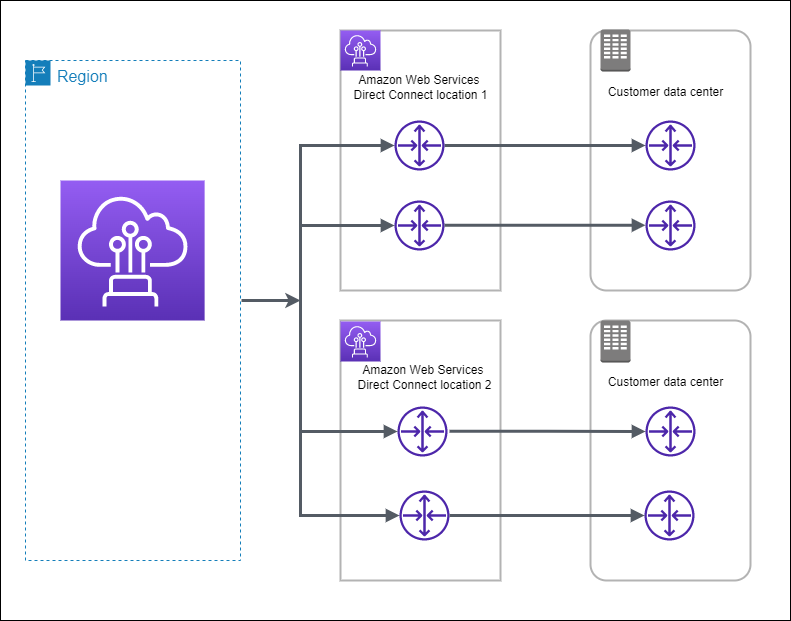
To make the situation better, you can have 2 DX Locations with 1 port each, and 2 different customer premises.
You can also combine the last 2 scenarios to reach top-level resilience.
Direct Connect is a physical technology, and as such not resilient by default. It needs to be architected so.
You can couple Dx with Site-to-site VPN attaching a Public VIF to the VGW to improve resilience.
Apart from Site-to-site VPN, maximum resiliency is achieved this way:
Cross-account sharing
You can associate an existing Direct Connect gateway or a new Direct Connect gateway with a transit gateway that is owned by any AWS account. The owner of the Transit Gateway creates an association proposal which must be accepted by the target account. An association proposal can contain prefixes that will be allowed from the transit gateway. The owner of the Direct Connect gateway can optionally override any requested prefixes in the association proposal.