Elstic Container Service (ECS)
Fully managed container orchestration service integrated with both AWS and third-party tools, such as Amazon Elastic Container Registry and Docker.
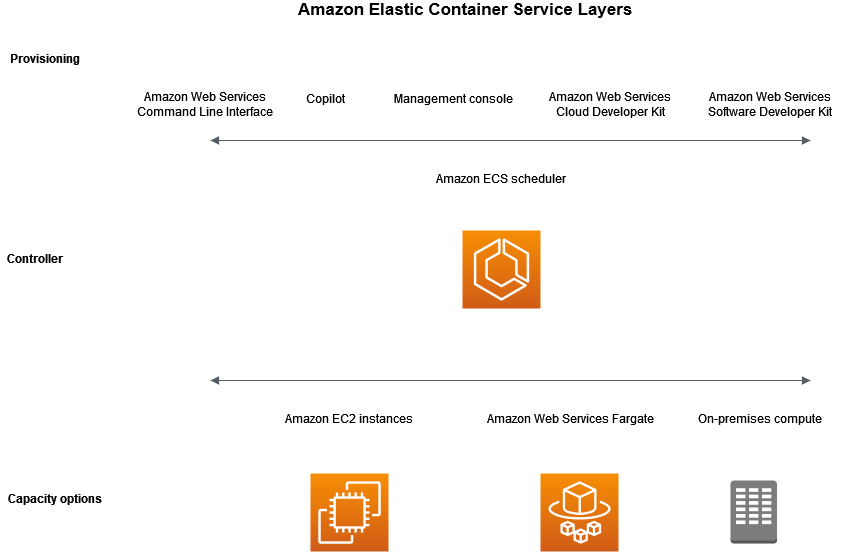
Capacity: the infrastructure containers are launched on.
Capacity options:
-
EC2: AWS provisioned, customer managed, using ASGs.
-
Fargate: serverless, fully managed.
-
On-prem VMs: with ECS Anywhere.
AWS capacity options support:
-
Regions and AZs
-
Local zones
-
Wavelength zones
-
AWS Outposts
Networking: resources are either launched in subnets (EC2) or injected into subnets (Fargate). This allows for flexible configurations, like public IP addresses when in public subnets or access via private IP. Services are associated with an Elastic Network Interface (ENI). You can either use a public IP address or use a NAT gateway to provide connectivity.
-
Amazon EC2 — You can launch EC2 instances on a public subnet. Amazon ECS uses these EC2 instances as cluster capacity, and any containers that are running on the instances can use the underlying public IP address of the host for outbound networking. This applies to both the host and bridge network modes. However, the awsvpc network mode doesn’t provide task ENIs with public IP addresses. Therefore, they can’t make direct use of an internet gateway.
-
Fargate — When you create your Amazon ECS service, specify public subnets for the networking configuration of your service, and use the Assign public IP address option. Each Fargate task is networked in the public subnet, and has its own public IP address for direct communication with the internet.
IAM: Task roles are the preferred way to authorize workloads in ECS.
Launch Types
They define what capacity tasks run on, like Fargate, EC2.
Not all the task configuration is available when using Fargate.
Fargate
Serverless, pay as you go. There’s a transparent shared infrastructure. There’s a spot option since spare capacity is resold at lower costs.
Fargate meets the standards for compliance programs including PCI, FIPS 140-2, FedRAMP, and HIPAA.
|
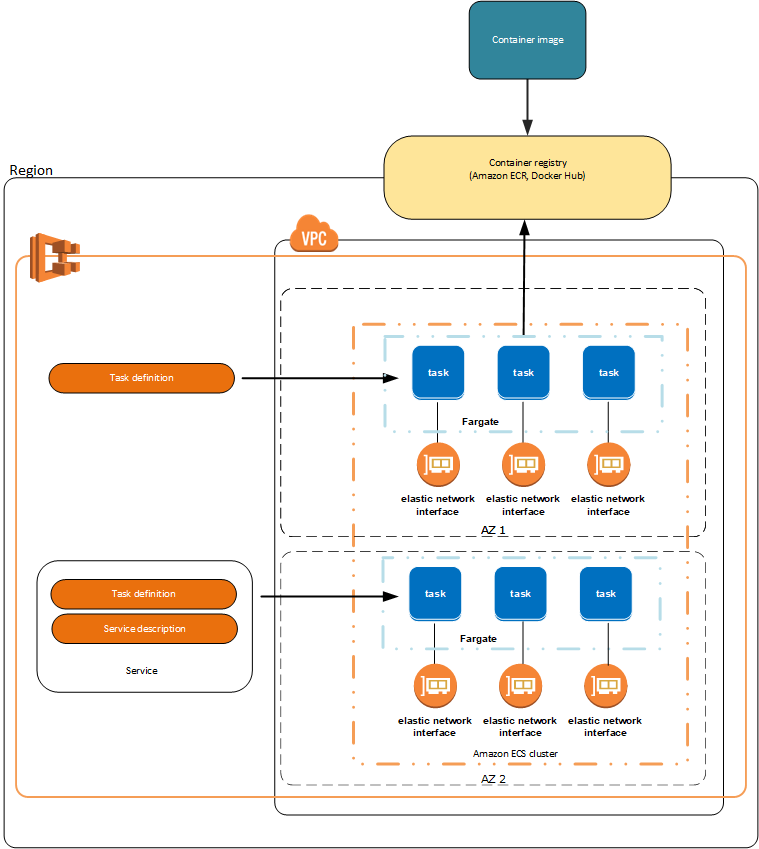
Amazon ECS on AWS Fargate workloads aren’t supported in Local Zones, Wavelength Zones, or on AWS Outposts at this time. |
In Fargate mode the containers have an ENI attached, so they can be accessed like any VPC resource and have a public IP address.
Integrations:
-
VPC
-
Auto Scaling
-
Elastic Load Balancing
-
IAM
-
Secrets Manager
ECS Container Definitions
Describes a container and all its configurations.
Parameters
-
Image: image URI and optionally information to access a private image.
-
Environment variables. You can pass wnvironment variables in 3 ways:
-
Using the
environmentcontainer definition parameter and set key-value pairs. -
Using the
environmentFilesparameter to list files from an S3 bucket to source environment variables from, like the--env-filedocker directive. Be sure to set up the bucket policy, the VPC endpoint and the S3 Access Point correctly. -
For sensitive data using the Secrets Manager. Be sure to set up IAM policies correctly specifying the
secretsmanager:GetSecretValueaction for the role that the task is using.
-
-
Resources limits
-
Logging configuration ⇒
awslogslog driver -
HealthChecks
-
Startup dependencies within the same task.
-
Timeouts for start and stop.
-
Container networking settings if the task networking mode is not
awsvpc. -
Docker configuration to override defaults: Entrypoint, Command, Working directory
-
Ulimits
-
Labels
ECS Task Definitions
Simple nginx json task definition
{
    "containerDefinitions": [
        {
            "name": "nginx",
            "image": "docker.io/nginx:latest",
            "cpu": 256,
            "memory": 512,
            "memoryReservation": 512,
            "portMappings": [
                {
                    "name": "nginx-80-tcp",
                    "containerPort": 80,
                    "hostPort": 80,
                    "protocol": "tcp",
                    "appProtocol": "http"
                }
            ],
            "essential": true,
            "environment": [],
            "environmentFiles": [],
            "mountPoints": [],
            "volumesFrom": [],
            "ulimits": [],
            "healthCheck": {
                "command": [
                    "CMD-SHELL",
                    "curl -f http://localhost/ || exit 1"
                ],
                "interval": 5,
                "timeout": 5,
                "retries": 3,
                "startPeriod": 5
            },
            "systemControls": []
        }
    ],
    "family": "nginx",
    "networkMode": "awsvpc",
    "volumes": [],
    "placementConstraints": [],
    "requiresCompatibilities": [
        "FARGATE",
        "EC2"
    ],
    "cpu": "256",
    "memory": "512",
    "runtimePlatform": {
        "cpuArchitecture": "X86_64",
        "operatingSystemFamily": "LINUX"
    },
    "tags": []
}
They’re JSON templates that describe containers in a task and additional information.
Parameters
-
Launch type
-
CPU and Memory reservations for the task.
-
Operating system and architecture
-
1 or more Container Definitions
-
Docker networking mode (only
awsvpcon Fargate): not configurable inawsvpcmode.-
awsvpc: Allocates a dedicated ENI with a primary private IPv4 address. If you want to reach the service you need to make sure the associated Security Group allows it. It allows greater granularity in control. Also, containers in the same task can communicate over localhost.
There’s a default quota for the number of network interfaces that can be attached to an Amazon EC2 Linux instance for each instance type. The primary network interface counts as one toward that quota.
Tasks and services that use the awsvpc network mode require the Amazon ECS service-linked role to provide Amazon ECS with the permissions to make calls to other AWS services on your behalf.
Amazon ECS populates the hostname of the task with an Amazon-provided (internal) DNS hostname when both the enableDnsHostnames and enableDnsSupport options are enabled on your VPC.
When hosting tasks that use the awsvpc network mode on Amazon EC2 Linux instances, your task ENIs aren’t given public IP addresses. To access the internet, tasks must be launched in a private subnet that’s configured to use a NAT gateway. Inbound network access must be from within a VPC that uses the private IP address or routed through a load balancer from within the VPC. Tasks that are launched within public subnets do not have access to the internet. -
bridge -
host: maps container ports to the ENI of the instance. ThehostPortparameter must be specified. Running multiple replicas of the task on the same instance is obviously impossible due to port conflicts. -
none -
default
-
-
Restart on failure
-
Placement constraints
-
Storage: Fargate supports EBS and EFS. EC2 supports EBS, EFS and FSx. Both support Docker bind mounts.
You can declare a volume without specifying the mount so that only when the task is created from the definitino a real volume is declared. This allows to reuse the definition. -
IAM role to use
The following task definition parameters are not valid in Fargate tasks:
-
disableNetworking -
dnsSearchDomains -
dnsServers -
dockerSecurityOptions -
extraHosts -
gpu -
ipcMode -
links -
placementConstraints -
privileged -
maxSwap -
swappiness
ECS Clusters
An Amazon ECS cluster is a logical grouping of tasks or services. In addition to tasks and services, a cluster consists of the following resources:
-
The infrastructure capacity which can be a combination of the following:
-
Amazon EC2 instances in the AWS cloud
-
Serverless (AWS Fargate) in the AWS cloud
-
On-premises virtual machines (VM) or servers
-
-
The network (VPC and subnet): When you use Amazon EC2 instances for the capacity, the subnet can be in Availability Zones, Local Zones, Wavelength Zones or AWS Outposts.
-
Namespace (optional)
-
Monitoring options
Clusters are region resilient.
When you configure a task while a cluster can contain a mix of Fargate and Auto Scaling group capacity providers. However, a capacity provider strategy can only contain either Fargate or Auto Scaling group capacity providers, but not both.
It’s Tasks or Services that you deploy in clusters.
ECS Tasks
You can specify the infrastructure your tasks or services run on. You can use a capacity provider strategy, or a launch type.
Capacity provider strategies: How to distribute workloads on infrastructure.
-
Fargate:
-
FARGATE
-
FARGATE_SPOT
-
-
${a_custom_name_for_ec2_asg_provider}
Launch types:
-
FARGATE
-
EC2
-
EXTERNAL
You can identify a set of related tasks and place them in a task group. All tasks with the same task group name are considered as a set when using the spread task placement strategy. For example, suppose that you’re running different applications in one cluster, such as databases and web servers. To ensure that your databases are balanced across Availability Zones, add them to a task group named databases and then use the spread task placement strategy.
ECS Services
Run and maintain a specified number of instances of a task definition simultaneously in an Amazon ECS cluster. If one of your tasks fails or stops, the Amazon ECS service scheduler launches another instance of your task definition to replace it. We recommend that you use the service scheduler for long running stateless services and applications.
You can also optionally run your service behind a load balancer.
You can use task placement strategies and constraints to customize how the scheduler places and terminates tasks.
There are two service scheduler strategies (aka Service Type) available:
-
REPLICA: places and maintains the desired number of tasks across your cluster. By default, the service scheduler spreads tasks across Availability Zones.
-
DAEMON: deploys exactly one task [.underline]#on each active container instance#fargate that meets all of the task placement constraints that you specify in your cluster. When using this strategy, there is no need to specify a desired number of tasks, a task placement strategy, or use Service Auto Scaling policies. This is Unsupported on Fargate.
ECS Service Definitions
-
Environment:
-
Launch Type
-
Capacity Provider Strategy
-
Platform version
-
-
Deployment configuration:
-
a Task Definition Family and revision
-
Service Type: only
replicaavailable on Fargate. -
Deployment Options:
-
Rolling update: you define a minimum percentace (up to 100%) of services that must be running and the maximum percentage of total tasks running (> 100%) during all the deployment phases.
-
Blue/Green deployment using CodeDeploy (needs a role)
-
-
-
Service Connect: Services can resolve endpoints within the same namespace without task or application configuration.
-
Service Discovery: uses Amazon Route 53 to create a namespace for your service, which allows it to be discoverable via DNS.
-
Networking
-
VPC
-
Subnets
-
Security Group
-
Public IP
-
-
Load Balancing
-
Auto Scaling
-
Volumes: if the Task Definition allows so.
ECS Roles
Task Execution Roles
They’re used by Amazon ECS container and Fargate agents to allow access to services like Secrets Manager, S3 and others.
They authorize ECS
Example of creating a task execution role for accessing the Secrets Manager
{
  "Version": "2012-10-17",
  "Statement": [
    {
      "Sid": "",
      "Effect": "Allow",
      "Principal": {
        "Service": "ecs-tasks.amazonaws.com"
      },
      "Action": "sts:AssumeRole"
    }
  ]
}{
"Version": "2012-10-17",
"Statement": [
{
"Effect": "Allow",
"Action": [
"secretsmanager:GetSecretValue"
],
"Resource": [
"arn:aws:secretsmanager:region:aws_account_id:secret:secret_name"
]
}
]
}Task Roles
They’re used by application code in the container to allow access to resources like Secrets Manager, S3 and others.
They authorize your application.
Example of creating a task role for accessing the Secrets Manager
{
   "Version":"2012-10-17",
   "Statement":[
      {
         "Effect":"Allow",
         "Principal":{
            "Service":[
               "ecs-tasks.amazonaws.com"
            ]
         },
         "Action":"sts:AssumeRole",
         "Condition":{
            "ArnLike":{
            "aws:SourceArn":"arn:aws:ecs:us-west-2:111122223333:*"
            },
            "StringEquals":{
               "aws:SourceAccount":"111122223333"
            }
         }
      }
   ]
}{
"Version": "2012-10-17",
"Statement": [
{
"Effect": "Allow",
"Action": [
"secretsmanager:GetSecretValue"
],
"Resource": [
"arn:aws:secretsmanager:region:aws_account_id:secret:secret_name"
]
}
]
}Container instance IAM role
Amazon ECS container instances, including both Amazon EC2 and external instances, run the Amazon ECS container agent and require an IAM role for the service to know that the agent belongs to you. Before you launch container instances and register them to a cluster, you must create an IAM role for your container instances to use.
This is needed to make API calls to CloudWatch, ECR, Secrets Manager, SSM Parameter Store. They’re useful if you want to manually add instances located in AWS or on-prem.
Amazon ECS provides the AmazonEC2ContainerServiceforEC2Role managed IAM policy which contains the permissions needed to use the full Amazon ECS feature set.
{
  "Version": "2012-10-17",
  "Statement": [
    {
      "Effect": "Allow",
      "Principal": { "Service": "ec2.amazonaws.com"},
      "Action": "sts:AssumeRole"
    }
  ]
}
You need to create an instance profile for that instance and associate the role to it.
Example architectures
Event Bridge invoked tasks
S3 bucket = upload ⇒ Event Bridge ⇒ ECS Task (task role for S3 read and DynamoDB) processing ⇒ write to DynamoDB
Event Bridge schedule invoked tasks
Event bridge schedule (E.g.: every hour) ⇒ ECS Task (Task role for S3 read/write) processing (E.g.: batch processing)
Lambda are an alternative.